Regular Expressions - Assertions
Assertions are metacharacters in regular expressions used to specify match positions. They do not match any actual characters, but rather the positions between characters.
Suppose we want to find all numbers that follow a price in a long article, rather than finding all numbers. A regular expression might match all numbers, but with assertions, you can precisely specify:I only match the numbers that immediately follow prices。
This article will systematically teach you four core assertions in regular expressions: positive lookahead, negative lookahead, positive lookbehind, and negative lookbehind.
Characteristics of Assertions
- Zero-width: Does not occupy positions of matched characters
- Condition checking: Only checks whether a specific condition is satisfied
- Does not affect the match result: Only serves as a constraint for matching
Example
const regex = /foo(?=bar)/;
console.log(regex.test("foobar")); // true
console.log(regex.test("food")); // false
Types of Assertions
Assertions in regular expressions are mainly divided into two categories and four types:
| Assertion Type | Regex Syntax | Alias | Check Direction | Expected Condition | Plain Explanation |
|---|---|---|---|---|---|
| Positive Lookahead | (?=pattern) |
Positive lookahead | Right (forward) | Exists pattern |
The position I'm looking for, itsright side mustbe... |
| Negative Lookahead | (?!pattern) |
Negative lookahead | Right (forward) | Does not exist pattern |
The position I'm looking for, itsright side must notbe... |
| Positive Lookbehind | (?<=pattern) |
Positive lookbehind | Left (backward) | Exists pattern |
The position I'm looking for, itsleft side mustbe... |
| Negative Lookbehind | (?<!pattern) |
Negative lookbehind | Left (backward) | Does not exist pattern |
The position I'm looking for, itsleft side must notbe... |
Positive Lookahead(?=...)
Positive LookaheadUsed to match a position such that immediately after this position (to the right), the specified pattern must appear....。
Syntax and Parameters
- Syntax:
(?=pattern) - Function: Checks whether the right side of the current position matches
pattern. If it matches, the assertion succeeds, and the engine returns to the current position to continue subsequent matching. - Key characteristics:Zero-width, meaning it only checks and does not "consume" any characters.
patternThe content inside the assertion will not become part of the final match result.
Code Example 1: Extracting Price Numbers
Suppose we have a piece of text and need to extract allprices:the amount numbers after them.
Example: JavaScript
// Positive lookahead
// Match one or more digits, but require the right side to be immediately followed by "yuan"
// "yuan" itself is not included in the match result
const pattern = /\d+(?=元)/g;
const matches = text.match(pattern);
console.log("Matched price numbers:", matches);
// Output: ['299', '599', '20']
Example: Python
text = "Product A price: 299 yuan, Product B price: 599 yuan, shipping: 20 yuan."
# Use positive lookahead
# Match one or more digits (\d+), but require that the right side of this number is immediately followed by "yuan"
# Note: "yuan" itself will not be matched into the result
pattern = r'\d+(?=元)'
matches = re.findall(pattern, text)
print("Matched price numbers:", matches)
# Output: Matched price numbers: ['299', '599', '20']
Code Explanation:
\d+is the main expression, matching one or more digits.(?=yuan)is the assertion, it checks\d+of the matched digit stringright sidewhether it is immediately followed by a "yuan" character.- The engine first finds
299, then looks to the right, finds "yuan", the assertion succeeds, so299is recorded. - Then continues to find
599, the right side is "yuan", succeeds, records it. - Finds
20, the right side is "yuan", succeeds, records it. In the end, we only get the numeric part.
Code Example 2: Validating Complex Passwords
Requirement: the password must contain at least one uppercase letter, one lowercase letter, and one digit.
Example: JavaScript
// Multiple positive lookahead assertions
const pattern = /^(?=.*[A-Z])(?=.*[a-z])(?=.*\d).{8,}$/;
// ^ Start of string
// (?=.*[A-Z]) The right side must contain at least one uppercase letter
// (?=.*[a-z]) The right side must contain at least one lowercase letter
// (?=.*\d) The right side must contain at least one digit
// .{8,} Total length at least 8
// $ End of string
return pattern.test(password);
}
// Test data
const passwords = ["Weak", "strong123", "STRONG123", "Strong123"];
passwords.forEach(pwd => {
console.log(`Password'${pwd}'is valid: ${validatePassword(pwd)}`);
});
// Output:
// Password 'Weak' is valid: false
// Password 'strong123' is valid: false
// Password 'STRONG123' is valid: false
// Password 'Strong123' is valid: true
Example: Pyhton
def validate_password(password):
# Use multiple positive lookahead assertions to check conditions separately
pattern = r'^(?=.*[A-Z])(?=.*[a-z])(?=.*\d).{8,}$'
# ^ represents the start of string
# (?=.*[A-Z]) Assert: looking right from the current position (start), you must be able to find an uppercase letter after any characters (.*)
# (?=.*[a-z]) Assert: similarly, looking right from the start, you must be able to find a lowercase letter
# (?=.*\d) Assert: looking right from the start, you must be able to find a digit
# .{8,} Main expression: match any character at least 8 times (total length requirement)
# $ represents the end of string
if re.match(pattern, password):
return True
else:
return False
# Test data
passwords = ["Weak", "strong123", "STRONG123", "Strong123"]
for pwd in passwords:
print(f"Password '{pwd}' is valid: {validate_password(pwd)}")
# Output:
# Password 'Weak' is valid: False # Length insufficient, and missing digit
# Password 'strong123' is valid: False # Missing uppercase letter
# Password 'STRONG123' is valid: False # Missing lowercase letter
# Password 'Strong123' is valid: True # Meets all conditions
Negative Lookahead(?!...)
Negative LookaheadThe opposite of positive lookahead. It matches a position such that after this position (to the right),must notimmediately follow the specified pattern...。
Syntax and Parameters
- Syntax:
(?!pattern) - Purpose: Check whether the right side of the current positiondoes not match
pattern. If it does not match, the assertion succeeds. - Key features: Also zero-width.
Code Example: Finding Words Not Ending in ing
In a sentence, find all wordsingthat do not end with.
Example: JavaScript
const text1 = "playing swimming run walk jumping sing";
const pattern1 = /\b\w+(?<!ing)\b/g;
console.log(text1.match(pattern1));
// ['run', 'walk', 'sing']
// Example 2: Match words not ending with q (semantically correct version)
const text2 = "I like faq apple Iraq you banana q";
const pattern2 = /\b\w*[^q\W]\b/g;
// Meaning:
// [^q\W] The word's last character is not q
// Better matches the real requirement of "not ending with q" than (?!q)
console.log(text2.match(pattern2));
// ['I', 'like', 'apple', 'you', 'banana']
// Example 3: Match filenames not ending with .js
const files = "index.js app.ts config.json main.js readme.md";
const pattern3 = /\b\w+\.(?!js\b)\w+\b/g;
// Meaning: \.(?!js\b) The dot must not be followed by js
console.log(files.match(pattern3));
// ['app.ts', 'config.json', 'readme.md']
Positive Lookbehind(?<=...)
Positive lookbehind assertionUsed to match a position where the specified pattern must immediately appear before this position (to the left)....。
Note: Not all programming languages' regex engines support lookbehind assertions. JavaScript only fully supports them after ES2018, and Python'sre`re` module supports them.
Syntax and Parameters
- Syntax:
(?<=pattern) - Purpose: Check whether the left side of the current position matches
pattern. If it matches, the assertion succeeds. - Key features: Zero-width.
patternMust have a fixed length (cannot be*or+a variable-length quantifier, etc., in some implementations).
Code Example: Extracting Amounts After Currency Symbols
Extract the digits after the dollar or pound sign, but not including the sign itself.
Example: JavaScript
const text1 = "Price: $199, £89, ¥1200";
const pattern1 = /(?<=\$|£)\d+/g;
// Meaning:
// (?<=\$|£) The left side must be $ or £
// \d+ Match the digits themselves
console.log(text1.match(pattern1));
// ['199', '89']
// Example 2: Match the number after a colon
const text2 = "port:8080 pid:1234 uid:1000";
const pattern2 = /(?<=:)\d+/g;
// The left side must be :
console.log(text2.match(pattern2));
// ['8080', '1234', '1000']
// Example 3: Match the minor version in a version number (after the major version number)
const text3 = "v1.2 v2.15 v10.3";
const pattern3 = /(?<=v\d+\.)\d+/g;
// The left side must be v + digits + dot
console.log(text3.match(pattern3));
// ['2', '15', '3']
// Example 4: Match the username after @ (without including @)
const text4 = "hello @alice and @bob_smith";
const pattern4 = /(?<=@)[a-zA-Z_]\w*/g;
console.log(text4.match(pattern4));
// ['alice', 'bob_smith']
// Example 5: Match the chapter number in Chinese "第 X 章"
const text5 = "第1章 第12章 第3章";
const pattern5 = /(?<=第)\d+(?=章)/g;
// Constrain both sides simultaneously, clearer
console.log(text5.match(pattern5));
// ['1', '12', '3']
Negative Lookbehind(?<!...)
Negative lookbehind assertionIt is the opposite of positive lookbehind. It matches a position where, before it (to the left),the specified pattern cannotappear immediately....。
Syntax and Parameters
- Syntax:
(?<!pattern) - Purpose: Check whether the left side of the current positiondoes not match
pattern。 - Key features: Zero-width, usually requires
patterna fixed length.
Code Example: Finding Non-negative Integers
In a paragraph, match all integers that are not negative (i.e., no minus sign on the left-of the digit).
Example: JavaScript
// Negative lookbehind assertion
// Match digits, but require the left side cannot be a minus sign -
const pattern = /(?<!-)\b\d+\b/g;
const matches = text.match(pattern);
console.log("Non-negative integers:", matches);
// Output: ['3', '22']
// The left side of -5 and -1 is '-', assertion fails, no match
Comprehensive Application and Flowchart
To more intuitively understand the workflow of the four assertions, we can use the following flowchart to illustrate a complex matching process containing multiple assertions:
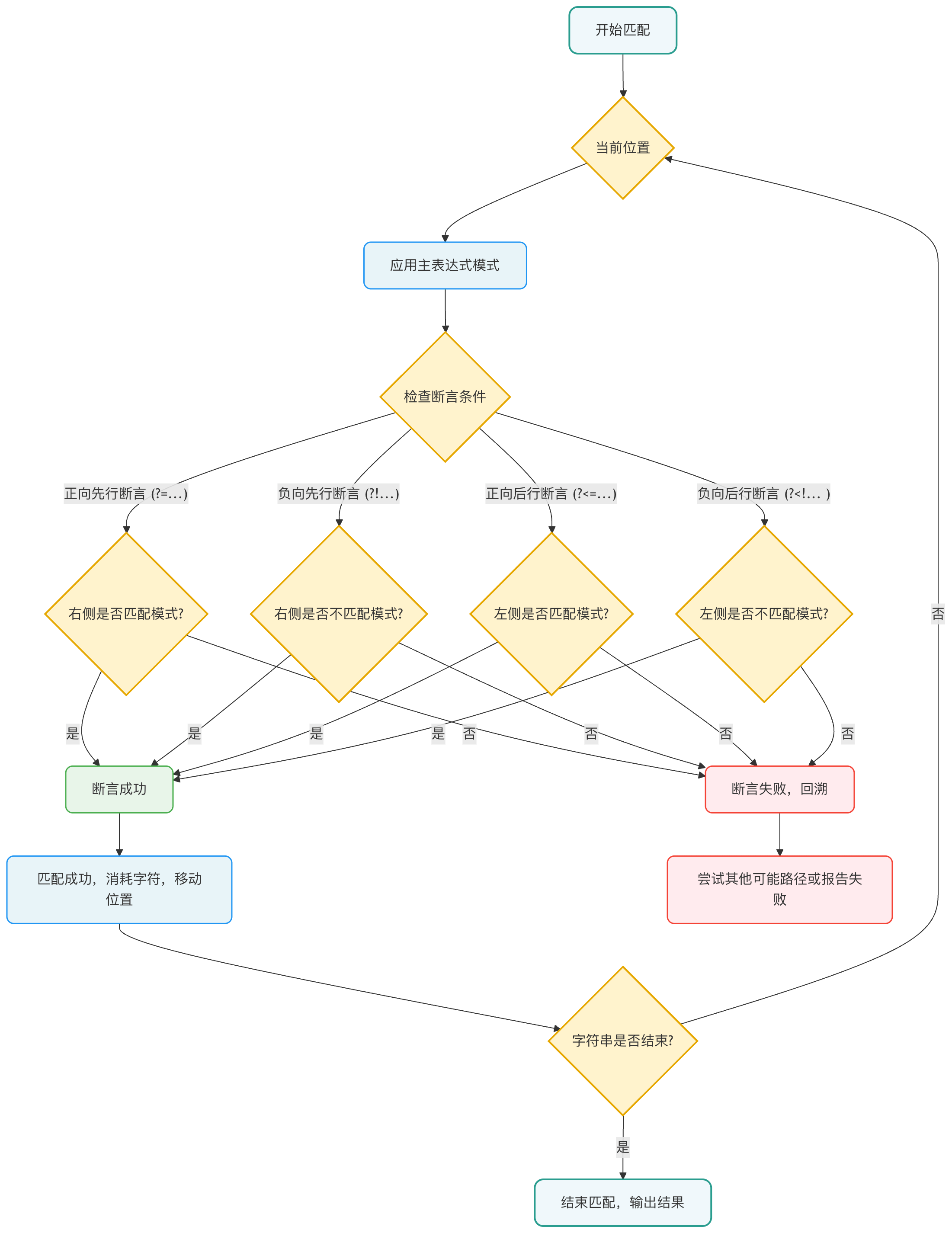
Flowchart description: The diagram shows how the regex engine handles assertions during matching. The core is thatassertions are independent check nodes. The engine, at thecurrent position where the main expression attempts to match,checks the context to the left or right according to the assertion type. Only when all assertion conditions are satisfied can the match continue forward and "consume" characters; otherwise, the engine backtracks to try other possibilities or declares a match failure.