Regular Expressions -Modifiers (Flags)
Regular expression modifiers (also called pattern modifiers or flags) are special directives used to change the matching behavior of a regular expression.
Flags are also called modifiers. Flags in regular expressions are used to specify additional matching strategies.
Flags are not written inside the regular expression; they are placed outside the expression, with the following format:
/pattern/flags
Common Modifiers
The following table lists commonly used modifiers in regular expressions:
1. i(ignore case) - Ignore case
-
Makes matching case-insensitive
-
Example:
/abc/iCan match "abc", "Abc", "ABC", etc. -
Supported languages: Almost all regular expression implementations (JavaScript, PHP, Python, etc.)
2. g(global) - Global match
-
Find all matches instead of stopping after the first match
-
Example: In the string "ababab",
/ab/gMatches all three "ab" -
Supported languages: JavaScript, PHP, etc.
3. m(multiline) - Multiline mode
-
Changes
^and$the behavior so that it matches the beginning and end of each line, not just the beginning and end of the entire string. -
Example: In a multiline string,
/^abc/mMatches "abc" at the beginning of each line -
Supported languages: JavaScript, PHP, Python, Perl, etc.
4. s(single line/dotall) - Single line mode
-
Makes the dot
.match all characters, including newline characters -
In JavaScript it is called "dotall" mode, using the
/smodifier -
Example:
/a.b/sCan match "a\nb" -
Supported languages: PHP, Perl, Python (as
re.DOTALL)、JavaScript(ES2018+)
5. u(unicode) - Unicode mode
-
Enables full Unicode support
-
Correctly handles UTF-16 surrogate pairs and Unicode character properties
-
Example:
/\p{Script=Greek}/uCan match Greek letters -
Supported languages: JavaScript, PHP, etc.
6. y(sticky) - Sticky matching
-
Starts matching from the current position of the target string (using the
lastIndexproperty) -
Similar to
^anchor, but it targets the starting position of the match -
Example: In JavaScript,
/a/ywill startlastIndexmatching "a" from -
Supported languages: JavaScript
7. x(extended) - Extended mode
-
Ignores whitespace and comments in the pattern, making the regular expression more readable
-
Example: In PHP,
/a b c/xis equivalent to/abc/ -
Supported languages: PHP, Perl, Python (as
re.VERBOSE)
g modifier
The g modifier finds all matches in a string:
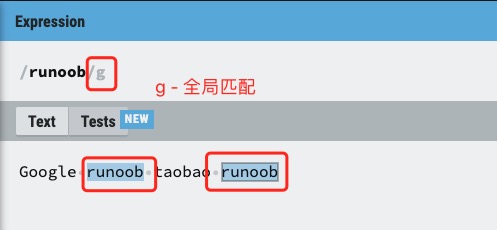
Example
Find "example" in the string:
Try it Yourself »
i modifier
The i modifier performs case-insensitive matching, example as follows:
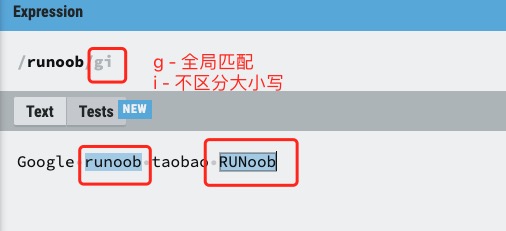
Example
Find "example" in the string:
Try it Yourself »
m modifier
The m modifier makes^and$match the beginning and end positions of each line in a piece of text.
With only g, it matches only the first line; after adding m, multiline matching is achieved.
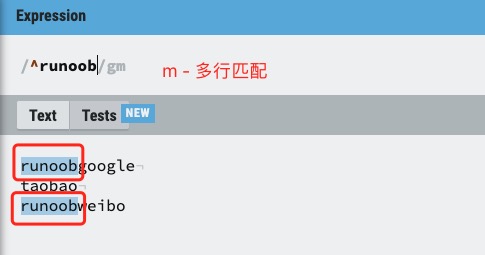
In the example below, the string uses\nto break lines:
Example
Find "example" in the string:
Try it Yourself »
s modifier
By default, the dot.matches any character except newline\nAfter adding s,.includes newline characters\n。
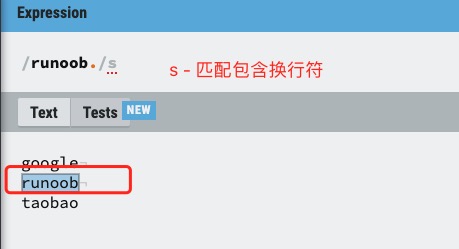
Example of the s modifier:
Example
Find in the string:
Try it Yourself »
Extended Notes
Supplementary table of language-specific modifiers:
| Language | Specific modifier | Description |
|---|---|---|
| PHP | A |
Anchors the pattern to the beginning of the string |
D |
$Matches only the end of the string (excluding trailing newline) |
|
U |
Reverses the greediness of quantifiers (makes all quantifiers non-greedy) | |
| Python | re.A |
make\w,\W,\b,\Betc. match only ASCII characters |
re.L |
Determined according to locale settings\w,\Wmeaning of etc. |
|
| JS(ES2022) | d |
Generates an indices property for match results (containing start and end indices of match positions) |
Example table of modifier combinations:
| Combination | Effect |
|---|---|
gi |
Global match + ignore case (e.g., find all forms of the word "email") |
ims |
Ignore case + multiline mode + dot matches newline (commonly used in log analysis) |
gu |
Global match + Unicode support (e.g., find all Unicode emojis) |
Inline modifier table (PCRE/Perl style):
| Syntax | Scope | Example |
|---|---|---|
(?i) |
Enable ignore case | a(?i)bc→ Matches "aBc", "aBC" |
(?-i) |
Disable ignore case | a(?i)b(?-i)c→ Matches only "aBc" |
(?i:...) |
Only effective within parentheses | a(?i:b)c→ Matches "aBc", "abc" |
Other extensionsNote: Implementations of modifiers may vary across languages. It is recommended to consult the documentation of the specific language when using them.