PHP File Upload
Through PHP, you can upload files to the server.
The examples in this chapter are completed under the test project, with the directory structure as follows:
test
|-----upload             # 文件上传的目录
|-----form.html          # 表单文件
|-----upload_file.php    # php 上传代码
Source Code Download
Create a File Upload Form
Allowing users to upload files from a form is very useful.
Please look at the following HTML form for uploading files:
<html>
<head>
<meta charset="utf-8">
<title>Example(example.com)</title>
</head>
<body>

<form action="upload_file.php" method="post" enctype="multipart/form-data">
    <label for="file">文件名:</label>
    <input type="file" name="file" id="file"><br>
    <input type="submit" name="submit" value="提交">
</form>

</body>
</html>
Save the above code to the form.html file.
Some notes regarding the above HTML form are listed below:
- <form>The tag'senctypeattribute specifies which content type to use when submitting the form. When the form needs binary data, such as file content, use "multipart/form-data"。
- <input>The tag'stype="file"attribute specifies that the input should be treated as a file. For example, when previewing in the browser, you will see a Browse button next to the input box.
Note:Allowing users to upload files is a huge security risk. Please only allow trusted users to perform file upload operations.
Create Upload Script
The "upload_file.php" file contains the code for uploading files:
<?php
if ($_FILES["file"]["error"] > 0)
{
    echo "错误:" . $_FILES["file"]["error"] . "<br>";
}
else
{
    echo "上传文件名: " . $_FILES["file"]["name"] . "<br>";
    echo "文件类型: " . $_FILES["file"]["type"] . "<br>";
    echo "文件大小: " . ($_FILES["file"]["size"] / 1024) . " kB<br>";
    echo "文件临时存储的位置: " . $_FILES["file"]["tmp_name"];
}
?>
By using PHP's global array $_FILES, you can upload files from the client computer to a remote server.
The first parameter is the input name of the form, and the second subscript can be "name", "type", "size", "tmp_name", or "error". As shown below:
- $_FILES["file"]["name"] - The name of the uploaded file
- $_FILES["file"]["type"] - The type of the uploaded file
- $_FILES["file"]["size"] - The size of the uploaded file, in bytes
- $_FILES["file"]["tmp_name"] - The name of the temporary copy of the file stored on the server
- $_FILES["file"]["error"] - The error code caused by the file upload
This is a very simple file upload method. For security reasons, you should add restrictions on which users are allowed to upload files.
Upload Restrictions
In this script, we added restrictions on file uploads. Users can only upload .gif, .jpeg, .jpg, .png files, and the file size must be less than 200 kB:
<?php
// 允许上传的图片后缀
$allowedExts = array("gif", "jpeg", "jpg", "png");
$temp = explode(".", $_FILES["file"]["name"]);
$extension = end($temp);        // 获取文件后缀名
if ((($_FILES["file"]["type"] == "image/gif")
|| ($_FILES["file"]["type"] == "image/jpeg")
|| ($_FILES["file"]["type"] == "image/jpg")
|| ($_FILES["file"]["type"] == "image/pjpeg")
|| ($_FILES["file"]["type"] == "image/x-png")
|| ($_FILES["file"]["type"] == "image/png"))
&& ($_FILES["file"]["size"] < 204800)    // 小于 200 kb
&& in_array($extension, $allowedExts))
{
    if ($_FILES["file"]["error"] > 0)
    {
        echo "错误:: " . $_FILES["file"]["error"] . "<br>";
    }
    else
    {
        echo "上传文件名: " . $_FILES["file"]["name"] . "<br>";
        echo "文件类型: " . $_FILES["file"]["type"] . "<br>";
        echo "文件大小: " . ($_FILES["file"]["size"] / 1024) . " kB<br>";
        echo "文件临时存储的位置: " . $_FILES["file"]["tmp_name"];
    }
}
else
{
    echo "非法的文件格式";
}
?>
Save the Uploaded File
The above example creates a temporary copy of the uploaded file in the PHP temporary folder on the server.
This temporary copy file will disappear when the script ends. To save the uploaded file, we need to copy it to another location:
<?php
// 允许上传的图片后缀
$allowedExts = array("gif", "jpeg", "jpg", "png");
$temp = explode(".", $_FILES["file"]["name"]);
echo $_FILES["file"]["size"];
$extension = end($temp);     // 获取文件后缀名
if ((($_FILES["file"]["type"] == "image/gif")
|| ($_FILES["file"]["type"] == "image/jpeg")
|| ($_FILES["file"]["type"] == "image/jpg")
|| ($_FILES["file"]["type"] == "image/pjpeg")
|| ($_FILES["file"]["type"] == "image/x-png")
|| ($_FILES["file"]["type"] == "image/png"))
&& ($_FILES["file"]["size"] < 204800)   // 小于 200 kb
&& in_array($extension, $allowedExts))
{
    if ($_FILES["file"]["error"] > 0)
    {
        echo "错误:: " . $_FILES["file"]["error"] . "<br>";
    }
    else
    {
        echo "上传文件名: " . $_FILES["file"]["name"] . "<br>";
        echo "文件类型: " . $_FILES["file"]["type"] . "<br>";
        echo "文件大小: " . ($_FILES["file"]["size"] / 1024) . " kB<br>";
        echo "文件临时存储的位置: " . $_FILES["file"]["tmp_name"] . "<br>";

        // 判断当前目录下的 upload 目录是否存在该文件
        // 如果没有 upload 目录,你需要创建它,upload 目录权限为 777
        if (file_exists("upload/" . $_FILES["file"]["name"]))
        {
            echo $_FILES["file"]["name"] . " 文件已经存在。 ";
        }
        else
        {
            // 如果 upload 目录不存在该文件则将文件上传到 upload 目录下
            move_uploaded_file($_FILES["file"]["tmp_name"], "upload/" . $_FILES["file"]["name"]);
            echo "文件存储在: " . "upload/" . $_FILES["file"]["name"];
        }
    }
}
else
{
    echo "非法的文件格式";
}
?>
The above script checks whether the file already exists; if it does not exist, it copies the file to the directory named "upload".
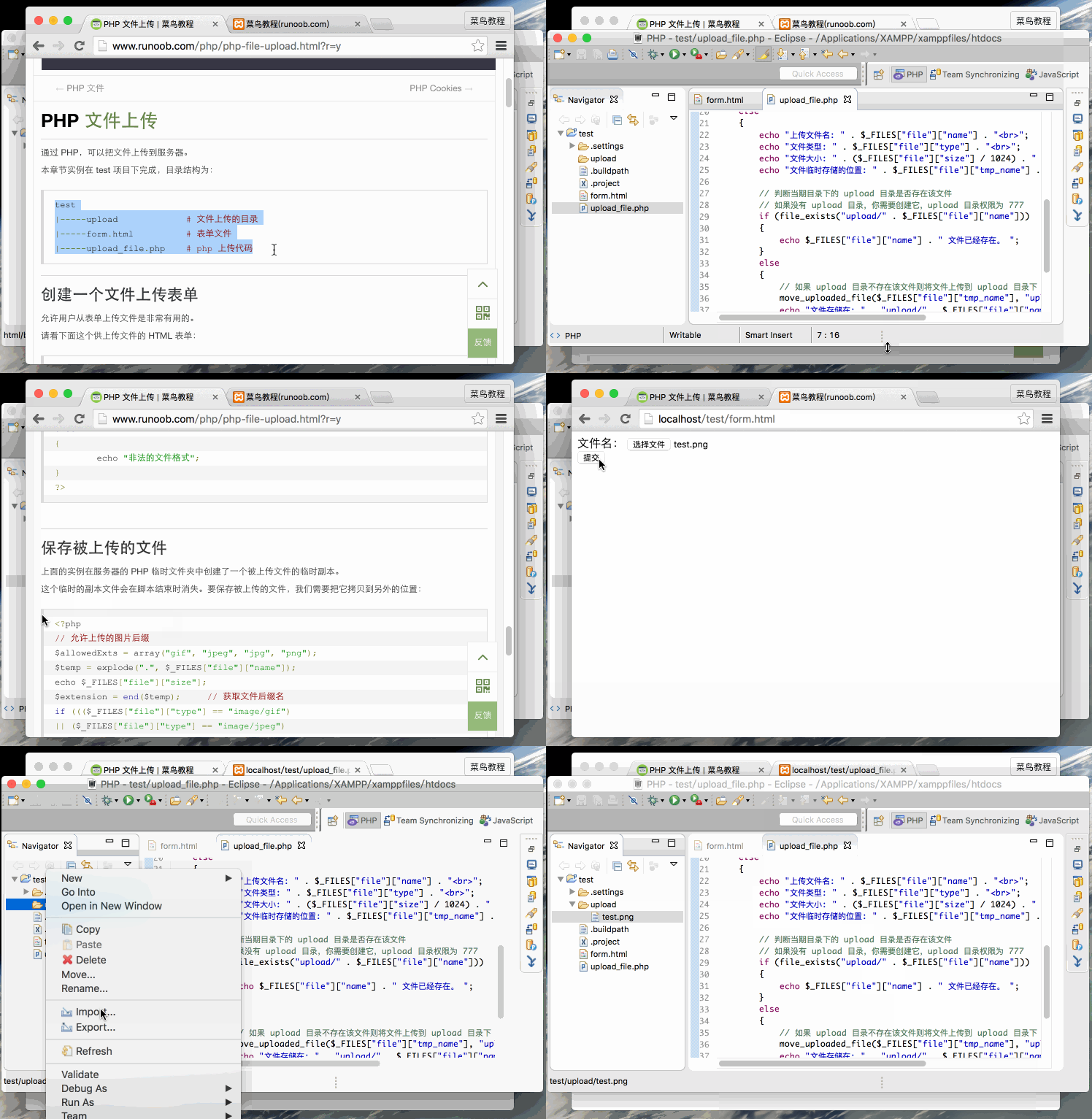
The file upload demonstration operation is shown below: