PHP - AJAX and PHP
AJAX (Asynchronous JavaScript and XML) is a technology used to exchange data with the server without refreshing the entire page.
AJAX is a technology that can update parts of a web page without needing to reload the entire page. It exchanges data with the server in the background and can update part of the web page content.
AJAX allows web pages to dynamically update parts of the content, providing a faster user experience.
AJAX typically uses the XMLHttpRequest object to communicate with the server in the background, although it can also use modern methods such as the fetch API.
For more content, you can refer to:AJAX Tutorial
How AJAX Works
- Send Request: The user triggers an AJAX request in some way (such as clicking a button).
- Create Request: JavaScript creates an XMLHttpRequest object to communicate with the server.
- Send Request: Send a request to the server via the XMLHttpRequest object.
- Server Processing: After receiving the request, the server processes the data.
- Return Response: The server returns the processing result to the client.
- Update Page: After JavaScript receives the server's response, it updates the corresponding part of the web page.
Steps to Use AJAX in PHP
1. Frontend:JavaScript initiates the AJAX request.
Use XMLHttpRequest or fetch to send a request to the PHP server.
2. Backend:PHP receives and processes the request.
PHP gets the data from the AJAX request and returns the result.
3. Frontend:Process the data returned by PHP.
Use JavaScript to parse and display the response data received from PHP.
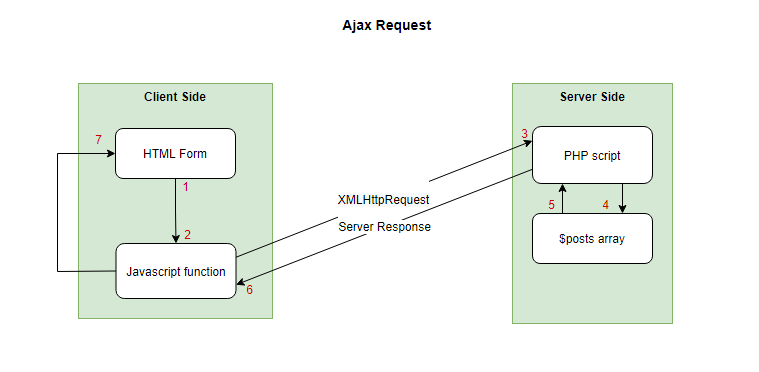
Using AJAX in PHP
1. Create HTML and JavaScript: First, you need an HTML page and JavaScript code to send AJAX requests.
Example
<html>
<head>
<meta charset="UTF-8">
<title>AJAX Example</title>
<script>
function sendRequest() {
var xhr = new XMLHttpRequest();
xhr.onreadystatechange = function() {
if (xhr.readyState == 4 && xhr.status == 200) {
document.getElementById("result").innerHTML = xhr.responseText;
}
};
xhr.open("GET", "your_php_file.php?param=value", true);
xhr.send();
}
</script>
</head>
<body>
<button onclick="sendRequest()">Send AJAX Request</button>
<div id="result"></div>
</body>
</html>
2. Write the PHP script:On the server side, you need a PHP file to process the request and return data.
Example
if (isset($_GET['param'])) {
// Handle request parameters
$param = $_GET['param'];
// Perform some operations...
// Return response
echo "Received parameter: " . $param;
}
?>
3. Send the request:When the user clicks the button, the JavaScript function sendRequest is called. It creates an XMLHttpRequest object and sends the request to the server.
4. Handle the response:After the server processes the request, it returns the result to the client. The client-side JavaScript code checks the response status and updates the page content when the status is 200 (i.e., the request succeeded).
AJAX PHP Example
The following example demonstrates how a web page communicates with a web server when the user types characters in an input box:
Example
Try to enter a name in the input box, such as: Anna:
Return value:
Example Explanation - HTML Page
When the user types characters in the input box above, the "showHint()" function is executed. This function is triggered by the "onkeyup" event:
Example
<head>
<script>
function showHint(str)
{
if (str.length==0)
{
document.getElementById("txtHint").innerHTML="";
return;
}
if (window.XMLHttpRequest)
{
// Code executed by IE7+, Firefox, Chrome, Opera, Safari browsers
xmlhttp=new XMLHttpRequest();
}
else
{
// Code executed by IE6, IE5 browsers
xmlhttp=new ActiveXObject("Microsoft.XMLHTTP");
}
xmlhttp.onreadystatechange=function()
{
if (xmlhttp.readyState==4 && xmlhttp.status==200)
{
document.getElementById("txtHint").innerHTML=xmlhttp.responseText;
}
}
xmlhttp.open("GET","gethint.php?q="+str,true);
xmlhttp.send();
}
</script>
</head>
<body>
<p><b>Enter a name in the input box:</b></p>
<form>
Name:<input type="text" onkeyup="showHint(this.value)">
</form>
<p>Return value:<span id="txtHint"></span></p>
</body>
</html>
Source Code Explanation:
If the input box is empty (str.length==0), the function clears the content of the txtHint placeholder and exits the function.
If the input box is not empty, then showHint() will perform the following steps:
- Create an XMLHttpRequest object
- Create a function to execute when the server response is ready
- Send a request to the file on the server
- Note the parameter (q) added to the end of the URL (containing the content of the input box)
The server page called via JavaScript above is a PHP file named "gethint.php".
The source code in "gethint.php" checks the name array and then returns the corresponding name(s) to the browser:
Example
// Fill the names into an array
$a[]="Anna";
$a[]="Brittany";
$a[]="Cinderella";
$a[]="Diana";
$a[]="Eva";
$a[]="Fiona";
$a[]="Gunda";
$a[]="Hege";
$a[]="Inga";
$a[]="Johanna";
$a[]="Kitty";
$a[]="Linda";
$a[]="Nina";
$a[]="Ophelia";
$a[]="Petunia";
$a[]="Amanda";
$a[]="Raquel";
$a[]="Cindy";
$a[]="Doris";
$a[]="Eve";
$a[]="Evita";
$a[]="Sunniva";
$a[]="Tove";
$a[]="Unni";
$a[]="Violet";
$a[]="Liza";
$a[]="Elizabeth";
$a[]="Ellen";
$a[]="Wenche";
$a[]="Vicky";
// Get the q parameter from the request URL address
$q=$_GET["q"];
// Check if there is a matching value, if q>0
if (strlen($q) > 0)
{
$hint="";
for($i=0; $i<count($a); $i++)
{
if (strtolower($q)==strtolower(substr($a[$i],0,strlen($q))))
{
if ($hint=="")
{
$hint=$a[$i];
}
else
{
$hint=$hint." , ".$a[$i];
}
}
}
}
// If there is no matching value, set the output to "no suggestion"
if ($hint == "")
{
$response="no suggestion";
}
else
{
$response=$hint;
}
// Output the return value
echo $response;
?>
Explanation: If JavaScript sends any text (i.e., strlen($q) > 0), then the following occurs:
- Search for names matching the characters sent by JavaScript
- If no match is found, set the response string to "no suggestion"
- If one or more matching names are found, set the response string with all the names
- Send the response to the "txtHint" placeholder
Implementing AJAX with fetch and PHP
HTML + JavaScript:
Example
<html>
<head>
<meta charset="UTF-8">
<meta name="viewport" content="width=device-width, initial-scale=1.0">
<title>AJAX with PHP Example</title>
</head>
<body>
<h1>AJAX Example</h1>
<button id="ajaxButton">Get Data from PHP</button>
<div id="result"></div>
<script>
document.getElementById('ajaxButton').addEventListener('click', function() {
// Send AJAX request
fetch('server.php', {
method: 'POST', // Use POST request
headers: {
'Content-Type': 'application/json'
},
body: JSON.stringify({ message: "Hello from client" })
})
.then(response => response.json()) // Parse as JSON
.then(data => {
document.getElementById('result').innerHTML = data.response; // Update page
})
.catch(error => console.error('Error:', error));
});
</script>
</body>
</html>
PHP server (server.php):
Example
// Set response headers to support JSON
header('Content-Type: application/json');
// Get the input data from the AJAX request
$request = json_decode(file_get_contents("php://input"), true);
// Process the data and return a response
if ($request['message'] === "Hello from client") {
$response = array('response' => 'Hello from PHP server!');
} else {
$response = array('response' => 'Invalid message');
}
// Return the result to the client
echo json_encode($response);
?>
Explanation:
- Frontend: When the user clicks the button, JavaScript uses
fetch()send a POST request toserver.php, and sends a piece of JSON data. - Backend: The PHP server reads the request sent by the client, processes it, and returns a JSON response.
- Response handling: After JavaScript receives the response from the PHP server, it updates the page content.
PHP Ajax Cross-Domain Problem Solutions
If your asynchronous requests need to cross domains, you can check:PHP Ajax Cross-Domain Problem Solutions。
Other extensions