Perl Arrays
A Perl array is a list variable that stores scalar values, and the variables can be of different types.
Array variables start with @. To access an array element, use the$ + variable name + [index value]format to read it, as in the following example:
Example
In the program, the $ symbol is escaped with \ so that it is output literally.
Executing the above program produces the following output:
$hits[0] = 25
$hits[1] = 30
$hits[2] = 40
$names[0] = google
$names[1] = example
$names[2] = taobao
Creating Arrays
Array variables start with the@symbol, with elements placed inside parentheses. You can also useqwto start defining an array.
@array = (1, 2, 'Hello');
@array = qw/这是 一个 数组/;
The second array uses theqw//operator, which returns a list of strings, with array elements separated by spaces. Of course, you can also use multiple lines to define an array:
@days = qw/google
taobao
...
example/;
You can also assign values to an array by index, as shown below:
$array[0] = 'Monday';
...
$array[6] = 'Sunday';
Accessing Array Elements
Access array elements using the$ + variable name + [index value]format to read, as in the following example:
Example
Executing the above program produces the following output:
google
taobao
example
example
Array index values start from 0, i.e., 0 is the first element, 1 is the second element, and so on.
Negative numbers start reading from the reverse end, -1 is the first element, -2 is the second element.
Array Ranges
Perl provides an array form that can be output by sequence, with the formatstart value + .. + end value, as in the following example:
Example
Executing the above program produces the following output:
1 2 3 4 5 6 7 8 9 10
10 11 12 13 14 15 16 17 18 19 20
a b c d e f g h i j k l m n o p q r s t u v w x y z
Array Size
The size of an array is determined by the scalar context of the array:
Example
Executing the above program produces the following output:
数组大小: 3
The array length returns the physical size of the array, not the number of elements. We can look at the following example:
Example
Executing the above program produces the following output:
数组大小:  51
最大索引: 50
From the output, we can see that the array has only four elements, but the array size is 51.
Adding and Removing Array Elements
Perl provides some useful functions to add and remove array elements.
If you have no programming experience before, you might ask what a function is. In fact, theprintwe used before is an output function.
The following table lists the common operation functions for arrays:
| No. | Type and Description |
|---|---|
| 1 | push @ARRAY, LIST
Places the list of values at the end of the array. |
| 2 | pop @ARRAY
Deletes the last value of the array. |
| 3 | shift @ARRAY
Pops the first value of the array and returns it. The array's index values are also decremented by one accordingly. |
| 4 | unshift @ARRAY, LIST
Places the list at the front of the array and returns the number of elements in the new array. |
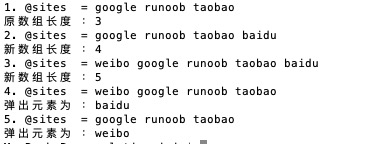
Example
Executing the above program produces the following output:
Slicing Arrays
We can slice an array and return the new sliced array:
Example
Executing the above program produces the following output:
weibo qq facebook
Array indexing requires specifying valid index values, which can be positive or negative numbers. Each index value is separated by a comma.
If the indexes are consecutive, you can use..to specify a range:
Example
Executing the above program produces the following output:
weibo qq facebook
Replacing Array Elements
In Perl, array element replacement uses the splice() function, with the following syntax format:
splice @ARRAY, OFFSET [ , LENGTH [ , LIST ] ]
Parameter description:
- @ARRAY: The array to be replaced.
- OFFSET: The starting position.
- LENGTH: The number of elements to replace.
- LIST: The list of replacement elements.
The following example replaces 5 elements in the array starting from the 6th element:
Example
Executing the above program produces the following output:
替换前 - 1 2 3 4 5 6 7 8 9 10 11 12 13 14 15 16 17 18 19 20
替换后 - 1 2 3 4 5 21 22 23 24 25 11 12 13 14 15 16 17 18 19 20
Converting a String to an Array
In Perl, converting a string to an array uses the split() function, with the following syntax format:
split [ PATTERN [ , EXPR [ , LIMIT ] ] ]
Parameter description:
- PATTERN: Delimiter, defaults to a space.
- EXPR: Specifies the string.
- LIMIT: If this parameter is specified, it returns the number of elements in the array.
Example
Executing the above program produces the following output:
o
com
weibo
Converting an Array to a String
In Perl, converting an array to a string uses the join() function, with the following syntax format:
join EXPR, LIST
Parameter description:
- EXPR: Connector.
- LIST: List or array.
Example
Executing the above program produces the following output:
www-example-com
google,taobao,example,weibo
Sorting Arrays
In Perl, sorting an array uses the sort() function, with the following syntax format:
sort [ SUBROUTINE ] LIST
Parameter description:
- SUBROUTINE: Specifies the rule.
- LIST: List or array.
Example
Executing the above program produces the following output:
排序前: google taobao example facebook
排序后: facebook google example taobao
Note: Array sorting is based on ASCII numeric values. Therefore, when sorting an array, it is best to first convert each element to lowercase before sorting.
Special Variable: $[
The special variable$[represents the first index value of an array. It is usually 0. If we set$[to 1, then the first index value of the array is 1, the second is 2, and so on. Here is an example:
Example
Executing the above program produces the following output:
网站: google taobao example facebook
@sites[1]: google
@sites[2]: taobao
In general, we do not recommend using the special variable$[. In new versions of Perl, this variable is deprecated.
Merging Arrays
Array elements are separated by commas. We can also use commas to merge arrays, as shown below:
Example
Executing the above program produces the following output:
numbers = 1 3 4 5 6
You can also embed multiple arrays within an array and merge them into the main array:
Example
Execute the above program, the output result is:
numbers = 1 3 5 2 4 6
Selecting Elements from a List
A list can be used as an array. Specifying an index value after the list can read the specified element, as shown below:
Example
Execute the above program, the output result is:
var 的值为 = 1
Similarly, we can use in arrays..to read elements in the specified range:
Example
Execute the above program, the output result is:
list 的值 = 4 3 2Other extensions