Perl Sending Email
If your program runs on a Linux/Unix system, you can usesendmailtool to send email.
The following is a simple script example for sending email:
Example
#!/usr/bin/perl
$to = '429240967@qq.com';
$from = 'test@example.com';
$subject = 'Example Tutorial Perl sending email test';
$message = 'This is an email sent using Perl.';
open(MAIL, "|/usr/sbin/sendmail -t");
print MAIL "To: $to\n";
print MAIL "From: $from\n";
print MAIL "Subject: $subject\n\n";
print MAIL $message;
close(MAIL);
print "Email sent successfully\n";
Executing the above program, the output result is:
Email sent successfully
Under normal circumstances, the above email will be intercepted by QQ mailbox. We can add it to the whitelist. For how to operate, you can click:https://kf.qq.com/faq/120322fu63YV130805rYRFzu.html
After adding it to the whitelist, you can receive emails normally.

Sending HTML formatted email
We can addContent-type: text/html\nto send HTML formatted email, as follows:
Example
#!/usr/bin/perl
$to = '429240967@qq.com';
$from = 'test@example.com';
$subject = 'Example Tutorial Perl sending email test';
$message = '<h1>This is an email sent using Perl<h1><p>Hello, I come from Example Tutorial, address is: http://www.example.com.</p>';
open(MAIL, "|/usr/sbin/sendmail -t");
print MAIL "To: $to\n";
print MAIL "From: $from\n";
print MAIL "Subject: $subject\n";
print MAIL "Content-type: text/html\n";
print MAIL $message;
close(MAIL);
print "Email sent successfully\n";
After successful execution, view the email content as follows:
Using the MIME::Lite module
If you are using a Windows system and don't have the sendmail tool, you can use Perl's MIME::Lite module as an email client to send emails.
The download address for the MIME::Lite module is:MIME-Lite-3.030.tar.gz。
Here we directly use cpan to install (requires root privileges), no need to download:
$ cpan -i MIME::Lite
……
  /usr/bin/make install  -- OK
After successful installation, let's demonstrate an example:
Example
#!/usr/bin/perl
use MIME::Lite;
$to = '429240967@qq.com';
$from = 'test@example.com';
$subject = 'Example Tutorial Perl sending email test';
$message = 'This is an email sent using Perl, using the MIME::Lite module.';
$msg = MIME::Lite->new(
From => $from,
To => $to,
Cc => $cc,
Subject => $subject,
Data => $message
);
$msg->send;
print "Email sent successfully\n";
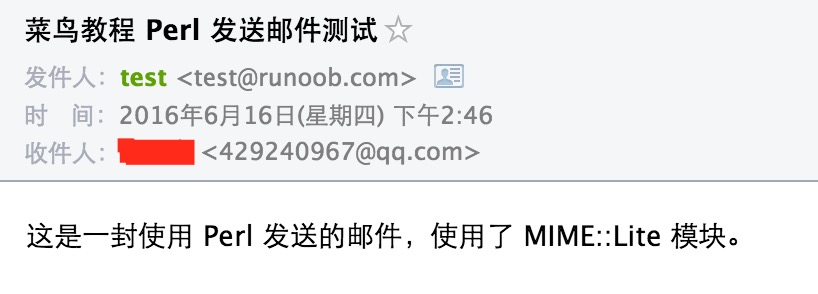
After successful execution, view the email content as follows:
Sending HTML formatted email
We can addContent-type: text/html\nto send HTML formatted email, as follows:
Example
#!/usr/bin/perl
use MIME::Lite;
$to = '429240967@qq.com';
$from = 'test@example.com';
$subject = 'Example Tutorial Perl sending email test';
$message = '<h1>This is an email sent using Perl<h1><p>The MIME::Lite module is used.</p><p>From Example Tutorial, address is: http://www.example.com.</p>';
$msg = MIME::Lite->new(
From => $from,
To => $to,
Cc => $cc,
Subject => $subject,
Data => $message
);
$msg->attr("content-type" => "text/html");
$msg->send;
print "Email sent successfully\n";
After successful execution, view the email content as follows:

Sending email with attachments
An example of sending email with attachments is as follows:
Example
#!/usr/bin/perl
use MIME::Lite;
$to = '429240967@qq.com';
$from = 'test@example.com';
$subject = 'Example Tutorial Perl sending email test';
$message = 'This is an email sent using Perl, using the MIME::Lite module, and includes an attachment.';
$msg = MIME::Lite->new(
From => $from,
To => $to,
Cc => $cc,
Subject => $subject,
Type => 'multipart/mixed'
);
$msg->attach (
Type => 'TEXT',
Data => $message
);
$msg->attach(Type => 'TEXT',
Path => './example.txt',
Filename => 'example.txt',
Disposition => 'attachment'
);
$msg->send;
print "Email sent successfully\n";
After successful execution, view the email content as follows:

You can add multiple attachments by using multiple $msg->attach.
Other extensions