LaTeX Math Formulas Basics
Mathematical typesetting is the jewel in LaTeX's crown, and it's the number one reason most people choose it.
This article covers the foundation of math formulas: inline and display formulas, superscripts and subscripts, fractions, square roots, Greek letters, and tables of common symbols.
Every "notation → result" comparison in this article is rendered in real time; what you see on the page is exactly what LaTeX typesets.
Inline Formulas and Display Formulas
Formulas come in only two forms: inline formulas embedded in a sentence, wrapped in a pair of $, and display formulas centered on their own line, wrapped in \[ and \].
Example
\[
x = \frac{-b \pm \sqrt{b^2 - 4ac}}{2a},
\]
where the discriminant$\Delta = b^2 - 4ac$determines the number of roots.
Rendered output:
| Form | Notation | Result | When to use |
|---|---|---|---|
| Inline formula | $...$ | Same height as text, embedded in a sentence | Simple formulas referenced in a sentence |
| Display formula | \[...\] | On its own line, centered, with a larger font size | Important and complex formulas |
Two habits to avoid: first, don't use the old-style $$...$$ for display formulas, as its spacing control is flawed; use \[...\] consistently. Second, when a sentence is interrupted by a display formula, don't leave a blank line before it—the formula is still part of the sentence, not a new paragraph.
Superscripts and Subscripts
^ is for superscripts, _ is for subscripts, and each only acts on the single character or brace group immediately following it.
Compare the notations in rows four and five: x_i^2 is "the square of the i-th x", while x^{i^2} is "x raised to the i² power"—braces determine the scope, and a tiny difference can lead to a huge error.
If a superscript or subscript has more than one character, you must use braces. x^10 would be typeset as x¹0 (x to the first power followed by a 0); the correct form is x^{10}.
Fractions and Square Roots
\frac{numerator}{denominator} produces a fraction, \sqrt{radicand} produces a square root, and the n-th root is written as \sqrt[n]{...}.
The last pair is worth special attention: ordinary parentheses don't grow with their content; \left( and \right) make the parentheses automatically match the content height, and they're a must when wrapping fractions or matrices.
Fractions in inline formulas are automatically compressed (the denominator is lowered and the font size shrinks). If you find it too small, replace \frac with \dfrac (display frac), and the fraction will keep its display size.
Greek Letters
The commands for Greek letters are simply "backslash + English name", with capitalization controlled by the first letter of the command.
| Command | Result | Command | Result |
|---|---|---|---|
| \alpha | \beta | ||
| \gamma | \delta | ||
| \epsilon | \varepsilon | ||
| \theta | \lambda | ||
| \mu | \pi | ||
| \sigma | \omega | ||
| \phi | \varphi |
| Command | Result | Command | Result |
|---|---|---|---|
| \Gamma | \Delta | ||
| \Sigma | \Omega |
Note two things: an uppercase command capitalizes only the first letter (\Sigma, not \SIGMA); \epsilon and \varepsilon, \phi and \varphi are two glyph variants of the same letter, each with its own role in mathematical convention—just keep them consistent in your paper.
Common Symbols Quick Reference
High-frequency symbols are grouped into three tables by usage, with the result column rendered in real time.
| Command | Result | Command | Result |
|---|---|---|---|
| \times | \div | ||
| \pm | \mp | ||
| \cdot | \leq | ||
| \geq | \neq | ||
| \approx | \equiv | ||
| \ll | \gg |
| Command | Result | Command | Result |
|---|---|---|---|
| \in | \notin | ||
| \subset | \subseteq | ||
| \cup | \cap | ||
| \emptyset | \infty | ||
| \forall | \exists | ||
| \Rightarrow | \Leftrightarrow |
| Command | Result | Command | Result |
|---|---|---|---|
| \partial | \nabla | ||
| \to | \mapsto | ||
| \mathrm{d}x | \hat{x} | ||
| \bar{x} | \vec{v} |
Large Operators: Sum, Integral, Limit
\sum, \int, and \lim are the three most commonly used large operators, used with superscripts and subscripts.
In display formulas, the superscripts and subscripts of the summation sign are placed directly above/below the symbol; in inline formulas they are automatically compressed to the sides. If you want to keep the "above/below" form in inline mode as well, just wrap it with \displaystyle.
Two Essential Packages: amsmath and amssymb
amsmath and amssymb are the "official extensions" for mathematical typesetting; it's recommended to just load them without a second thought before writing formulas.
| Package | What it provides |
|---|---|
| amsmath | More formula environments (align, etc., in Part 7), \dfrac, \tfrac, formula numbering control |
| amssymb | Extended math symbols, such as \mathbb blackboard bold fonts |
The font effect commands commonly used in mathematics also come from these two packages:
The last row is a typesetting detail: if the base of the natural logarithm e or the imaginary unit i is written directly, it will be treated as a variable and typeset in italics; wrapping it with \mathrm typesets it in upright form, which conforms to publishing standards.
Don't use Chinese or full-width punctuation in formulas. Things like $α+β$ with a full-width plus sign and Unicode Greek letters typed via an input method are all incorrect usage—formula content must be entered using commands, and Chinese explanations should be placed outside the $.
Comprehensive Example: A Real Document
Let's put this article's content into a complete document and compile it:
Example
\usepackage{amsmath} % Math formula enhancement package; standard for formula typesetting
\begin{document}
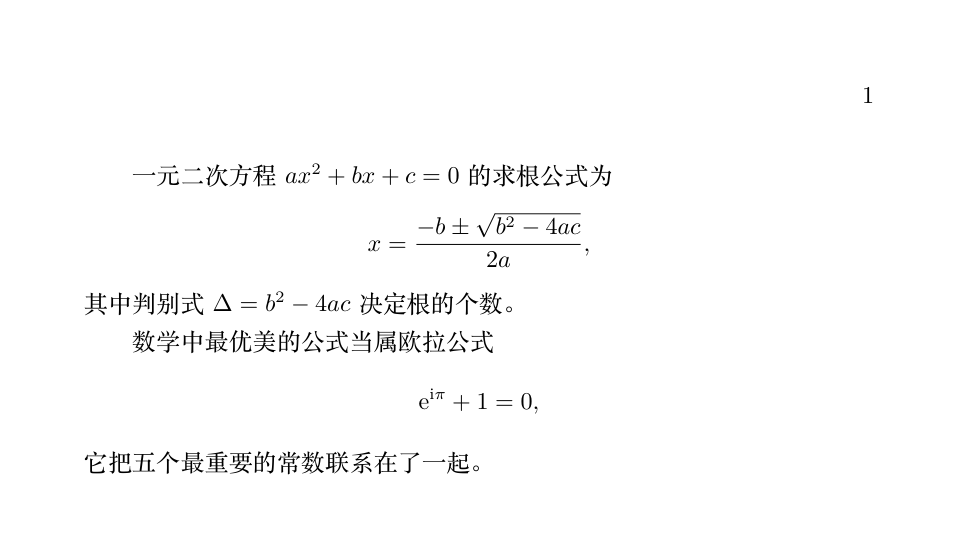
A quadratic equation in one variable$ax^2 + bx + c = 0$has the root-finding formula
\[
x = \frac{-b \pm \sqrt{b^2 - 4ac}}{2a},
\]
where the discriminant$\Delta = b^2 - 4ac$determines the number of roots.
The most beautiful formula in mathematics is Euler's formula
\[
\mathrm{e}^{\mathrm{i}\pi} + 1 = 0,
\]
It connects the five most important constants together.
\end{document}
Summary
| Requirement | Notation |
|---|---|
| Inline formula | $...$ |
| Display formula | \[...\] |
| Superscripts and subscripts | x^{10}, a_{ij} (multi-character must use braces) |
| Fraction / square root | \frac{a}{b}、\sqrt[n]{x} |
| Adaptive parentheses | \left( \right) |
| Large inline fraction | \dfrac{a}{b} |
| Upright characters | \mathrm{e} |