Vue.js Reactivity API
Vue can add dynamic reactive interfaces to data.
For example, in the following example, we use the $watch property to listen to data. $watch must be added outside the Vue instance to achieve correct reactivity.
In the example, clicking the button increments the counter by 1. setTimeout sets the counter value to add 20 after 10 seconds.
Example
Try it »
Vue does not allow dynamically adding new root-level reactive properties to an already created instance.
Vue cannot detect the addition or deletion of object properties. The best way is to declare root-level reactive properties before initializing the instance, even if they are just empty values.
If we need to add or delete properties at runtime, we can use the global Vue, Vue.set, and Vue.delete methods.
Vue.set
The Vue.set method is used to set an object's property. It can solve the limitation that Vue cannot detect added properties. The syntax format is as follows:
Vue.set( target, key, value )
Parameter description:
- target: can be an object or an array
- key: can be a string or a number
- value: can be any type
Example
Try it »
In the above example, the following code was used to create a variable myproduct at the beginning:
var myproduct = {"id":1, name:"book", "price":"20.00"};
This variable was assigned to the data object of the Vue instance:
var vm = new Vue({ el: '#app', data: { products: myproduct } });If we want to add one or more properties to the myproduct array, we can use the following code after the Vue instance is created:
vm.products.qty = "1";
View the console output:
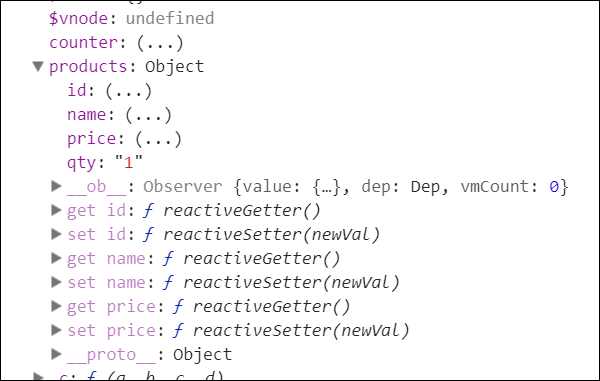
As seen in the figure above, the quantity property qty was added to the product, but the get/set methods are only available for the id, name, and price properties, and cannot be used on the qty property.
We cannot achieve reactivity by adding properties to the Vue object. Vue mainly creates all properties at the beginning. If we want to achieve this functionality, we can use Vue.set:
Example
Try it »
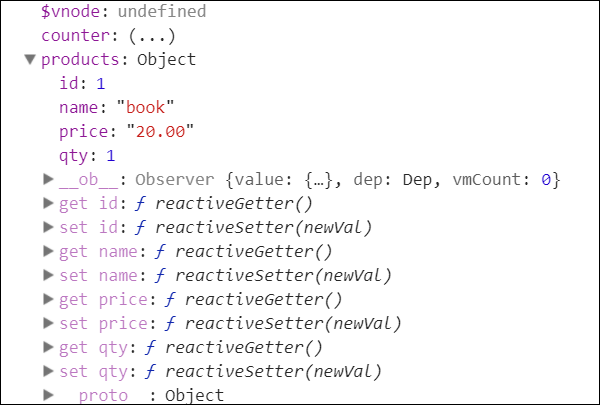
From the console output result, it can be seen that the get/set methods can be used on the qty property.
Vue.delete
Vue.delete is used to delete dynamically added properties. Syntax format:
Vue.delete( target, key )
Parameter description:
- target: can be an object or an array
- key: can be a string or a number
Example
Try it »
In the above example, we used Vue.delete to delete the price property. The following is the console output result:
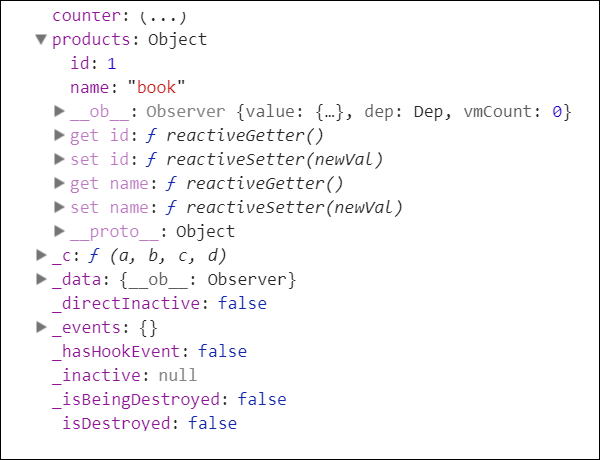
From the output result in the figure above, we can see that the price property has been deleted, leaving only the id and name properties. The get/set methods of the price property have also been deleted.
Other Extensions