Redis Stream
Redis Stream is a data structure newly added in Redis version 5.0.
Redis Stream is mainly used for message queues (MQ, Message Queue). Redis itself has a Redis publish/subscribe (pub/sub) feature to implement message queue functionality, but it has a drawback: messages cannot be persisted. If network disconnection, Redis downtime, etc. occur, messages will be discarded.
Simply put, publish/subscribe (pub/sub) can distribute messages, but it cannot record historical messages.
Redis Stream provides message persistence and master-slave replication, allowing any client to access data at any time, and it can remember each client's access position, and ensure messages are not lost.
The structure of Redis Stream is shown below. It has a message linked list that links all added messages together. Each message has a unique ID and corresponding content:
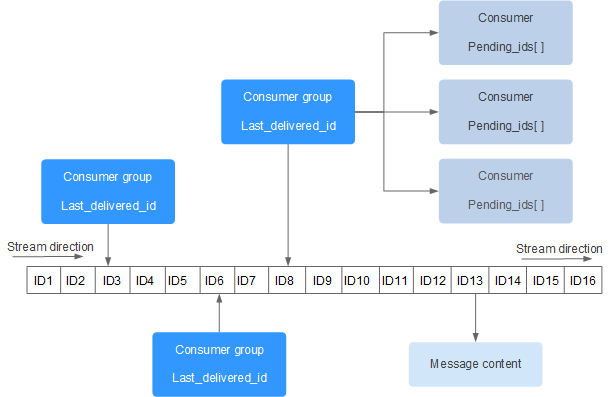
Each Stream has a unique name, which is the Redis key. It is automatically created when we first use the xadd command to append a message.
Diagram explanation:
- Consumer GroupConsumer group, created using the XGROUP CREATE command. A consumer group has multiple consumers.
- last_delivered_idCursor. Each consumer group has a cursor, last_delivered_id. When any consumer reads a message, the cursor last_delivered_id moves forward.
- pending_idsState variable of the consumer, used to maintain the consumer's unacknowledged IDs. pending_ids records messages that have already been read by the client but have not yet been acked (Acknowledge character: acknowledgment character).
Message queue related commands:
- XADD- Add a message to the end
- XTRIM- Trim the stream to limit its length
- XDEL- Delete a message
- XLEN- Get the number of elements contained in the stream, i.e., the message length
- XRANGE- Get the message list, which automatically filters out deleted messages
- XREVRANGE- Get the message list in reverse, IDs from largest to smallest
- XREAD- Get the message list in blocking or non-blocking mode
Consumer group related commands:
- XGROUP CREATE- Create a consumer group
- XREADGROUP GROUP- Read messages from a consumer group
- XACK- Mark a message as "processed"
- XGROUP SETID- Set a new last delivered message ID for the consumer group
- XGROUP DELCONSUMER- Delete a consumer
- XGROUP DESTROY- Delete a consumer group
- XPENDING- Display information about pending messages
- XCLAIM- Transfer ownership of a message
- XINFO - View information about streams and consumer groups;
- XINFO GROUPS- Print consumer group information;
- XINFO STREAM- Print stream information
XADD
Use XADD to add a message to the queue. If the specified queue does not exist, a queue will be created. XADD syntax format:
XADD key ID field value [field value ...]
- keyQueue name; create it if it does not exist
- IDMessage ID. We use * to indicate that it is generated by Redis. It can be customized, but you need to ensure its incrementality.
- field valueRecord.
Example
"1601372323627-0"
redis> XADD mystream * field1 value1 field2 value2 field3 value3
"1601372323627-1"
redis> XLEN mystream
(integer) 2
redis> XRANGE mystream - +
1) 1) "1601372323627-0"
2) 1) "name"
2) "Sara"
3) "surname"
4) "OConnor"
2) 1) "1601372323627-1"
2) 1) "field1"
2) "value1"
3) "field2"
4) "value2"
5) "field3"
6) "value3"
redis>
XTRIM
Use XTRIM to trim the stream to limit its length. Syntax format:
XTRIM key MAXLEN [~] count
- keyQueue name
- MAXLENLength
- countCount
Example
"1601372434568-0"
127.0.0.1:6379> XTRIM mystream MAXLEN 2
(integer) 0
127.0.0.1:6379> XRANGE mystream - +
1) 1) "1601372434568-0"
2) 1) "field1"
2) "A"
3) "field2"
4) "B"
5) "field3"
6) "C"
7) "field4"
8) "D"
127.0.0.1:6379>
redis>
XDEL
Use XDEL to delete messages. Syntax format:
XDEL key ID [ID ...]
- keyQueue name
- IDMessage ID
Example
1538561698944-0
> XADD mystream * b 2
1538561700640-0
> XADD mystream * c 3
1538561701744-0
> XDEL mystream 1538561700640-0
(integer) 1
127.0.0.1:6379> XRANGE mystream - +
1) 1) 1538561698944-0
2) 1) "a"
2) "1"
2) 1) 1538561701744-0
2) 1) "c"
2) "3"
XLEN
Use XLEN to get the number of elements contained in the stream, i.e., the message length. Syntax format:
XLEN key
- keyQueue name
Example
"1601372563177-0"
redis> XADD mystream * item 2
"1601372563178-0"
redis> XADD mystream * item 3
"1601372563178-1"
redis> XLEN mystream
(integer) 3
redis>
XRANGE
Use XRANGE to get the message list, which automatically filters out deleted messages. Syntax format:
XRANGE key start end [COUNT count]
- keyQueue name
- startStart value,-represents the minimum value
- endEnd value,+represents the maximum value
- countCount
Example
"1601372577811-0"
redis> XADD writers * name Jane surname Austen
"1601372577811-1"
redis> XADD writers * name Toni surname Morrison
"1601372577811-2"
redis> XADD writers * name Agatha surname Christie
"1601372577812-0"
redis> XADD writers * name Ngozi surname Adichie
"1601372577812-1"
redis> XLEN writers
(integer) 5
redis> XRANGE writers - + COUNT 2
1) 1) "1601372577811-0"
2) 1) "name"
2) "Virginia"
3) "surname"
4) "Woolf"
2) 1) "1601372577811-1"
2) 1) "name"
2) "Jane"
3) "surname"
4) "Austen"
redis>
XREVRANGE
Use XREVRANGE to get the message list, which automatically filters out deleted messages. Syntax format:
XREVRANGE key end start [COUNT count]
- keyQueue name
- endEnd value,+represents the maximum value
- startStart value,-represents the minimum value
- countCount
Example
"1601372731458-0"
redis> XADD writers * name Jane surname Austen
"1601372731459-0"
redis> XADD writers * name Toni surname Morrison
"1601372731459-1"
redis> XADD writers * name Agatha surname Christie
"1601372731459-2"
redis> XADD writers * name Ngozi surname Adichie
"1601372731459-3"
redis> XLEN writers
(integer) 5
redis> XREVRANGE writers + - COUNT 1
1) 1) "1601372731459-3"
2) 1) "name"
2) "Ngozi"
3) "surname"
4) "Adichie"
redis>
XREAD
Use XREAD to get the message list in blocking or non-blocking mode. Syntax format:
XREAD [COUNT count] [BLOCK milliseconds] STREAMS key [key ...] id [id ...]
- countCount
- millisecondsOptional. Blocking milliseconds. If not set, it is non-blocking mode.
- keyQueue name
- idMessage ID
Example
> XREAD COUNT 2 STREAMS mystream writers 0-0 0-0
1) 1) "mystream"
2) 1) 1) 1526984818136-0
2) 1) "duration"
2) "1532"
3) "event-id"
4) "5"
5) "user-id"
6) "7782813"
2) 1) 1526999352406-0
2) 1) "duration"
2) "812"
3) "event-id"
4) "9"
5) "user-id"
6) "388234"
2) 1) "writers"
2) 1) 1) 1526985676425-0
2) 1) "name"
2) "Virginia"
3) "surname"
4) "Woolf"
2) 1) 1526985685298-0
2) 1) "name"
2) "Jane"
3) "surname"
4) "Austen"
XGROUP CREATE
Use XGROUP CREATE to create a consumer group. Syntax format:
XGROUP [CREATE key groupname id-or-$] [SETID key groupname id-or-$] [DESTROY key groupname] [DELCONSUMER key groupname consumername]
- keyQueue name; create it if it does not exist
- groupnameGroup name.
- $Indicates consuming from the tail, only accepting new messages. All current Stream messages will be ignored.
Start consuming from the head:
XGROUP CREATE mystream consumer-group-name 0-0
Start consuming from the tail:
XGROUP CREATE mystream consumer-group-name $
XREADGROUP GROUP
Use XREADGROUP GROUP to read messages from a consumer group. Syntax format:
XREADGROUP GROUP group consumer [COUNT count] [BLOCK milliseconds] [NOACK] STREAMS key [key ...] ID [ID ...]
- groupConsumer group name
- consumerConsumer name.
- countNumber to read.
- millisecondsBlocking milliseconds.
- keyQueue name.
- IDMessage ID.
XREADGROUP GROUP consumer-group-name consumer-name COUNT 1 STREAMS mystream >Other extensions