SVG Blur Effect
The blur effect in SVG can be achieved through the<feGaussianBlur>element, which uses the Gaussian blur algorithm to blur the image.
Blur effects can be used to create various visual effects such as soft shadows, depth of field, blurred backgrounds, and more.
<feGaussianBlur>Element:
<feGaussianBlur>The element is used to perform Gaussian blur on an image. It has two main parameters:
stdDeviation: Specifies the standard deviation of the Gaussian blur. The larger the standard deviation, the stronger the blur. One or two numbers can be used to specify the standard deviation in the horizontal and vertical directions respectively. If only one number is given, the horizontal and vertical standard deviations are the same.in: Specifies the input image, usuallySourceGraphic, which represents the target element itself to which the filter effect is applied.
The following code defines a blur filter and then applies it to a red-filled rectangle, causing the rectangle to appear blurred. stdDeviation="5" means that the standard deviation in both horizontal and vertical directions is 5, i.e., the blur amount is 5 pixels.
Example
<!-- Define the blur filter -->
<filter id="blur_filter">
<feGaussianBlur in="SourceGraphic" stdDeviation="5" />
</filter>
<!-- The rectangle to which the blur filter is applied -->
<rect x="50" y="50" width="100" height="80" fill="red" filter="url(#blur_filter)" />
</svg>
Example 1
The <feGaussianBlur> element is used to create blur effects:
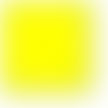
Below is the SVG code:
Example
<defs>
<filter id="f1" x="0" y="0">
<feGaussianBlur in="SourceGraphic" stdDeviation="15" />
</filter>
</defs>
<rect width="90" height="90" stroke="green" stroke-width="3"
fill="yellow" filter="url(#f1)" />
</svg>
Try it Yourself »
Click to view:View SVG file。
Code explanation:
- The id attribute of the <filter> element defines a unique name for the filter.
- The <feGaussianBlur> element defines the blur effect.
- The in="SourceGraphic" part defines that the effect is created from the entire image.
- The stdDeviation attribute defines the amount of blur.
- The filter attribute of the <rect> element is used to link the element to the "f1" filter.
Notes
You can apply the blur effect to any SVG graphic element, including rectangles, circles, paths, and more.
The parameters of the blur effect
stdDeviationcan be adjusted as needed to achieve a suitable blur level.Blur effects can be combined with other filter effects, such as shadows, blend modes, and so on.
By using the<feGaussianBlur>element, you can add blur effects to SVG graphic elements, giving them a soft, blurred appearance, thus achieving various visual effects.