Pandas Installation
Installing pandas requires the basic environment to be Python. Pandas is a Python-based library, so you need to install Python first, and then through Python's package management toolpipInstall Pandas.
Install pandas using pip:
pip install pandas
After successful installation, we can import the pandas package for use:
import pandas
Example - View pandas version
>>> import pandas
>>> pandas.__version__ # View version
'1.1.5'
>>> pandas.__version__ # View version
'1.1.5'
Importing pandas generally uses an aliaspdinstead:
import pandas as pd
Example - View pandas version
>>> import pandas as pd
>>> pd.__version__ # View version
'1.1.5'
>>> pd.__version__ # View version
'1.1.5'
A simple pandas example:
Example
import pandas as pd
mydataset = {
'sites': ["Google", "Example", "Wiki"],
'number': [1, 2, 3]
}
myvar = pd.DataFrame(mydataset)
print(myvar)
mydataset = {
'sites': ["Google", "Example", "Wiki"],
'number': [1, 2, 3]
}
myvar = pd.DataFrame(mydataset)
print(myvar)
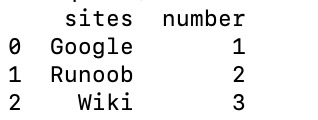
Execute the above code, and the output is: