NumPy Matrix Library (Matrix)
NumPy contains a matrix librarynumpy.matlib, the functions in this module return a matrix, not an ndarray object.
numpy.matlibIt is specifically used to create and manipulate matrix objects. Although NumPy's core supports multi-dimensional arrays (ndarray), numpy.matlib provides some convenient functions that specifically return matrix types, making it easier for users to perform traditional linear algebra operations.
A matrix is a rectangular array arranged by
 rows
rows and columns of elements.
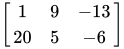
The elements in a matrix can be numbers, symbols, or mathematical expressions. The following is a 2-row, 3-column matrix consisting of 6 numeric elements:
Transpose Matrix
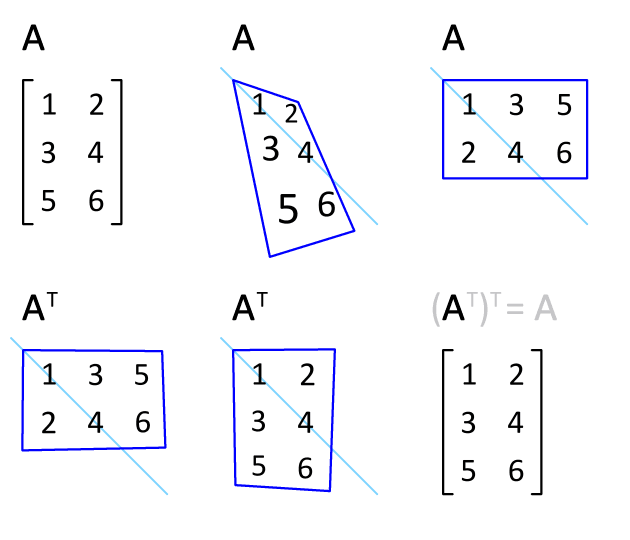
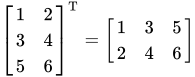
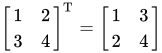
In NumPy, besides using the numpy.transpose function to swap the dimensions of an array, you can also use theTattribute.
For example, given a matrix with m rows and n columns, using the t() function converts it into a matrix with n rows and m columns.
Example
The output result is as follows:
原数组:
[[ 0  1  2  3]
 [ 4  5  6  7]
 [ 8  9 10 11]]


转置数组:
[[ 0  4  8]
 [ 1  5  9]
 [ 2  6 10]
 [ 3  7 11]]
matlib.empty()
The matlib.empty() function returns a new matrix, with the syntax format:
numpy.matlib.empty(shape, dtype, order)
Parameter description:
- shape: Integer or tuple of integers defining the shape of the new matrix
- Dtype: Optional, data type
- order: C (row-major order) or F (column-major order)
Example
The output result is:
[[-1.49166815e-154 -1.49166815e-154]
 [ 2.17371491e-313  2.52720790e-212]]
numpy.matlib.zeros()
The numpy.matlib.zeros() function creates a matrix filled with 0s.
Example
The output result is:
[[0. 0.]
 [0. 0.]]
numpy.matlib.ones()
The numpy.matlib.ones() function creates a matrix filled with 1s.
Example
The output result is:
[[1. 1.]
 [1. 1.]]
numpy.matlib.eye()
The numpy.matlib.eye() function returns a matrix with diagonal elements equal to 1 and all other positions equal to 0.
numpy.matlib.eye(n, M,k, dtype)
Parameter description:
- n: Number of rows of the returned matrix
- M: Number of columns of the returned matrix, default is n
- k: Index of the diagonal
- dtype: Data type
Example
The output result is:
[[1. 0. 0. 0.]
 [0. 1. 0. 0.]
 [0. 0. 1. 0.]]
numpy.matlib.identity()
The numpy.matlib.identity() function returns an identity matrix of a given size.
An identity matrix is a square matrix. The elements on the diagonal from the upper-left to the lower-right (called the main diagonal) are all 1, and all other elements are 0.

Example
The output result is:
[[ 1.  0.  0.  0.  0.]
 [ 0.  1.  0.  0.  0.]
 [ 0.  0.  1.  0.  0.]
 [ 0.  0.  0.  1.  0.]
 [ 0.  0.  0.  0.  1.]]
numpy.matlib.rand()
The numpy.matlib.rand() function creates a matrix of a given size, with data filled randomly.
Example
The output result is:
[[0.23966718 0.16147628 0.14162   ]
 [0.28379085 0.59934741 0.62985825]
 [0.99527238 0.11137883 0.41105367]]
Matrices are always two-dimensional, while ndarray is an n-dimensional array. The two objects are interchangeable.
Example
The output result is:
[[1  2]
 [3  4]]
Example
The output result is:
[[1  2]
 [3  4]]
Example
The output result is:
[[1  2]
 [3  4]]
The following functions also exist in the NumPy namespace, but they return matrix objects.
| Function Name | Parameter Description | Function Description |
|---|---|---|
| matrix(data[, dtype, copy]) | data: array-like or string, dtype: data type, copy: whether to copy | Create a matrix object from an array or string |
| asmatrix(data[, dtype]) | data: input data, dtype: data type (optional) | Convert the input to a matrix object |
| bmat(obj[, ldict, gdict]) | obj: string or nested sequence, ldict, gdict: namespace dictionaries (optional) | Build a matrix from a string, nested sequence, or array |
| empty(shape[, dtype, order]) | shape: shape, dtype: data type, order: storage order | Create a matrix with uninitialized elements |
| zeros(shape[, dtype, order]) | shape: shape, dtype: data type, order: storage order | Create an all-zero matrix |
| ones(shape[, dtype, order]) | shape: shape, dtype: data type, order: storage order | Create an all-ones matrix |
| eye(n[, M, k, dtype, order]) | n: number of rows, M: number of columns, k: diagonal offset, dtype: data type, order: storage order | Create a matrix with 1s on the diagonal and 0s elsewhere |
| identity(n[, dtype]) | n: size, dtype: data type (optional) | Create an identity square matrix |
| repmat(a, m, n) | a: array or matrix, m, n: number of repetitions | Repeat the array or matrix for m rows and n columns |
| rand(args) | args: Specify the matrix shape | Generate a uniformly distributed random matrix of the specified shape |
| randn(args) | args: Specify the matrix shape | Generate a standard normal distribution random matrix of the specified shape |
Notes
- Although
numpy.matlibis convenient, the official NumPy recommendation is to use thendarrayand@operator to perform matrix operations, becausematrixthe type has some limitations and may be deprecated in future versions. - For new code, it is recommended to use
ndarrayfirst to ensure better compatibility and flexibility.