jQuery UI Usage
Once you download jQuery UI, you will get a zip archive containing the following files:
/css//development-bundle//js/index.html
Using jQuery UI on a Web Page
Open it in a text editorindex.html, you will see references to some external files: theme, jQuery, and jQuery UI. Normally, you need to reference these three files in your page in order to use jQuery UI's form widgets and interaction widgets:
<link rel="stylesheet" href="css/themename/jquery-ui.custom.css.html" />
<script src="js/jquery.min.js.html"></script>
<script src="js/jquery-ui.custom.min.js.html"></script>
Once you reference these required files, you can add some jQuery widgets to your page. For example, to create a datepicker widget, you need to add a text input field to the page, and then call.datepicker(), as shown below:
HTML:
<input type="text" name="date" id="date" />
JavaScript:
$( "#date" ).datepicker();
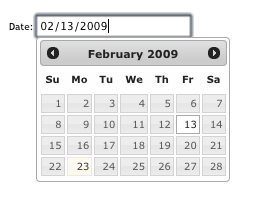
To view live demos of jQuery UI widgets and interaction widgets, please visitjQuery UI Examples。
Other Extensions