jQuery Cookie Plugin
jQuery can manipulate cookies through the jquery.cookie.js plugin.
Official Website:http://plugins.jquery.com/cookie/
GitHub Address:https://github.com/carhartl/jquery-cookie
You need to include jQuery before using jquery.cookie.js:
We can use a third-party resource library to include these two files:
Usage
Create a cookie:
$.cookie('name', 'value');
If no expiration time is specified, the cookie will expire when the browser is closed.
Create a cookie and set it to expire after 7 days:
$.cookie('name', 'value', { expires: 7 });
Create a cookie and set the cookie's valid path to the website's root directory:
$.cookie('name', 'value', { expires: 7, path: '/' });
Note:By default, only the web page that sets a cookie can read that cookie. If you want one page to read a cookie set by another page, you must set the cookie's path. The cookie's path is used to set the top-level directory that can read the cookie. Setting this path to the website's root directory allows all web pages to read each other's cookies (generally, you should not set it this way to prevent conflicts).
Read a cookie:
$.cookie('name'); // => "value"
$.cookie('nothing'); // => undefined
Read all cookie information:
$.cookie(); // => { "name": "value" }
Delete a cookie:
Note:When deleting a cookie, you must pass the exact same path, domain, and security options used to set the cookie.
Example
Try it Yourself »
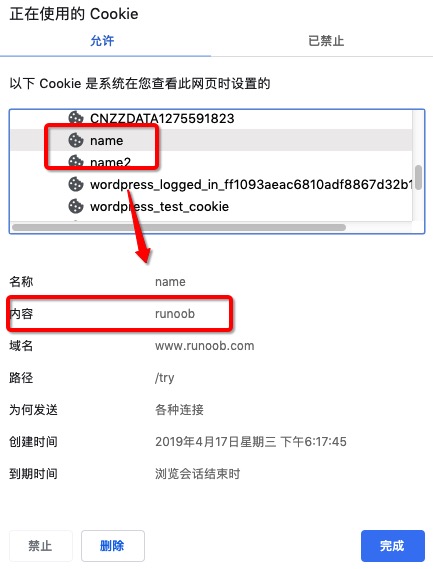
After execution, we can view the cookie information in the browser, as shown in the figure below:
Parameter Description
raw
Default value: false.
By default, encoding and decoding are automatically performed when reading and writing cookies (using encodeURIComponent for encoding and decodeURIComponent for decoding). To disable this feature, set raw: true:
$.cookie.raw = true;
json
Set the cookie data to be stored and read using JSON, so you don't need to use JSON.stringify and JSON.parse.
$.cookie.json = true;
expires
expires: 365
Defines the cookie's validity period. The value can be a number (in days, calculated from when the cookie is created) or a Date object. If omitted, the created cookie is a session cookie, which will be deleted when the user exits the browser.
path
path: '/'
Default: Only the web page that sets the cookie can read that cookie.
Defines the cookie's valid path. By default, the value of this parameter is the path of the web page that created the cookie (standard browser behavior).
If you want to access this cookie throughout the entire website, you need to set the valid path like this: path: '/'. If you want to delete a cookie that has a defined valid path, you need to include this path when calling the function:
$.cookie('the_cookie', null,{ path: '/' });
domain
domain: 'example.com'
Default value: The domain of the web page that created the cookie.
secure
secure: true
Default value: false. If true, the cookie's transmission requires a secure protocol (HTTPS).
Other Extensions