jQuery height()Method
 jQuery HTML/CSS Methods
Examples
Return the height of the <div> element:
Try it yourself »
Definition and Usage
The height() method sets or returns the height of the selected elements.
When this method is used toreturnthe height,it returns the height of the first matched element.
When this method is used tosetthe height, it sets the height of all matched elements.
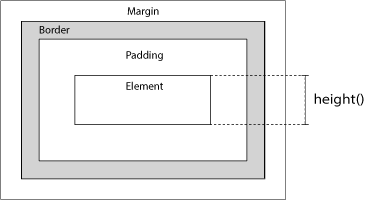
As shown in the image below, this method does not include padding, border, or margin.
Related methods:
- width()- Set or return the width of elements
- innerWidth()- Return the width of elements (including padding)
- innerHeight()- Return the height of elements (including padding)
- outerWidth()- Return the width of elements (including padding and border)
- outerHeight()- Return the height of elements (including padding and border)
Syntax
Return the height:
Set the height:
Set the height using a function:
| Parameter | Description |
|---|---|
| value | Required when setting the height. Specifies the height of the element, in units such as px, em, pt, etc. The default unit is px. |
| function(index,currentheight) | Optional. Specifies a function that returns the new height of the selected elements.
|

More Examples
Set the height of an element
How to set the height of an element using different units.
Increase the height using a function
How to increase the height of an element using a function.
Return the height of the document and window elements
How to return the current height of the document and window elements.
Display dimensions using related methods
How to use width(), height(), innerHeight(), innerWidth(), outerWidth(), and outerHeight().
Other extensions