HTML DOM Nodes
In the HTML DOM, everything is a node. The DOM is HTML treated as a node tree.
DOM Nodes
DOM Nodes
According to the W3C HTML DOM standard, everything in an HTML document is a node:
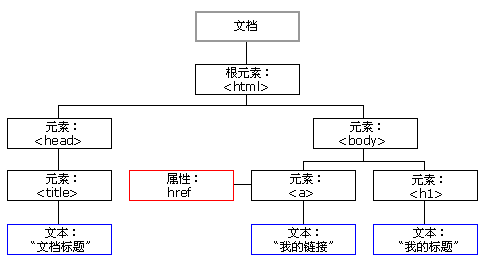
- The entire document is a document node
- Every HTML element is an element node
- The text inside HTML elements is text nodes
- Every HTML attribute is an attribute node
- Comments are comment nodes
HTML DOM Node Tree
The HTML DOM views an HTML document as a tree structure. This structure is called anode tree:
HTML DOM Tree Example
Node Parents, Children, and Siblings
The nodes in the node tree have a hierarchical relationship to each other.
We often use the termsparent、childandsiblingand other terms to describe these relationships. A parent node has child nodes. Child nodes at the same level are called siblings (brothers or sisters).
- In the node tree, the top node is called the root.
- Every node has a parent, except the root (which has no parent).
- A node can have any number of child nodes.
- Siblings are nodes that have the same parent node.
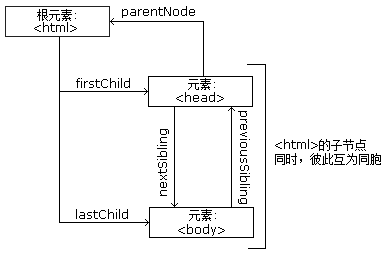
The image below shows part of the node tree and the relationships between nodes:
Look at the following HTML fragment:
From the HTML above:
- The <html> node has no parent; it is the root node
- The parent of <head> and <body> is the <html> node
- The parent of the text node "Hello world!" is the <p> node
And:
- The <html> node has two child nodes: <head> and <body>
- The <head> node has two child nodes: <meta> and <title> nodes
- The <title> node also has one child node: the text node "DOM Tutorial"
- The <h1> and <p> nodes are sibling nodes, and are also children of <body>
And:
- The <head> element is the first child of the <html> element
- The <body> element is the last child of the <html> element
- The <h1> element is the first child of the <body> element
- The <p> element is the last child of the <body> element
Warning!
A common error in DOM processing is to expect an element node to contain text.
In this example:<title>DOM Tutorial</title>, the element node <title> contains atext node with the value "DOM Tutorial".。
Through the node'sinnerHTMLproperty, you can access the value of the text node.
You will learn more about the innerHTML property in a later chapter.
Other Extensions