How to Use<AppML>
This chapter demonstrates how to create an <AppML> application through the following 4 simple steps.
The next chapter will introduce how to download <AppML> and start developing web applications on your own computer.
1. Create a Model
Create a file with the following content:
<datasource>
<database>
<connection>Demo</connection>
<sql>SELECT CustomerName,ContactName,City,Country FROM Customers</sql>
<orderby>CustomerName</orderby>
</database>
</datasource>
<filters>
<query>
<field>CustomerName</field>
</query>
</filters>
</appml>
In the Models subdirectory (we recommend), save the file as Customers.xml.
Model Analysis
The <appml> tag defines the model.
The <datasource> tag defines the data source of the model.
The <database> tag defines the database.
The <connection> tag defines the connection to the database.
The <sql> tag defines the data query.
The <orderby> tag defines the default sorting.
The <query> tag defines valid query filters.
2. Create a Web Page
In your first <AppML> app, create an HTML page:
Example
<html>
<body>
<h1>My First Web Application</h1>
<table>
<tr>
<th>Customer</th>
<th>City</th>
<th>Country</th>
</tr>
<tr>
<td>Alfreds Futterkiste</td>
<td>Berlin</td>
<td>Germany</td>
</tr>
</table>
</body>
</html>
Try it Yourself »
3. Add Styles
Add style sheets to your web page, then execute the <AppML> app:
Example
<html>
<head>
<link rel="stylesheet" href="appml.css.html">
</head>
<body>
<h1>My First Web Application</h1>
<table class="appmltable">
<tr>
<th>Customer</th>
<th>City</th>
<th>Country</th>
</tr>
<tr>
<td>Alfreds Futterkiste</td>
<td>Berlin</td>
<td>Germany</td>
</tr>
</table>
</body>
</html>
Try it Yourself »
4. Add Scripts, Then Run the Application
Add scripts to your web page to run the <AppML> app:
Example
<html>
<head>
<link rel="stylesheet" href="appml.css.html">
</head>
<body>
<h1>My First Web Application</h1>
<div id="Place01">
<table id="Template01" class="appmltable">
<tr>
<th>Customer</th>
<th>City</th>
<th>Country</th>
</tr>
<tr id="appml_row">
<td>#CustomerName#</td>
<td>#City#</td>
<td>#Country#</td>
</tr>
</table>
</div>
<script src="appml.js.html"></script>
<script>
app=new AppML("appml.htmlx","Models/Customers.xml");
app.run("Place01","Template01");
</script>
</body>
</html>
Try it Yourself »
Example Analysis
The <AppML> library contains a large number of functions. These functions can be called in your web pages.
<script src="appml.js.html">The <AppML> library is loaded.
JavaScript statement:app=new AppML("appml.htmlx","Models/Customers.xml");Creates an AppML application object, then executes the web server script "appml.htmlx" to load the data from the "Customers.xml" file.
JavaScript statement:app.run("Place01","Template01");Inserts the data into the HTML element with id="Place01", using the element with id="Template01" as a template.
Attributesid="appml_row"Defines how each data record is inserted into the HTML element.
The data in the # markers will be replaced with the model's data.
With all of the above, can you imagine a faster prototype?
How Does It Work?
- When a web page loads, you can load the <AppML> controller in the page.
- Using the <AppML> controller, you can create <AppML> objects in the page.
- When you run the <AppML> object in the page, it requests the server-side data controller.
- The <AppML> object receives data from the server (using the data model).
- The <AppML> object (or your code) displays the data in the page.
- (Optional) Web users can change the data.
- (Optional) <AppML> can send data to the server in the background.
- (Optional) The server controller can store data on the server side.
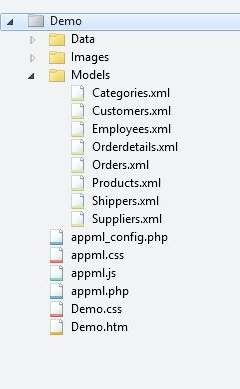
Typical Web Files and Folders:
|
|
Data folder:Data Images folder:Images Models folder: Models Application:Demo.htm Styles:Demo.css
<AppML> configuration file:appml_config.php (or .htmlx) <AppML> style file:appml.css <AppML> browser controller:appml.js <AppML> server controller:appml.php (or .htmlx) |
No Limitations
You can place the <AppML> object in the HTML page. <AppML> does not affect other parts of the page.
When the scheme page does not exist, <AppML> defaults to the standard display page. This is perfect for rapid prototyping.
However, the main function of <AppML> is not for page display. <AppML> is mainly for reading application data. The data it brings can be freely designed for display using HTML, CSS, and JavaScript. You can:
- Write your own HTML and let AppML handle the data.
- Invoke the model and handle all the display.
- Use AppML's properties and methods to create other combinations.
You will soon discover that <AppML> has powerful capabilities, providing data and data models for your web applications. You can:
- Define data security for users or user groups
- Connect to all types of databases, such as Access, MySQL, SQL, and Oracle
- Connect XML files and Text files
- Define data types, data formats, and data constraints.
- Add any new elements to the model.