Docker Compose
Compose Introduction
Compose is a tool for defining and running multi-container Docker applications. With Compose, you can use a YML file to configure all the services your application needs. Then, with a single command, you can create and start all services from the YML file configuration.
If you don't yet understand YML file configuration, you can first readYAML Getting Started Tutorial。
The three steps used by Compose:
-
Use a Dockerfile to define the application's environment.
-
Use docker-compose.yml to define the services that make up your application so they can run together in an isolated environment.
-
Finally, run the docker-compose up command to start and run the entire application.
An example docker-compose.yml configuration is as follows (configuration parameters refer to below):
Example
version: '3'
services:
web:
build: .
ports:
- "5000:5000"
volumes:
- .:/code
- logvolume01:/var/log
links:
- redis
redis:
image: redis
volumes:
logvolume01: {}
Compose Installation
On Linux, we can download its binary package from Github to use it. Latest release address:https://github.com/docker/compose/releases。
Run the following command to download the current stable release of Docker Compose:
$ sudo curl -L "https://github.com/docker/compose/releases/download/v2.2.2/docker-compose-$(uname -s)-$(uname -m)" -o /usr/local/bin/docker-compose
To install another version of Compose, replace v2.2.2.
Docker Compose is hosted on GitHub and is not very stable.
You can also install Docker Compose quickly by executing the following command.
curl -L https://get.daocloud.io/docker/compose/releases/download/v2.4.1/docker-compose-`uname -s`-`uname -m` > /usr/local/bin/docker-compose
Apply executable permissions to the binary file:
$ sudo chmod +x /usr/local/bin/docker-compose
Create symlink:
$ sudo ln -s /usr/local/bin/docker-compose /usr/bin/docker-compose
Test whether the installation was successful:
$ docker-compose version
cker-compose version 1.24.1, build 4667896b
NoteFor alpine, the following dependency packages are required: py-pip, python-dev, libffi-dev, openssl-dev, gcc, libc-dev, and make.
macOS
Docker Desktop for Mac and Docker Toolbox already include Compose and other Docker applications, so Mac users do not need to install Compose separately. Docker installation instructions can be found atMacOS Docker installation。
windows PC
Docker Desktop for Windows and Docker Toolbox already include Compose and other Docker applications, so Windows users do not need to install Compose separately. Docker installation instructions can be found atWindows Docker Installation。
Usage
1. Preparation
Create a test directory.
$ mkdir composetest
$ cd composetest
In the test directory, create a file named app.py, and copy and paste the following content:
composetest/app.py file code
import redis
from flask import Flask
app = Flask(__name__)
cache = redis.Redis(host='redis', port=6379)
def get_hit_count():
retries = 5
while True:
try:
return cache.incr('hits')
except redis.exceptions.ConnectionError as exc:
if retries == 0:
raise exc
retries -= 1
time.sleep(0.5)
@app.route('/')
def hello():
count = get_hit_count()
return 'Hello World! I have been seen {} times.\n'.format(count)
In this example, redis is the hostname of the redis container on the application network, and the port used by that host is 6379.
In the composetest directory, create another file namedrequirements.txtwith the following content:
flask
redis
2. Create a Dockerfile
In the composetest directory, create a file namedDockerfilewith the following content:
FROM python:3.7-alpine
WORKDIR /code
ENV FLASK_APP app.py
ENV FLASK_RUN_HOST 0.0.0.0
RUN apk add --no-cache gcc musl-dev linux-headers
COPY requirements.txt requirements.txt
RUN pip install -r requirements.txt
COPY . .
CMD ["flask", "run"]
Dockerfile content explanation:
- FROM python:3.7-alpine: Build the image starting from the Python 3.7 image.
- WORKDIR /code: Set the working directory to /code.
-
ENV FLASK_APP app.py
ENV FLASK_RUN_HOST 0.0.0.0
Set the environment variables used by the flask command.
- RUN apk add --no-cache gcc musl-dev linux-headers: Install gcc, so that Python packages such as MarkupSafe and SQLAlchemy can be compiled and accelerated.
-
COPY requirements.txt requirements.txt
RUN pip install -r requirements.txt
Copy requirements.txt and install Python dependencies.
- COPY . .: Copy the current directory from the project (.) to the working directory in the image (.).
- CMD ["flask", "run"]: The container's default execution command is: flask run.
3. Create docker-compose.yml
In the test directory, create a file named docker-compose.yml, and paste the following content:
docker-compose.yml configuration file
version: '3'
services:
web:
build: .
ports:
- "5000:5000"
redis:
image: "redis:alpine"
The Compose file defines two services: web and redis.
- web: The web service uses an image built from the Dockerfile in the current directory. It then binds the container and the host to the exposed port 5000. This example service uses the default port 5000 of the Flask web server.
- redis: The redis service uses the public Redis image from Docker Hub.
4. Use Compose commands to build and run your application
In the test directory, execute the following command to launch the application:
docker-compose up
If you want to run the service in the background, you can add-dParameters:
docker-compose up -d
yml configuration directive reference
version
Specify which version of Compose this yml complies with.
build
Specify as the build image context path:
For example, for the webapp service, specify the image built from the context path ./dir/Dockerfile:
version: "3.7"
services:
  webapp:
    build: ./dir
Or, as an object with the path specified in the context, and optional Dockerfile and args:
version: "3.7"
services:
  webapp:
    build:
      context: ./dir
      dockerfile: Dockerfile-alternate
      args:
        buildno: 1
      labels:
        - "com.example.description=Accounting webapp"
        - "com.example.department=Finance"
        - "com.example.label-with-empty-value"
      target: prod
- context: context path.
- dockerfile: specifies the Dockerfile filename used to build the image.
- args: Add build arguments, which are environment variables accessible only during the build process.
- labels: Set labels for the built image.
- target: Multi-stage build, you can specify which stage to build.
cap_add,cap_drop
Add or remove host kernel capabilities available to the container.
cap_add:
  - ALL # 开启全部权限

cap_drop:
  - SYS_PTRACE # 关闭 ptrace权限
cgroup_parent
Specify the parent cgroup group for the container, meaning it will inherit the resource limits of that group.
cgroup_parent: m-executor-abcd
command
Override the default command for container startup.
command: ["bundle", "exec", "thin", "-p", "3000"]
container_name
Specify a custom container name, rather than the generated default name.
container_name: my-web-container
depends_on
Set dependency relationships.
- docker-compose up: Start services in dependency order. In the following example, db and redis are started before web.
- docker-compose up SERVICE : automatically includes the dependencies of SERVICE. In the following example, docker-compose up web will also create and start db and redis.
- docker-compose stop: Stop services in dependency order. In the following example, web is stopped before db and redis.
version: "3.7"
services:
  web:
    build: .
    depends_on:
      - db
      - redis
  redis:
    image: redis
  db:
    image: postgres
Note: The web service will not wait for redis db to be fully started before starting.
deploy
Specify configuration related to the deployment and operation of the service. Only useful in swarm mode.
version: "3.7"
services:
  redis:
    image: redis:alpine
    deploy:
      mode:replicated
      replicas: 6
      endpoint_mode: dnsrr
      labels:
        description: "This redis service label"
      resources:
        limits:
          cpus: '0.50'
          memory: 50M
        reservations:
          cpus: '0.25'
          memory: 20M
      restart_policy:
        condition: on-failure
        delay: 5s
        max_attempts: 3
        window: 120s
Optional parameters.
endpoint_mode: How to access cluster services.
endpoint_mode: vip
# Docker 集群服务一个对外的虚拟 ip。所有的请求都会通过这个虚拟 ip 到达集群服务内部的机器。
endpoint_mode: dnsrr
# DNS 轮询(DNSRR)。所有的请求会自动轮询获取到集群 ip 列表中的一个 ip 地址。
labels: Set labels on the service. You can use the container's labels (configurations at the same level as deploy) to override the labels under deploy.
mode: Specify the mode provided by the service.
-
replicated: Replicate the service; replicate the specified service to the machines in the cluster.
-
global: Global service; the service will be deployed to every node in the cluster.
-
Diagram: In the figure below, the yellow blocks show the operation of replicated mode, and the gray blocks show the operation of global mode.
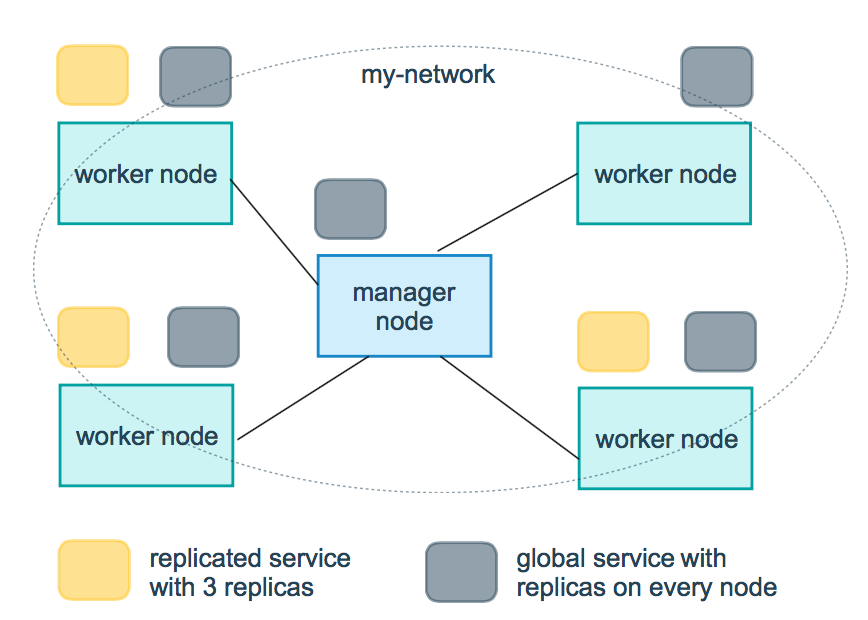
replicas:modeWhen it is set to replicated, this parameter is required to configure the specific number of running nodes.
resources: Configure resource usage limits for the server. For example, in the above example, configure the CPU percentage and memory usage required by the redis cluster to run, avoiding exceptions caused by excessively high resource usage.
restart_policy: Configure how to restart the container when it exits.
- condition: optional none, on-failure, or any (default: any).
- delay: Set how long to wait before restarting (default: 0).
- max_attempts: Number of attempts to restart the container. Once exceeded, it will no longer retry (default: retry forever).
- window: Set the container restart timeout (default: 0).
rollback_config: Configure how the service should be rolled back in case of update failure.
- parallelism: The number of containers to roll back at once. If set to 0, all containers roll back simultaneously.
- delay: The time to wait between each container group rollback (default: 0s).
- failure_action: what to do if the rollback fails. Either continue or pause (default pause).
- monitor: The duration to keep observing whether each container update has failed (ns|us|ms|s|m|h) (default is 0s).
- max_failure_ratio: The failure rate that can be tolerated during rollback (default: 0).
- order: the order of operations during rollback. Either stop-first (serial rollback) or start-first (parallel rollback) (default stop-first).
update_config: Configure how the service should be updated, which is useful for configuring rolling updates.
- parallelism: The number of containers updated at one time.
- delay: The waiting time between updating a group of containers.
- failure_action: What to do if the update fails. One of continue, rollback, or pause (default: pause).
- monitor: The duration to keep observing whether each container update has failed (ns|us|ms|s|m|h) (default is 0s).
- max_failure_ratio: The failure rate that can be tolerated during the update process.
- order: the order of operations during rollback. Either stop-first (serial rollback) or start-first (parallel rollback) (default stop-first).
Note: Only supported in V3.4 and higher.
devices
Specify the device mapping list.
devices:
  - "/dev/ttyUSB0:/dev/ttyUSB0"
dns
Custom DNS server, can be a single value or a list of multiple values.
dns: 8.8.8.8

dns:
  - 8.8.8.8
  - 9.9.9.9
dns_search
Custom DNS search domains. Can be a single value or a list.
dns_search: example.com

dns_search:
  - dc1.example.com
  - dc2.example.com
entrypoint
Override the container's default entrypoint.
entrypoint: /code/entrypoint.sh
It can also be in the following format:
entrypoint:
    - php
    - -d
    - zend_extension=/usr/local/lib/php/extensions/no-debug-non-zts-20100525/xdebug.so
    - -d
    - memory_limit=-1
    - vendor/bin/phpunit
env_file
Add environment variables from a file. Can be a single value or a list of multiple values.
env_file: .env
It can also be in a list format:
env_file:
  - ./common.env
  - ./apps/web.env
  - /opt/secrets.env
environment
Add environment variables. You can use arrays or dictionaries, or any boolean values. Boolean values need to be enclosed in quotes to ensure that the YML parser does not convert them to True or False.
environment:
  RACK_ENV: development
  SHOW: 'true'
expose
Expose ports, but do not map to the host machine; only accessible by connected services.
Only internal ports can be specified as parameters:
expose:
 - "3000"
 - "8000"
extra_hosts
Add hostname mappings. Similar to docker client --add-host.
extra_hosts:
 - "somehost:162.242.195.82"
 - "otherhost:50.31.209.229"
The above will create a mapping relationship with an IP address and hostname in the /etc/hosts file inside the service's container:
162.242.195.82  somehost
50.31.209.229   otherhost
healthcheck
Used to detect whether the docker service is running healthily.
healthcheck:
  test: ["CMD", "curl", "-f", "http://localhost"] # 设置检测程序
  interval: 1m30s # 设置检测间隔
  timeout: 10s # 设置检测超时时间
  retries: 3 # 设置重试次数
  start_period: 40s # 启动后,多少秒开始启动检测程序
image
Specify the image that the container runs. All of the following formats are acceptable:
image: redis
image: ubuntu:14.04
image: tutum/influxdb
image: example-registry.com:4000/postgresql
image: a4bc65fd # 镜像id
logging
Logging configuration for the service.
driver: Specify the logging driver for the service container. The default value is json-file. There are the following three options:
driver: "json-file"
driver: "syslog"
driver: "none"
Only under the json-file driver can the following parameters be used to limit the number and size of logs.
logging:
  driver: json-file
  options:
    max-size: "200k" # 单个文件大小为200k
    max-file: "10" # 最多10个文件
When the file limit is reached, old files are automatically deleted.
Under the syslog driver, you can use syslog-address to specify the log receiving address.
logging:
  driver: syslog
  options:
    syslog-address: "tcp://192.168.0.42:123"
network_mode
Set network mode.
network_mode: "bridge"
network_mode: "host"
network_mode: "none"
network_mode: "service:[service name]"
network_mode: "container:[container name/id]"
networks
Configure the network that the container connects to, referencing entries under the top-level networks.
services:
  some-service:
    networks:
      some-network:
        aliases:
         - alias1
      other-network:
        aliases:
         - alias2
networks:
  some-network:
    # Use a custom driver
    driver: custom-driver-1
  other-network:
    # Use a custom driver which takes special options
    driver: custom-driver-2
aliases: Other containers on the same network can use the service name or this alias to connect to the corresponding container's service.
restart
- no: This is the default restart policy. The container will not be restarted under any circumstances.
- always: The container is always restarted.
- on-failure: The container is restarted only when it exits abnormally (exit status non-zero).
- unless-stopped: Always restart the container when it exits, but do not consider containers that were already stopped when the Docker daemon started.
restart: "no"
restart: always
restart: on-failure
restart: unless-stopped
Note: In swarm cluster mode, please use restart_policy instead.
secrets
Store sensitive data, such as passwords:
version: "3.1"
services:

mysql:
  image: mysql
  environment:
    MYSQL_ROOT_PASSWORD_FILE: /run/secrets/my_secret
  secrets:
    - my_secret

secrets:
  my_secret:
    file: ./my_secret.txt
security_opt
Modify the container's default schema label.
security-opt:
  - label:user:USER   # 设置容器的用户标签
  - label:role:ROLE   # 设置容器的角色标签
  - label:type:TYPE   # 设置容器的安全策略标签
  - label:level:LEVEL  # 设置容器的安全等级标签
stop_grace_period
Specify how long to wait before sending SIGKILL to shut down the container if it cannot handle SIGTERM (or any signal of stop_signal).
stop_grace_period: 1s # 等待 1 秒
stop_grace_period: 1m30s # 等待 1 分 30 秒
Default waiting time is 10 seconds.
stop_signal
Set an alternative signal to stop the container. By default, SIGTERM is used.
The following example uses SIGUSR1 to replace SIGTERM to stop the container.
stop_signal: SIGUSR1
sysctls
Set kernel parameters in the container, can use array or dictionary format.
sysctls:
  net.core.somaxconn: 1024
  net.ipv4.tcp_syncookies: 0

sysctls:
  - net.core.somaxconn=1024
  - net.ipv4.tcp_syncookies=0
tmpfs
Mount a temporary file system inside the container. Can be a single value or a list of multiple values.
tmpfs: /run

tmpfs:
  - /run
  - /tmp
ulimits
Override the container's default ulimit.
ulimits:
  nproc: 65535
  nofile:
    soft: 20000
    hard: 40000
volumes
Mount the host's data volumes or files into the container.
version: "3.7"
services:
  db:
    image: postgres:latest
    volumes:
      - "/localhost/postgres.sock:/var/run/postgres/postgres.sock"
      - "/localhost/data:/var/lib/postgresql/data"
other extensions