Docker Machine
Docker Machine was an early Docker tool for creating and managing Docker hosts, but with the maturation of Docker Desktop, Terraform, and Kubernetes, it has fulfilled its historical mission and been completely replaced.
Docker Desktop in local development scenariosComplete replacementhas replaced Docker Machine, which is no longer suitable for practical use.
| Comparison Item | Docker Machine | Docker Desktop |
|---|---|---|
| Product Positioning | Docker host creation and management tool | Local integrated Docker development environment |
| Main purpose | Create a VM and install Docker Engine | Run Docker directly locally |
| Typical usage era | Docker early (1.x ~ 18.x) | Current mainstream |
| macOS / Windows support | Indirect (depends on VirtualBox) | Native support |
| Whether additional virtualization software is required | Yes (VirtualBox / VMware) | No (built-in) |
| Docker Engine management | Manual/semi-automatic | Fully automatic |
| Usage complexity | High | Low |
| Whether a GUI is provided | no | Yes |
| Kubernetes support | Not supported | Optional built-in |
| Multi Docker Host management | Supported | Not supported (focus on standalone machine) |
| Suitable for production environments | Not suitable | Not suitable |
| Official maintenance status | Basically stopped updating | Continuously active |
| Current recommendation | ❌ Not recommended | ✅ Highly recommended |
Introduction
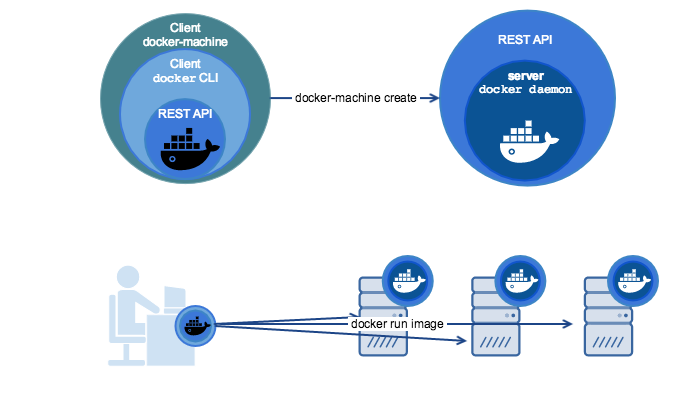
Docker Machine is a tool that allows you to install Docker on virtual hosts, and you can use the docker-machine command to manage the hosts.
Docker Machine can also centrally manage all Docker hosts, for example, quickly installing Docker on 100 servers.

The virtual hosts managed by Docker Machine can be on-premises or cloud providers, such as Alibaba Cloud, Tencent Cloud, AWS, or DigitalOcean.
Using the docker-machine command, you can start, inspect, stop, and restart managed hosts, as well as upgrade the Docker client and daemon, and configure the Docker client to communicate with your hosts.
Installation
Before installing Docker Machine, you need to install Docker first.
Docker Machine can be installed and used on multiple platforms, including Linux, macOS, and Windows.
Linux installation command
$ base=https://github.com/docker/machine/releases/download/v0.16.0 &&
  curl -L $base/docker-machine-$(uname -s)-$(uname -m) >/tmp/docker-machine &&
  sudo mv /tmp/docker-machine /usr/local/bin/docker-machine &&
  chmod +x /usr/local/bin/docker-machine
macOS installation command
$ base=https://github.com/docker/machine/releases/download/v0.16.0 &&
  curl -L $base/docker-machine-$(uname -s)-$(uname -m) >/usr/local/bin/docker-machine &&
  chmod +x /usr/local/bin/docker-machine
Windows installation command
If you are on the Windows platform, you can useGit BASH, and enter the following command:
$ base=https://github.com/docker/machine/releases/download/v0.16.0 &&
  mkdir -p "$HOME/bin" &&
  curl -L $base/docker-machine-Windows-x86_64.exe > "$HOME/bin/docker-machine.exe" &&
  chmod +x "$HOME/bin/docker-machine.exe"
Check whether the installation succeeded:
$ docker-machine version
docker-machine version 0.16.0, build 9371605
Note:The release notes for each version also contain installation instructions:https://github.com/docker/machine/releases
Usage
This chapter introduces the usage of docker-machine through VirtualBox. Operations for other cloud providers are basically the same. For details, refer to each provider's documentation.
1. List available machines
You can see that currently there is only the default virtual machine here.
$ docker-machine ls

2、Create machine
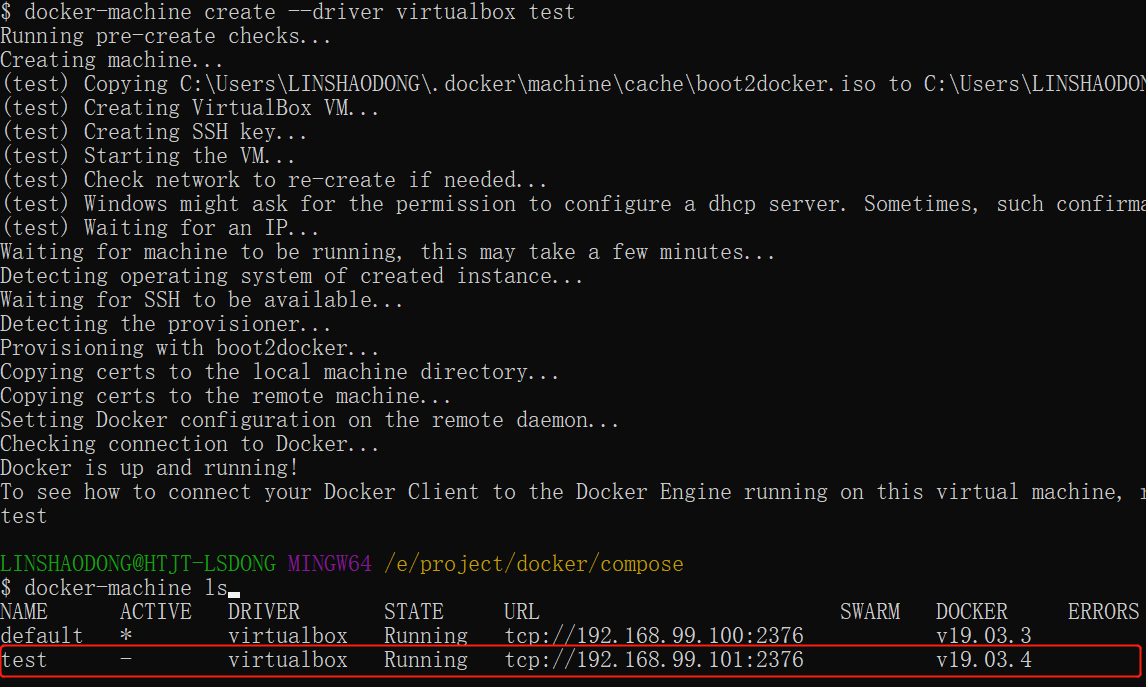
Create a machine named test.
$ docker-machine create --driver virtualbox test
- --driver: Specify the driver type used to create the machine, here it is virtualbox.
3. View the machine's IP
$ docker-machine ip test

4、Stop machine
$ docker-machine stop test

5、Start machine
$ docker-machine start test

6、Enter machine
$ docker-machine ssh test

docker-machine command parameter description
-
docker-machine active: View the currently active Docker host.
$ docker-machine ls

NAME      ACTIVE   DRIVER         STATE     URL
dev       -        virtualbox     Running   tcp://192.168.99.103:2376
staging   *        digitalocean   Running   tcp://203.0.113.81:2376

$ echo $DOCKER_HOST
tcp://203.0.113.81:2376

$ docker-machine active
staging
- config: View connection information for the currently active Docker host.
- create: Create a Docker host
- env: Display the environment variables needed to connect to a host.
- inspect: Output detailed information of the specified Docker in JSON format.
- ip: Get the address of the specified Docker host.
- kill: Directly kill the specified Docker host.
- ls: List all managed hosts
- provision: Reconfigure the specified host
- regenerate-certs: Regenerate TLS information for a host.
- restart: Restart the specified host
- rm: Delete a Docker host, and the corresponding virtual machine will also be deleted.
- ssh: Connect to the host via SSH and execute commands.
- scp: Use scp to remotely copy data between Docker hosts and between a Docker host and the local host
- mount: Use SSHFS to mount or unmount directories from a computer
- start: Start a specified Docker host. If the object is a virtual machine, the virtual machine will be started.
- status: Get the status of the specified Docker host (including: Running, Paused, Saved, Stopped, Stopping, Starting, Error), etc.
- stop: Stop a specified Docker host.
- upgrade: Update the Docker version of a specified host to the latest
- url: Get the listening URL of the specified Docker host.
- version: Displays the version of Docker Machine or the host's Docker version.
- help: Display help information