window.onload()The method is used to execute an operation immediately after the webpage is loaded; that is, once the HTML document has finished loading, a method is executed immediately.
window.onload()Usually used on the <body> element to execute script code after the page has completely loaded (including images, CSS files, etc.).
Syntax when there is only one function to execute:
window.onload = funcRef;
The funcRef method will be called after the page has finished loading.
Syntax when there are multiple functions to execute:
window.onload=function(){
    Func1();
    Func2();
    Func3();
    .....
}
After the page has finished loading, Func1, Func2, and Func3 will be executed in order.
Why use window.onload()?
Because JavaScript function methods can only be used after the HTML document has finished rendering. If rendering is not complete, the DOM tree is incomplete at that point, so calling some JavaScript code may result in an "undefined" error.
Example
Try it yourself »
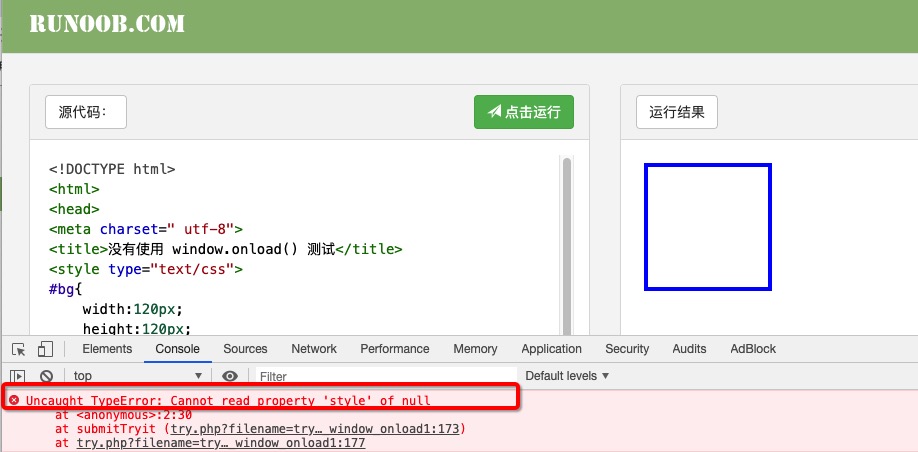
In the above example, the effect we want to achieve is to set the background color of the div to #F90, but this effect was not achieved because the code is executed sequentially. When execution reachesdocument.getElementById("#bg").style.backgroundColor="#F00"the div object has not yet been loaded, so the background color was not set successfully. The error message is as follows:
We can add window.onload and it will execute normally. The modified code is as follows:
Example
Try it yourself »
The window.onload event binds an event handler function. It binds an anonymous function, and of course you can also bind a named function. The code example is as follows:
Example
Try it yourself »
Example with multiple functions to execute:
Example
Try it yourself »
The difference between window.onload and jQuery ready()
window.onload = function () {};    // JavaScript
$(document).ready(function () {}); // jQuery
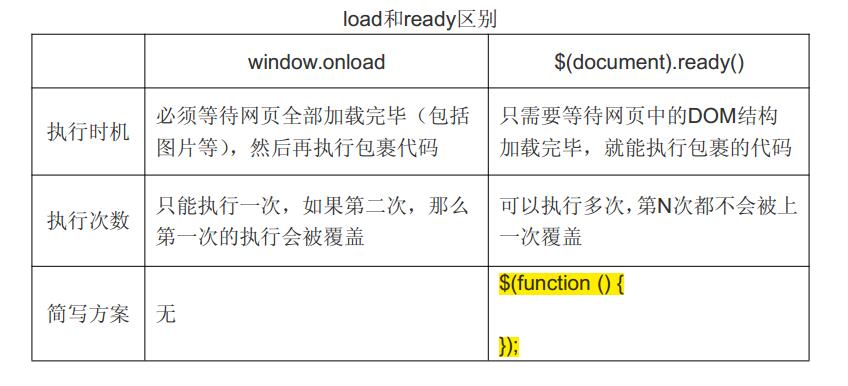
Both of the above methods execute DOM operations after the HTML document has finished loading, but they still have certain differences, as shown in the figure below: