For web development, CSS is the most effective technique for beautifying pages and setting page layouts. But the problem is that CSS is a markup language with a very loose and imprecise syntax structure. WEB programmers often find a lot of redundant code, errors, or areas that can be significantly optimized in their own or others' CSS files. If you often use static programming languages (such as Java, C), you will find that practical IDE tools bring huge efficiency to programming. An integrated development environment like Eclipse that can automatically analyze code problems in real time is a typical example. So, do CSS programmers have such helpful tools?
The 10 tools introduced below are all online applications. You don't need to install them on your computer. As long as you can access the Internet, you can use them. Most of these tools are very simple to use, but some require skill.
CSS issue checking tool:CSS Lint
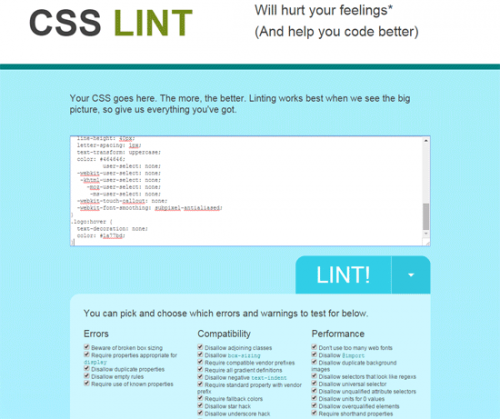
CSS Lint is an open-source tool for validating the quality of CSS files. It was originally written by Nicholas C. Zakas and Nicole Sullivan, and the initial version was released at the Velocity conference in June 2011. CSS Lint's detection rules include errors and warnings. When selectors or properties are written incorrectly, braces are missing, or semicolons are added redundantly, it will prompt parsing errors, and parsing errors are displayed with priority.
CSS code analysis and statistics tool:CSS Stats

Css Stats is an online CSS code analysis tool. You can analyze CSS code by entering the website CSS URL. Css Stats is a powerful tool for front-end web designers to analyze website CSS code. It can count rules, font sizes, widths and heights, number of colors, etc. in CSS code.
For web designers, sharing webpage CSS code is a must-do. To analyze the effect of the entire website design, you need detailed statistics on how many fonts, font sizes, colors, and background colors are used in the website design. Css Stats also provides CSS analysis data for popular websites, such as Google, Yahoo, Twitter, Facebook, Tumblr, etc.
CSS code optimization and compression tool:CSS Shrinks

CSS Shrinks can significantly compress the size of your CSS. Many Web programmers write CSS code with a lot of redundant syntax and whitespace. This tool can optimize CSS syntax, remove useless spaces and blank lines, significantly compress CSS output, and greatly reduce bandwidth waste without affecting the correctness of your CSS.
CSS code formatting tool:ProCSSor

ProCSSor not only provides basic CSS code optimization functions, but also offers a large number of customization options. For example, it lets you set optimization options for CSS rules, CSS properties, and CSS syntax. It also provides fallback solutions for the incompatibility of new CSS3 properties and rules in various browsers.
Codrops CSS Syntax Reference

The Codrops CSS reference is rich and comprehensive, and the interface is clean and straightforward. You can use this tool to master the most important and comprehensive knowledge of CSS. Its CSS knowledge base is divided into several categories, including pseudo-classes, properties, functions, data types, concepts, rules, etc.
CSS3 browser compatibility query tool:Can I Use

"Can I Use" - Here you can find the compatibility of all new web features across different brands of browsers and different versions of each brand. When you know what browsers your target users are using, these tables will be of great help to building your website. Open caniuse.com, the homepage lists all HTML5, CSS3 and other new web features. If you want to view the compatibility of a feature in different browsers, just click it. For example, to see the compatibility of @font-face Web fonts in various browsers, click the first item in the CSS area and you will see a table listing all browser versions, with different colors representing each browser's support for @font-face Web fonts. Red indicates no support, light green indicates partial support. The browsers listed in the figure also include some mobile and tablet device browsers, such as the Android system browser. With such comprehensive information, when designing a website, you can selectively use advanced CSS and JavaScript features according to the target users of the site to improve user experience.
Check whether your code complies with CSS standards:W3C CSS Validation Service

This tool is used to check whether your CSS syntax is correct and whether it complies with the W3C CSS standards. We know that since the earliest IE, various browsers have implemented their own dialects, which are incompatible with each other across browsers. However, when developing web pages, we must consider browser compatibility as much as possible. The best way is to follow the W3C CSS standard specifications. The W3C CSS Validation Service is used to validate the problems in your CSS. It will remind you which syntax, which properties, and which rules have problems.
CodePad
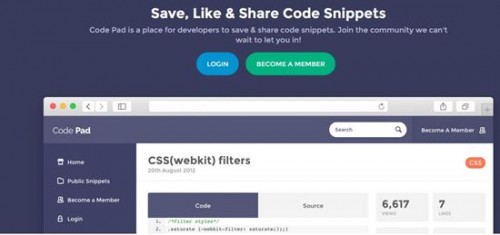
Codepad.org is a very interesting website. Its homepage is very simple: on the left are the programming languages that can be compiled and executed, on the right is the input box for you to enter your program, and below the input box are a "Run Code" check button and a "Submit" button.
It is also very simple to operate. First select the programming language you want to compile and run, then paste or enter the source code of the program in the input box, and then click submit. You can see the error prompts from compilation or the execution results.
Maybe you think it is boring, but I think it can be very useful at certain times, especially when you cannot find a compiler and want to verify a piece of code. Such situations are quite common. In particular, it is hard to have a computer that can run all languages. If there is one, it must be your own personal computer. When you are not using your own computer, you will be anxious. Moreover, I think this service is very interesting because, in this way, you can even write programs in any language on your mobile phone.
Currently this website supports the following languages - C, C++, D, Haskell, Lua, OCaml, PHP, Perl, Plain Text, Python, Ruby, Scheme, Tcl.
CSS animation generation tool:Gradient Animator
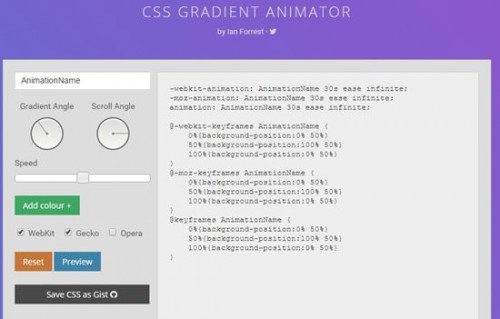
This is a dynamic background generation tool implemented using CSS Gradient and CSS Animation technologies. The tool is very easy to use. With a few clicks of the mouse, a modern gradient dynamic background code is generated. It can make the CSS gradient background move smoothly. You can set the angle of movement, the speed of movement, and the angle of the gradient. It supports all modern browsers and IE 10+. It is very suitable for making webpage splash screens.
Web color tool:CSS Colours

As the name implies, this tool is used to make it convenient for web designers to find colors. It provides the visual effects of various colors, as well as the English names of the colors, RGB values, and hexadecimal values, making it very convenient to use.
Source: http://www.webhek.com/10-css-tools