What is Vue.js?
Vue.js is a library used to build interactive web interfaces.
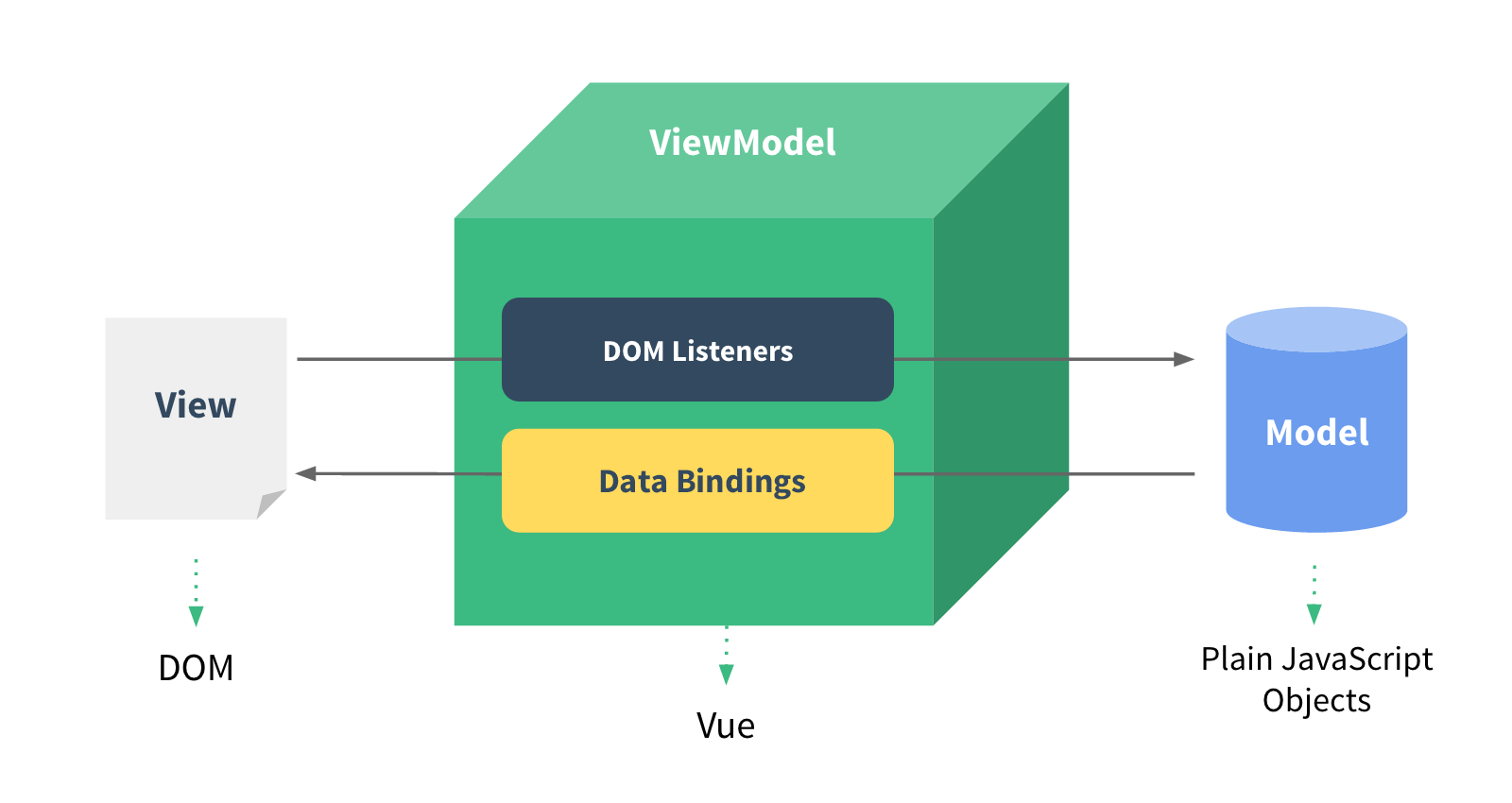
Vue.js provides MVVM data binding and a composable component system with a simple, flexible API.
This chapter is about Vue 1.x. For Vue 2.x, click the links below.
Vue.js 2.0 Tutorial:http://www.example.com/vue2/vue-tutorial.html
Vue 2.0 Beginner's Guide:http://www.example.com/w3cnote/vue2-start-coding.html
Vue.js 3.x Tutorial:https://www.example.com/vue3/vue3-tutorial.html
Vue.js Features
- Simplicity:HTML template + JSON data, then create a Vue instance, that's how simple it is.
- Data-driven:Automatically tracks dependent template expressions and computed properties.
- Component-based:Build interfaces with decoupled, reusable components.
- Lightweight:~24kb min+gzip, no dependencies.
- Fast:Precise and efficient asynchronous batch DOM updates.
- Module friendly:Install via NPM or Bower, seamlessly integrating into your workflow.
If you like any of the following, you will definitely like Vue.js:
- Extensible data binding mechanism
- Native objects as models
- Concise and clear API
- Component-based UI building
- Can be used together with multiple lightweight libraries
Vue.js Installation
Standalone Version
Download directly and include it with a <script> tag; Vue will be registered as a global variable.
Vue.js official website download address:http://vuejs.org/guide/installation.html
You can directly download the production version from the official website and use it in your project.
Alternatively, you can use the static resource CDN library (version 1.0.18):
https://lf3-cdn-tos.bytecdntp.com/cdn/expire-1-M/vue/1.0.18/vue.min.js
NPM Installation
NPM installation is recommended when building large applications with Vue.js:
# 最新稳定版本
$ npm install vue
# 最新稳定 CSP 兼容版本
$ npm install vue@csp
# 开发版本(直接从 GitHub 安装)
$ npm install vuejs/vue#dev
Bower Installation
# 最新稳定版本
$ bower install vue
Create the First Vue Application
Next, let's create our first Vue application.
View Layer- HTML code:
<div id="app">
  {{ message }}
</div>
Model Layer- JavaScript code (must be placed after the specified HTML element):
new Vue({
    el:'#app',
    data: {
        message:'Hello World!'
    }
});
Two-way Data Binding
Next, we create a View layer HTML file: vueapp.htm, and a Model layer file: vueapp.js, and then via vue.js (using the v-model directive) we complete the underlying logic in between to achieve the binding effect. Changing either layer will cause the other layer to change.
Code for vueapp.htm:
<div id="app">
  <p>{{ message }}</p>
  <input v-model="message">
</div>
Code for vueapp.js:
new Vue({
  el: '#app',
  data: {
    message: 'Example!'
  }
})
In the above example, {{message}} will change as the input field changes. If you don't want it to change, you can modify it to:
{{* message }}
It also supports some simple expressions:
<!-- 字符串连接 -->
{{ message + '官网地址:www.example.com' }}
<!-- 字符串反转 -->
{{ message.split('').reverse().join('') }}
List Output
List outputv-forcan be done with this directive (v-for replaces v-repeat in versions before 1.0):
<!DOCTYPE html>
<html>
<head>
<meta charset="utf-8">
<title>Example(example.com)</title>
<script src="https://lf3-cdn-tos.bytecdntp.com/cdn/expire-1-M/vue/1.0.18/vue.min.js"></script>
</head>
<body>
<div id="app">
  <ul>
    <li v-for="todo in todos">
      {{ todo.text }}
    </li>
  </ul>
</div>
<script>
    new Vue({
  el: '#app',
  data: {
    todos: [
      { text: 'Learn JavaScript' },
      { text: 'Learn Vue.js' },
      { text: 'Build Something Awesome' }
    ]
  }
})
</script>
</body>
</html>
Multidimensional Array Example
<div id="app">
  <ul id="example-2">
  <li v-for="item in items">
    {{ parentMessage }} - {{ $index }} - {{ item.message }}
  </li>
</ul>
</div>
<script>
var example2 = new Vue({
  el: '#example-2',
  data: {
    parentMessage: 'Example官网',
    items: [
      { message: 'www.example.com' },
      { message: 'www.example.com' }
    ]
  }
})
</script>
Conditional Rendering
In string templates like Handlebars, we have to write a conditional block like this:
<!-- Handlebars 模板 -->
{{#if ok}}
  <h1>Yes</h1>
{{/if}}
In Vue.js, we use the v-if directive to achieve the same functionality:
<h1 v-if="ok">Yes</h1>
You can also use v-else to add an "else" block:
<h1 v-if="ok">Yes</h1>
<h1 v-else>No</h1>
Because v-if is a directive, it needs to be applied to an element. But what if we want to toggle multiple elements? In that case, we can use a <template> element as a wrapper element, apply v-if to it, and the final rendered result will not include it.
<template v-if="ok">
  <h1>Title</h1>
  <p>Paragraph 1</p>
  <p>Paragraph 2</p>
</template>
v-show
v-show works similarly to v-if, except that elements with v-show are always rendered and remain in the DOM, and v-show does not support the <template> tag.
<h1 v-show="ok">Hello!</h1>
Filters
Similar to pipes in Linux, vue.js also uses |:
{{message | uppercase}}
This will output message in uppercase. Filters can also be chained together:
{{message | reverse | uppercase}}
Here, reverse is not a built-in filter. We can use Vue.filter to define a custom one:
Vue.filter('reverse', function (value) {
    return value.split('').reverse().join('')
})
Reference Documentation
Official website:http://vuejs.org/
Official documentation:http://cn.vuejs.org/examples/