Develop with Claude Code, Codex CLI, and OpenCode — these tools all run in the terminal.

Many people install them and start using them right away, still using macOS's built-in Terminal.app or Windows' cmd. They run fine, but when you open four or five panes at once — one running Claude Code, one running a dev server, one watching logs, one running tests — the system default terminal can't handle it, and lag is obvious when AI outputs large chunks of content.

The terminal is one of the tools you have open the longest every day, so it's worth picking one carefully~

Before choosing, understand these key dimensions:

  • GPU Rendering — When Claude Code streams out hundreds of lines of code or logs scroll rapidly, CPU rendering stutters, GPU rendering doesn't. It's basically standard on modern terminals.
  • Graphics Protocols — AI tools increasingly output images, charts, and rendered diffs, requiring the terminal to support Kitty / Sixel / iTerm2 protocols for proper display.
  • Configuration as Code — Config files can be managed with Git, letting you restore your environment in one second on a new computer and keep multiple machines consistent.
  • Built-in AI — The terminal has built-in AI command suggestions and error explanations (deepest in Warp), or connects via shell plugins like gh copilot, Amazon Q, aichat.
  • Multiplexing — Manage multiple panes and sessions simultaneously. WezTerm has it built-in; other terminals pair with zellij (recommended for beginners) or tmux.
  • Ligature Font Support — With programming fonts like Fira Code and JetBrains Mono, != displays as ≠, improving code readability.

Sorted by usage scenario, 34 options total

macOS Exclusive/ 3

The ceiling of features, complete with plugins/split views/search
Free and Open Source
Terminal.app
Bundled with the system, zero configuration
Free and built-in
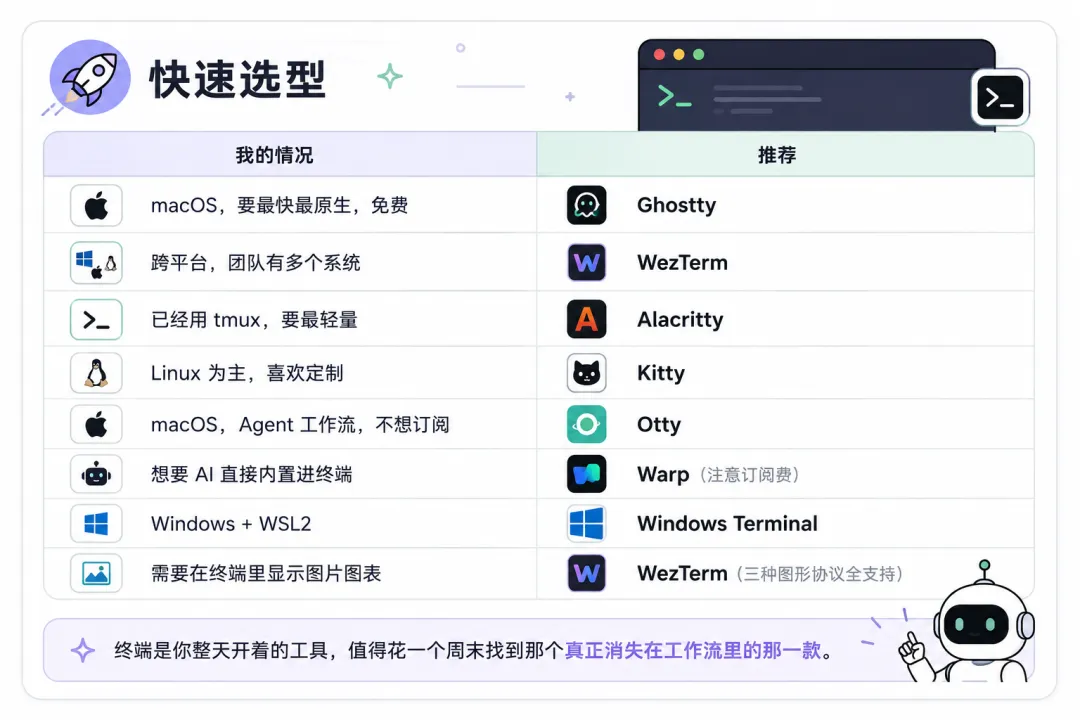
Native experience + GPU acceleration, the hot new favorite of 2026
Free and Open Source

Cross-platform GPU Acceleration/ 8

Lua-programmable config, built-in multiplexer, supports three graphics protocols
Free and Open Source
Lowest input latency, for ultimate speed
Free and Open Source
Self-developed graphics protocol + kittens plugin, the top choice for Linux geeks
Free and Open Source
Block-based UI + AI built-in command assistant
A new-generation terminal with Rust + WebGPU rendering
Free and Open Source
Rigorous support for terminal protocol standards
Free and Open Source
Built with GTK4, incorporating GNOME's visual language
Free and Open Source
Integrates web / file preview / AI panel
Free and Open Source

Windows / WSL / 3

Official Microsoft, the first choice for Windows
Free and built-in
A classic veteran solution
Free and Open Source
Built with Electron, highly themeable
Free and Open Source

Bundled with Linux Desktops/ 9

Default terminal for GNOME desktop
Free and built-in
Default terminal for KDE desktop
Free and built-in
Tiled split-screen layout
Free and Open Source
Grid-style multi-pane
Free and Open Source
Bundled with XFCE desktop, lightweight
Free and built-in
Bundled with MATE desktop
Free and built-in
A veteran from the X11 era, the strongest compatibility
Free and Open Source
Minimalist classic, extremely low resource usage
Free and Open Source
Wayland-native, fast and lightweight
Free and Open Source

SSH / Remote Management/ 8

Cross-platform SSH client, desktop + mobile sync
Formerly Terminus, handles local / SSH / serial
Free and Open Source
The most established SSH client on Windows
Free and Open Source
All-in-one remote management suite for Windows
Enterprise-grade commercial software
Made by a Chinese team, batch server management
Built-in server monitoring panel, commonly used in China
Free
Complete Linux terminal environment for Android
Free and Open Source

AI Enhancement / Emerging Directions/ 3

Designed for AI Agent workflows
Free
AI command assistant (also appears in the cross-platform category)
IDE built-in terminal
Built into editors such as VS Code / JetBrains
Provided with the IDE
$ Choosing a terminal is like choosing an editor — whatever works well enough is good