1. What is a Web Crawler
Web crawler: A program that automatically grabs information from the internet, capturing valuable information for us from the internet.
2. Python Web Crawler Architecture
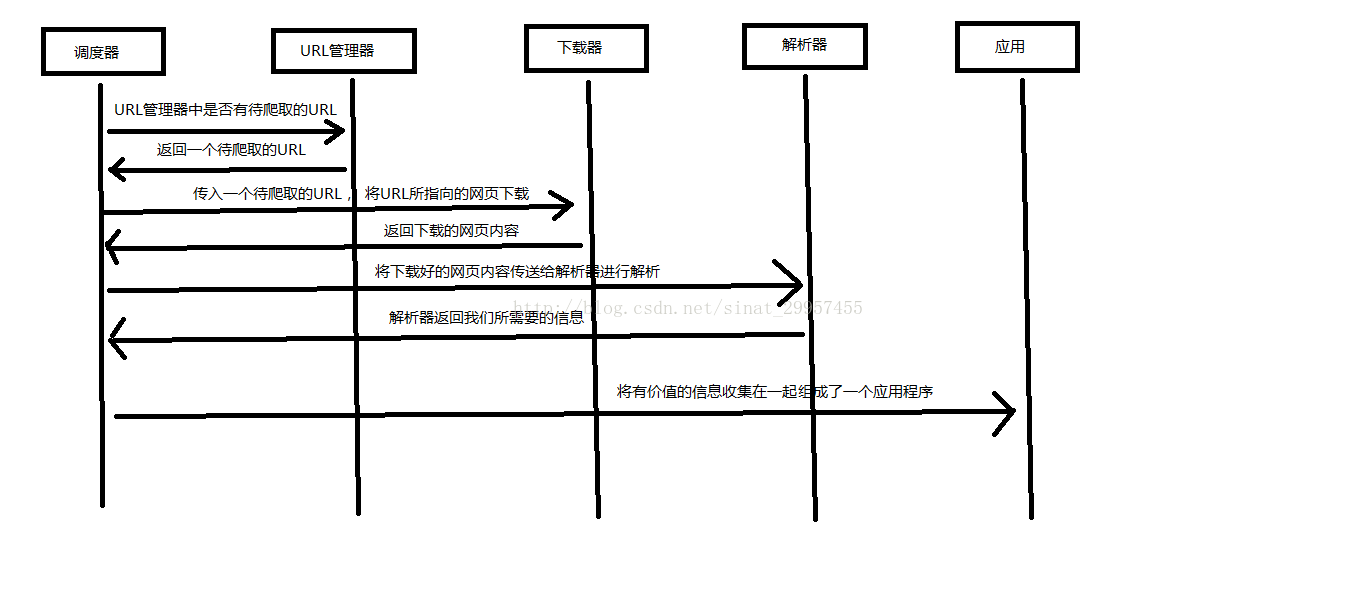
The Python web crawler architecture mainly consists of five parts: the scheduler, URL manager, web page downloader, web page parser, and application (valuable data crawled).
- Scheduler:Equivalent to a computer's CPU, mainly responsible for coordinating the work among the URL manager, downloader, and parser.
- URL manager:Includes URLs to be crawled and already crawled URLs, preventing duplicate crawling and circular crawling of URLs. The URL manager is mainly implemented in three ways: through memory, database, and cache database.
- Web page downloader:Downloads a web page by passing in a URL address, converting the web page into a string. Web page downloaders include urllib2 (Python's official basic module), including login, proxy, and cookie support, and requests (third-party package).
- Web page parser:Parses a web page string, extracting useful information according to our requirements, and can also parse based on the DOM tree parsing method. Web page parsers include regular expressions (intuitive, converting web pages into strings and extracting valuable information through fuzzy matching; when the document is complex, this method becomes very difficult for extracting data), html.parser (built into Python), beautifulsoup (third-party plugin that can use Python's built-in html.parser or lxml for parsing; it is more powerful compared to the other methods), and lxml (third-party plugin that can parse XML and HTML). html.parser, beautifulsoup, and lxml all parse using the DOM tree method.
- Application:It is an application composed of useful data extracted from web pages.
The following diagram explains how the scheduler coordinates work:
3. Three Ways urllib2 Implements Downloading Web Pages
4. Installation of the Third-Party Library Beautiful Soup
Beautiful Soup: A third-party Python plugin used to extract data from XML and HTML. Official website addresshttps://www.crummy.com/software/BeautifulSoup/
1. Install Beautiful Soup
Open cmd (Command Prompt), navigate to the scripts folder in the Python (Python 2.7 version) installation directory, type dir to check whether pip.exe exists. If it does, you can use Python's built-in pip command to install. Enter the following command to install:
pip install beautifulsoup4
2. Test Whether the Installation Was Successful
Write a Python file and enter:
import bs4
print bs4
Run the file. If it outputs normally, the installation was successful.
5. Using Beautiful Soup to Parse HTML Files
Original address: https://blog.csdn.net/sinat_29957455/article/details/70846427