- Single leading underscore:_var
- Single trailing underscore:var_
- Double leading underscore:__var
- Double leading and trailing underscore:__var__
- Single underscore:_
At the end of the article, you will find a short "cheat sheet" that summarizes the five different underscore naming conventions and their meanings, as well as a short video tutorial that lets you experience their behavior firsthand.
Let's get started right away!
1. Single Leading Underscore _var
When it comes to variable and method names, a single underscore prefix has a conventional meaning. It is a hint to programmers - meaning that the Python community agrees on what it should mean, but the behavior of the program is not affected.
The meaning of the underscore prefix is to inform other programmers: a variable or method starting with a single underscore is for internal use only. This convention is defined in PEP 8.
This is not enforced by Python. Python does not have a strong distinction between "private" and "public" variables like Java does. It's as if someone put up a small underscore warning sign saying:
"Hey, this isn't really meant to be part of the class's public interface. Just leave it alone."
Take a look at the example below:
class Test:
   def __init__(self):
       self.foo = 11
       self._bar = 23
If you instantiate this class and try to access the foo and _bar attributes defined in the __init__ constructor, what happens? Let's take a look:
>>> t = Test()
>>> t.foo
11
>>> t._bar
23
You'll see that the single underscore in _bar does not prevent us from "entering" the class and accessing the value of that variable.
That's because the single underscore prefix in Python is merely a convention - at least when it comes to variable and method names.
However, a leading underscore does affect the way names are imported from a module.
Suppose you have the following code in a module named my_module:
# This is my_module.py:

def external_func():
   return 23

def _internal_func():
   return 42
Now, if you use a wildcard import to import all names from the module, Python will not import names with a leading underscore (unless the module defines an __all__ list that overrides this behavior):
>>> from my_module import *
>>> external_func()
23
>>> _internal_func()
NameError: "name '_internal_func' is not defined"
By the way, wildcard imports should be avoided because they make it unclear which names exist in the namespace. For clarity, sticking to regular imports is better.
Unlike wildcard imports, regular imports are not affected by the leading single underscore naming convention:
>>> import my_module
>>> my_module.external_func()
23
>>> my_module._internal_func()
42
I know this may be a bit confusing. If you follow the PEP 8 recommendation and avoid wildcard imports, then the only thing you really need to remember is this:
A single underscore is a Python naming convention indicating that this name is for internal use. It is usually not enforced by the Python interpreter, but merely serves as a hint to programmers.
2. Single Trailing Underscore var_
Sometimes the most appropriate name for a variable is already taken by a keyword. Therefore, names like class or def cannot be used as variable names in Python. In such cases, you can append an underscore to resolve the naming conflict:
>>> def make_object(name, class):
SyntaxError: "invalid syntax"

>>> def make_object(name, class_):
...    pass
In short, a single trailing underscore (suffix) is a convention used to avoid naming conflicts with Python keywords. PEP 8 explains this convention.
3. Double Leading Underscore __var
So far, the meanings of all the naming patterns we've covered come from agreed-upon conventions. But for attributes of Python classes that start with a double underscore (including variables and methods), the situation is a bit different.
A double underscore prefix causes the Python interpreter to rewrite attribute names to avoid naming conflicts in subclasses.
This is also called name mangling - the interpreter changes the variable's name so that conflicts are less likely to arise when the class is extended.
I know this sounds abstract. So I put together a small code example to illustrate it:
class Test:
   def __init__(self):
       self.foo = 11
       self._bar = 23
       self.__baz = 23
Let's use the built-in dir() function to look at the object's attributes:
>>> t = Test()
>>> dir(t)
['_Test__baz', '__class__', '__delattr__', '__dict__', '__dir__',
'__doc__', '__eq__', '__format__', '__ge__', '__getattribute__',
'__gt__', '__hash__', '__init__', '__le__', '__lt__', '__module__',
'__ne__', '__new__', '__reduce__', '__reduce_ex__', '__repr__',
'__setattr__', '__sizeof__', '__str__', '__subclasshook__',
'__weakref__', '_bar', 'foo']
The above is a list of this object's attributes. Let's look through this list and search for our original variable names foo, _bar, and __baz - I guarantee you'll notice some interesting changes.
The self.foo variable appears unmodified as foo in the attribute list.
self._bar behaves the same way - it appears on the class as _bar. Like I said before, in this case, the leading underscore is just a convention. Just a hint to programmers. However, for self.__baz, the situation looks a bit different. When you search for __baz in that list, you won't see a variable with that name.
What happened to __baz?
If you look closely, you'll see that there is an attribute on this object named _Test__baz. This is the name mangling done by the Python interpreter. It does this to prevent the variable from being overridden in subclasses.
Let's create another class that extends the Test class and try to override the existing attributes added in the constructor:
class ExtendedTest(Test):
   def __init__(self):
       super().__init__()
       self.foo = 'overridden'
       self._bar = 'overridden'
       self.__baz = 'overridden'
Now, do you think the values of foo, _bar, and __baz will appear on an instance of this ExtendedTest class? Let's take a look:
>>> t2 = ExtendedTest()
>>> t2.foo
'overridden'
>>> t2._bar
'overridden'
>>> t2.__baz
AttributeError: "'ExtendedTest' object has no attribute '__baz'"
Wait a moment, why do we get an AttributeError when we try to view the value of t2 .__ baz? Name mangling was triggered again! It turns out that this object doesn't even have a __baz attribute:
>>> dir(t2)
['_ExtendedTest__baz', '_Test__baz', '__class__', '__delattr__',
'__dict__', '__dir__', '__doc__', '__eq__', '__format__', '__ge__',
'__getattribute__', '__gt__', '__hash__', '__init__', '__le__',
'__lt__', '__module__', '__ne__', '__new__', '__reduce__',
'__reduce_ex__', '__repr__', '__setattr__', '__sizeof__', '__str__',
'__subclasshook__', '__weakref__', '_bar', 'foo', 'get_vars']
As you can see, __baz became _ExtendedTest__baz to prevent accidental modification:
>>> t2._ExtendedTest__baz
'overridden'
But the original _Test__baz is still there:
>>> t2._Test__baz
42
Double underscore name mangling is completely transparent to the programmer. The following example confirms this:
class ManglingTest:
   def __init__(self):
       self.__mangled = 'hello'

   def get_mangled(self):
       return self.__mangled

>>> ManglingTest().get_mangled()
'hello'
>>> ManglingTest().__mangled
AttributeError: "'ManglingTest' object has no attribute '__mangled'"
Does name mangling also apply to method names? Yes, it does. Name mangling affects all names that start with two underscore characters ("dunders") in the context of a class:
class MangledMethod:
   def __method(self):
       return 42

   def call_it(self):
       return self.__method()

>>> MangledMethod().__method()
AttributeError: "'MangledMethod' object has no attribute '__method'"
>>> MangledMethod().call_it()
42
Here is another perhaps surprising example of name mangling in action:
_MangledGlobal__mangled = 23

class MangledGlobal:
   def test(self):
       return __mangled

>>> MangledGlobal().test()
23
In this example, I declared a global variable named _MangledGlobal__mangled. Then I access the variable in the context of a class named MangledGlobal. Thanks to name mangling, I am able to reference the _MangledGlobal__mangled global variable as __mangled within the test() method of the class.
The Python interpreter automatically expands the name __mangled to _MangledGlobal__mangled because it starts with two underscore characters. This shows that name mangling is not specifically associated with class attributes. It applies to any name starting with two underscore characters used in the context of a class.
There's a lot to take in, isn't there?
Honestly, these examples and explanations didn't just pop out of my head. I did some research and worked on them. I've been using Python for many years, but rules and special cases like these don't always come to mind.
Sometimes the most important skill for a programmer is "pattern recognition" and knowing where to look up information. If you feel a bit overwhelmed at this point, don't worry. Take your time and try out some of the examples in this article.
Let these concepts fully sink in so that you can understand the overall idea of name mangling, and some of the other behaviors I've shown you. If you ever run into them unexpectedly, you'll know what to look up in the documentation.
4. Double Leading and Double Trailing Underscore _var_
Perhaps surprisingly, name mangling is not applied if a name begins and ends with double underscores. Variables surrounded by a double underscore prefix and suffix are not modified by the Python interpreter:
class PrefixPostfixTest:
   def __init__(self):
       self.__bam__ = 42

>>> PrefixPostfixTest().__bam__
42
However, Python reserves names with double leading and double trailing underscores for special purposes. Examples include the __init__ object constructor, or __call__ --- which makes an object callable.
These dunder methods are often called magic methods - but many people in the Python community (including myself) don't like that term.
It's best to avoid using names that begin and end with double underscores ("dunders") in your own programs, to avoid conflicts with future changes to the Python language.
5. Single Underscore _
By convention, a single standalone underscore is sometimes used as a name to indicate that a variable is temporary or insignificant.
For example, in the loop below, we don't need to access the running index, so we can use "_" to indicate that it is just a temporary value:
>>> for _ in range(32):
...    print('Hello, World.')
You can also use a single underscore as a "don't care" variable in unpacking expressions to ignore specific values. Again, this meaning is only "by convention" and does not trigger any special behavior in the Python interpreter. A single underscore is simply a valid variable name that serves this purpose.
In the code example below, I unpack a car tuple into separate variables, but I'm only interested in the color and mileage values. However, for the unpacking expression to run successfully, I need to assign all values contained in the tuple to variables. In this case, "_" as a placeholder variable comes in handy.
>>> car = ('red', 'auto', 12, 3812.4)
>>> color, _, _, mileage = car

>>> color
'red'
>>> mileage
3812.4
>>> _
12
In addition to being used as a temporary variable, "_" is a special variable in most Python REPLs, which represents the result of the most recent expression evaluated by the interpreter.
This is very convenient, for example, you can access previously calculated results in an interpreter session, or you can dynamically build multiple objects and interact with them without having to assign names to these objects in advance.
>>> 20 + 3
23
>>> _
23
>>> print(_)
23

>>> list()
[]
>>> _.append(1)
>>> _.append(2)
>>> _.append(3)
>>> _
[1, 2, 3]
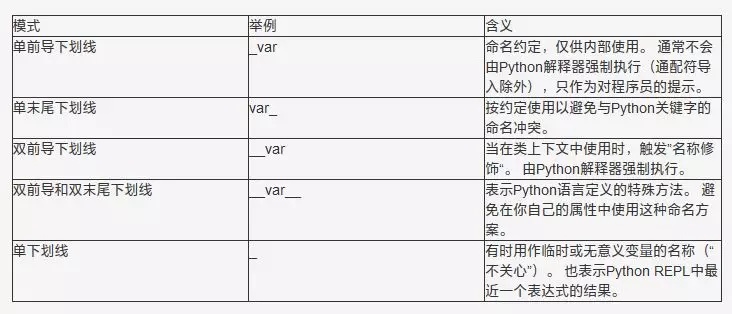
Python Underscore Naming Patterns - Summary
The following is a brief summary, a "cheat sheet", listing the meanings of the five Python underscore patterns I discussed in this article:
Original URL: https://zhuanlan.zhihu.com/p/36173202