Introduction
Chat applications are very common on the web. Developers also have many choices when building such applications. This article introduces how to implement a PHP-AJAX based chat application that can send and receive messages without refreshing the page.
Core Logic
Before defining the core functionality of the application, let's first look at the basic appearance of the chat application, as shown in the following screenshot:
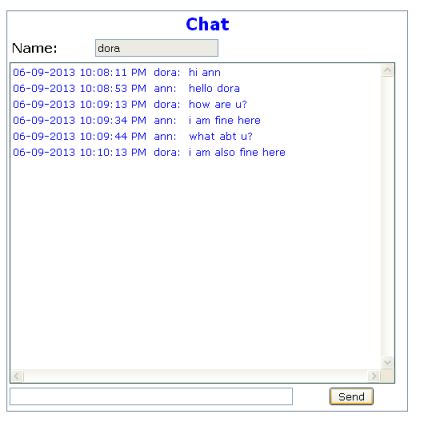
Enter chat text through the input box at the bottom of the chat window. Clicking the Send button starts executing the function set_chat_msg. This is an Ajax-based function, so chat text can be sent to the server without refreshing the page. The program executes chat_send_ajax.php on the server along with the username and chat text.
//
// Set Chat Message
//

function set_chat_msg()
{
    if(typeof XMLHttpRequest != "undefined")
    {
        oxmlHttpSend = new XMLHttpRequest();
    }
    else if (window.ActiveXObject)
    {
       oxmlHttpSend = new ActiveXObject("Microsoft.XMLHttp");
    }
    if(oxmlHttpSend == null)
    {
       alert("Browser does not support XML Http Request");
       return;
    }

    var url = "chat_send_ajax.php";
    var strname="noname";
    var strmsg="";
    if (document.getElementById("txtname") != null)
    {
        strname = document.getElementById("txtname").value;
        document.getElementById("txtname").readOnly=true;
    }
    if (document.getElementById("txtmsg") != null)
    {
        strmsg = document.getElementById("txtmsg").value;
        document.getElementById("txtmsg").value = "";
    }

    url += "?name=" + strname + "&msg=" + strmsg;
    oxmlHttpSend.open("GET",url,true);
    oxmlHttpSend.send(null);
}
The PHP module receives form data from the Query String and updates it into a database table named chat. The chat database table has a column namedID、USERNAME、CHATDATEandMSGcolumn. The ID field is an auto-increment field, so the value of this ID field will automatically increment. The current date and time will be updated to the CHATDATE column.
require_once('dbconnect.php');

db_connect();

$msg = $_GET["msg"];
$dt = date("Y-m-d H:i:s");
$user = $_GET["name"];

$sql="INSERT INTO chat(USERNAME,CHATDATE,MSG) " .
      "values(" . quote($user) . "," .
      quote($dt) . "," . quote($msg) . ");";

      echo $sql;

$result = mysql_query($sql);
if(!$result)
{
    throw new Exception('Query failed: ' . mysql_error());
    exit();
}
In order to receive chat messages from all users in the database table, the timer function is set to call the following JavaScript command in a loop every 5 seconds, that is, execute the get_chat_msg function every 5 seconds.
var t = setInterval(function(){get_chat_msg()},5000);
get_chat_msg is an Ajax-based function. It executes the chat_recv_ajax.php program to obtain chat information from the database table. In the onreadystatechange property, another JavaScript function get_chat_msg_result is hooked up. When the chat messages from the database table are returned, program control enters the get_chat_msg_result function.
//
// General Ajax Call
//

var oxmlHttp;
var oxmlHttpSend;

function get_chat_msg()
{
    if(typeof XMLHttpRequest != "undefined")
    {
        oxmlHttp = new XMLHttpRequest();
    }
    else if (window.ActiveXObject)
    {
       oxmlHttp = new ActiveXObject("Microsoft.XMLHttp");
    }
    if(oxmlHttp == null)
    {
        alert("Browser does not support XML Http Request");
       return;
    }

    oxmlHttp.onreadystatechange = get_chat_msg_result;
    oxmlHttp.open("GET","chat_recv_ajax.php",true);
    oxmlHttp.send(null);
}
In the chat_recv_ajax.php program, chat messages from users are collected through SQLselectcommands. To limit the number of rows, a limit clause (limit 200) is also given in the SQL query, which requires the last 200 rows in the chat database table. The obtained messages are then returned to the Ajax function for display in the chat window.
require_once('dbconnect.php');

db_connect();

$sql = "SELECT *, date_format(chatdate,'%d-%m-%Y %r')
as cdt from chat order by ID desc limit 200";
$sql = "SELECT * FROM (" . $sql . ") as ch order by ID";
$result = mysql_query($sql) or die('Query failed: ' . mysql_error());

// Update Row Information
$msg="";
while ($line = mysql_fetch_array($result, MYSQL_ASSOC))
{
   $msg = $msg . "" .
        "" .
        "";
}
$msg=$msg . "<table style="color: blue; font-family: verdana, arial; " .
  "font-size: 10pt;" border="0">
  <tbody><tr><td>" . $line["cdt"] .
  " </td><td>" . $line["username"] .
  ": </td><td>" . $line["msg"] .
  "</td></tr></tbody></table>";

echo $msg;
While the data is ready, the JavaScript function collects the data received from PHP. This data will be arranged and placed insideDIVthe tag. oxmlHttp.responseText retains the chat messages received from the PHP program and copies them to the document.getElementById("DIV_CHAT").innerHTML property of the DIV tag.
function get_chat_msg_result(t)
{
    if(oxmlHttp.readyState==4 || oxmlHttp.readyState=="complete")
    {
        if (document.getElementById("DIV_CHAT") != null)
        {
            document.getElementById("DIV_CHAT").innerHTML =  oxmlHttp.responseText;
            oxmlHttp = null;
        }
        var scrollDiv = document.getElementById("DIV_CHAT");
        scrollDiv.scrollTop = scrollDiv.scrollHeight;
    }
}
The following SQL CREATE TABLE command can be used to create a database table named chat. All information entered by users will go into the database table.
create table chat( id bigint AUTO_INCREMENT,username varchar(20),
chatdate datetime,msg varchar(500), primary key(id));
Points of Interest
The code used to implement this chat application is very interesting. It can be improved into a fully mature HTTP chat application. The logic for creating the application is also very simple. Even beginners will have no difficulty understanding it.
License
This article, along with any related source code and files, is licensed under The Code Project Open License (CPOL).
Source: http://www.codeceo.com/article/php-chart-app.html