Preface
Nginx was designed and developed by Igor Sysoev for rambler.ru, the second most visited site in Russia. Since its release in 2004, with the power of open source, it has become mature and complete.
Nginx is feature-rich; it can be used as an HTTP server, a reverse proxy server, or a mail server. It supports FastCGI, SSL, Virtual Host, URL Rewrite, Gzip, and other features. It also supports many third-party module extensions.
Nginx's stability, feature set, sample configuration files, and low system resource consumption have enabled it to catch up from behind. It has a usage rate of 12.18% among globally active websites, about 22.2 million websites.
We've bragged enough. If you still aren't satisfied, you can find such praise all over Baidu Baike or in some books.
Nginx Common Features
1. HTTP proxy, reverse proxy: one of the most commonly used functions of a web server, especially reverse proxy.
Here I provide two diagrams to illustrate forward proxy and reverse proxy. For specific details, you can look up reference materials.
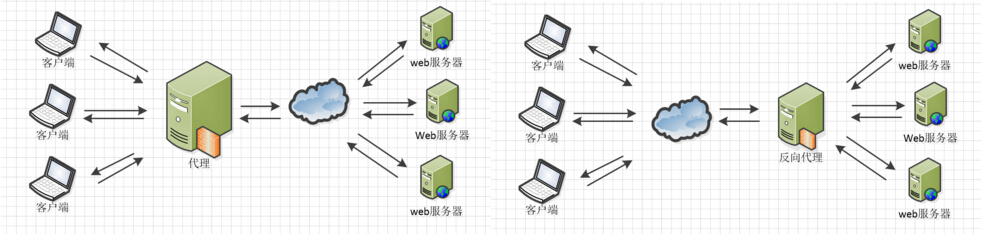
When Nginx acts as a reverse proxy, it provides stable performance and flexible forwarding configuration. Nginx can adopt different forwarding strategies based on different regular expression matches — for example, requests ending with image files go to a file server, dynamic pages go to a web server. As long as your regex is correct and you have the corresponding server solutions, you can do whatever you want. Nginx also performs error page redirects and exception judgment on returned results. If a distributed server has an exception, it can forward the request to another server and automatically remove the abnormal server.
2. Load Balancing
Nginx provides two types of load balancing strategies: built-in strategies and extended strategies. The built-in strategies are round robin, weighted round robin, and IP hash. Extended strategies are wildly imaginative — there's nothing you can think of that it can't do. You can refer to all load balancing algorithms and implement them one by one.
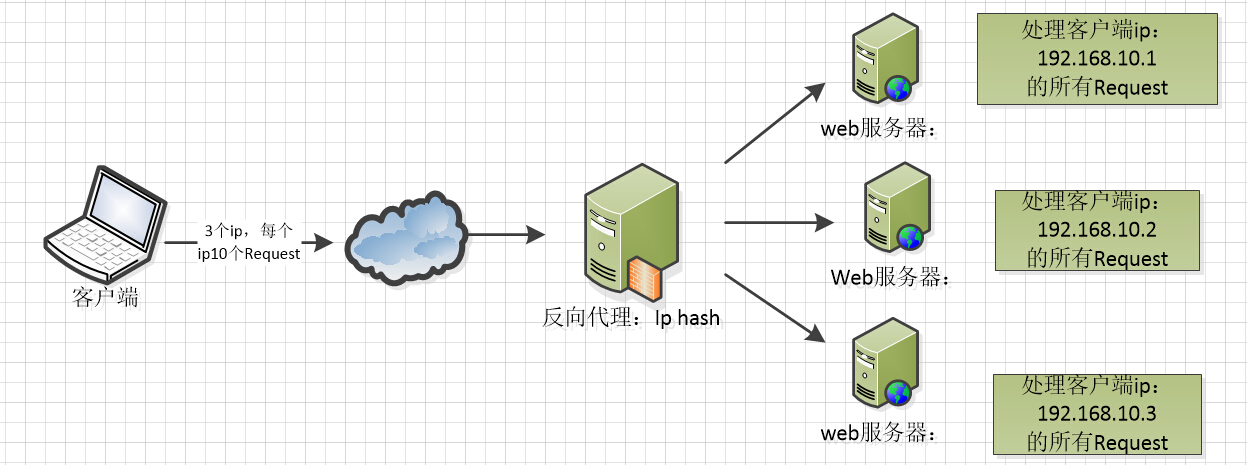
Here are three diagrams to understand the implementation of these three load balancing algorithms.

The IP hash algorithm performs a hash operation on the IP of client requests, and then based on the hash result, dispatches requests from the same client IP to the same server for processing, which can solve the problem of sessions not being shared.
3. Web Caching
Nginx can apply different caching policies to different files, with flexible configuration, and supports FastCGI_Cache, mainly used to cache FastCGI dynamic programs. Together with the third-party ngx_cache_purge, it can manage addition and deletion for the specified URL cache content.
4. Nginx Related Addresses
Source code:https://trac.nginx.org/nginx/browser
Official website:http://www.nginx.org/
Nginx Configuration File Structure
If you have downloaded your installation files, you might as well open the nginx.conf file in the conf folder. The basic configuration of the Nginx server, including the default configuration, is stored here.
The comment symbol in nginx.conf is:#
The default Nginx configuration file nginx.conf is as follows:
#user  nobody;
worker_processes  1;

#error_log  logs/error.log;
#error_log  logs/error.log  notice;
#error_log  logs/error.log  info;

#pid        logs/nginx.pid;


events {
    worker_connections  1024;
}


http {
    include       mime.types;
    default_type  application/octet-stream;

    #log_format  main  '$remote_addr - $remote_user [$time_local] "$request" '
    #                  '$status $body_bytes_sent "$http_referer" '
    #                  '"$http_user_agent" "$http_x_forwarded_for"';

    #access_log  logs/access.log  main;

    sendfile        on;
    #tcp_nopush     on;

    #keepalive_timeout  0;
    keepalive_timeout  65;

    #gzip  on;

    server {
        listen       80;
        server_name  localhost;

        #charset koi8-r;

        #access_log  logs/host.access.log  main;

        location / {
            root   html;
            index  index.html index.htm;
        }

        #error_page  404              /404.html;

        # redirect server error pages to the static page /50x.html
        #
        error_page   500 502 503 504  /50x.html;
        location = /50x.html {
            root   html;
        }

        # proxy the PHP scripts to Apache listening on 127.0.0.1:80
        #
        #location ~ \.php$ {
        #    proxy_pass   http://127.0.0.1;
        #}

        # pass the PHP scripts to FastCGI server listening on 127.0.0.1:9000
        #
        #location ~ \.php$ {
        #    root           html;
        #    fastcgi_pass   127.0.0.1:9000;
        #    fastcgi_index  index.php;
        #    fastcgi_param  SCRIPT_FILENAME  /scripts$fastcgi_script_name;
        #    include        fastcgi_params;
        #}

        # deny access to .htaccess files, if Apache's document root
        # concurs with nginx's one
        #
        #location ~ /\.ht {
        #    deny  all;
        #}
    }


    # another virtual host using mix of IP-, name-, and port-based configuration
    #
    #server {
    #    listen       8000;
    #    listen       somename:8080;
    #    server_name  somename  alias  another.alias;

    #    location / {
    #        root   html;
    #        index  index.html index.htm;
    #    }
    #}


    # HTTPS server
    #
    #server {
    #    listen       443 ssl;
    #    server_name  localhost;

    #    ssl_certificate      cert.pem;
    #    ssl_certificate_key  cert.key;

    #    ssl_session_cache    shared:SSL:1m;
    #    ssl_session_timeout  5m;

    #    ssl_ciphers  HIGH:!aNULL:!MD5;
    #    ssl_prefer_server_ciphers  on;

    #    location / {
    #        root   html;
    #        index  index.html index.htm;
    #    }
    #}

}
Nginx file structure
...              #全局块

events {         #events块
   ...
}

http      #http块
{
    ...   #http全局块
    server        #server块
    {
        ...       #server全局块
        location [PATTERN]   #location块
        {
            ...
        }
        location [PATTERN]
        {
            ...
        }
    }
    server
    {
      ...
    }
    ...     #http全局块
}
- 1、Global block: Configures instructions that affect Nginx globally. Generally includes the user group running the Nginx server, the PID storage path for Nginx processes, log storage path, configuration file includes, the number of allowed worker processes, etc.
- 2、events block: Configures instructions that affect the Nginx server or its network connections with users. Includes the maximum number of connections per process, which event-driven model to choose for handling connection requests, whether to allow accepting multiple network connections simultaneously, enabling serialization of multiple network connections, etc.
- 3、http block: Can nest multiple server blocks, and configures most functions such as proxy, cache, log definitions, as well as third-party module configurations. For example, file includes, mime-type definitions, custom logs, whether to use sendfile to transfer files, connection timeout, number of requests per connection, etc.
- 4、server block: Configures parameters related to virtual hosts. There can be multiple server blocks in one http block.
- 5、location block: Configures request routing and handling of various pages.
Below is a configuration file for your understanding.
########### 每个指令必须有分号结束。#################
#user administrator administrators;  #配置用户或者组,默认为nobody nobody。
#worker_processes 2;  #允许生成的进程数,默认为1
#pid /nginx/pid/nginx.pid;   #指定nginx进程运行文件存放地址
error_log log/error.log debug;  #制定日志路径,级别。这个设置可以放入全局块,http块,server块,级别以此为:debug|info|notice|warn|error|crit|alert|emerg
events {
    accept_mutex on;   #设置网路连接序列化,防止惊群现象发生,默认为on
    multi_accept on;  #设置一个进程是否同时接受多个网络连接,默认为off
    #use epoll;      #事件驱动模型,select|poll|kqueue|epoll|resig|/dev/poll|eventport
    worker_connections  1024;    #最大连接数,默认为512
}
http {
    include       mime.types;   #文件扩展名与文件类型映射表
    default_type  application/octet-stream; #默认文件类型,默认为text/plain
    #access_log off; #取消服务日志
    log_format myFormat '$remote_addr–$remote_user [$time_local] $request $status $body_bytes_sent $http_referer $http_user_agent $http_x_forwarded_for'; #自定义格式
    access_log log/access.log myFormat;  #combined为日志格式的默认值
    sendfile on;   #允许sendfile方式传输文件,默认为off,可以在http块,server块,location块。
    sendfile_max_chunk 100k;  #每个进程每次调用传输数量不能大于设定的值,默认为0,即不设上限。
    keepalive_timeout 65;  #连接超时时间,默认为75s,可以在http,server,location块。

    upstream mysvr {
      server 127.0.0.1:7878;
      server 192.168.10.121:3333 backup;  #热备
    }
    error_page 404 https://www.baidu.com; #错误页
    server {
        keepalive_requests 120; #单连接请求上限次数。
        listen       4545;   #监听端口
        server_name  127.0.0.1;   #监听地址
        location  ~*^.+$ {       #请求的url过滤,正则匹配,~为区分大小写,~*为不区分大小写。
           #root path;  #根目录
           #index vv.txt;  #设置默认页
           proxy_pass  http://mysvr;  #请求转向mysvr 定义的服务器列表
           deny 127.0.0.1;  #拒绝的ip
           allow 172.18.5.54; #允许的ip
        }
    }
}
The above is the basic configuration of Nginx. Points to note are as follows:
1. Several common configuration items:
- 1. $remote_addr and $http_x_forwarded_for are used to record the client's IP address;
- 2. $remote_user: used to record the client user name;
- 3. $time_local: used to record the access time and time zone;
- 4. $request: used to record the requested URL and HTTP protocol;
- 5. $status: used to record the request status; success is 200;
- 6. $body_bytes_sent: records the size of the file body content sent to the client;
- 7. $http_referer: used to record which page link the visit came from;
- 8. $http_user_agent: records relevant information about the client browser;
2. Thundering herd phenomenon: when a network connection arrives, multiple sleeping processes are woken up at the same time, but only one process can obtain the connection, which affects system performance.
3. Every directive must end with a semicolon.
Original article address: https://www.cnblogs.com/knowledgesea/p/5175711.html