< meta > element
Overview
Meta tags provide metadata about HTML documents. Metadata is not displayed on the page, but is machine-readable. It can be used by browsers (how to display content or reload the page), search engines (keywords), or other web services.
Required Attributes
| Attribute | Value | Description |
|---|---|---|
| content | some text | Defines the meta information associated with the http-equiv or name attribute. |
Optional Attributes
| Attribute | Value | Description |
|---|---|---|
| http-equiv | content-type / expire / refresh / set-cookie | Associates the content attribute with the HTTP header. |
| name | author / description / keywords / generator / revised / others | Associates the content attribute with a name. |
| content | some text | Defines the format used to interpret the content attribute value. |
SEO Optimization
-
Page KeywordsEach web page should have a set of unique keywords describing the content of the page.
Use descriptive and representative keywords and phrases that people are likely to search for and that accurately describe the information provided on the page. If the tagged content is too short, search engines may not consider it relevant. Also, the tag should not exceed 874 characters.
<meta name="keywords" content="your tags" />
- Page DescriptionEach web page should have a description tag that does not exceed 150 characters and accurately reflects the content of the page.
<meta name="description" content="150 words" />
- Search Engine Indexing Methodsrobotterms is a set of comma-separated values, usually with the following values: none, noindex, nofollow, all, index, and follow. Ensure the nofollow and noindex attribute values are used correctly.
<meta name="robots" content="index,follow" />
<!--
    all:文件将被检索,且页面上的链接可以被查询;
    none:文件将不被检索,且页面上的链接不可以被查询;
    index:文件将被检索;
    follow:页面上的链接可以被查询;
    noindex:文件将不被检索;
    nofollow:页面上的链接不可以被查询。
 -->
- Page Redirection and RefreshThe number in content represents time (in seconds), i.e., after how many seconds to refresh. If a url is added, it will redirect to the specified page (search engines can detect this automatically, and it can easily be regarded as misleading by engines and penalized).
<meta http-equiv="refresh" content="0;url=" />
- Other
<meta name="author" content="author name" /> <!-- 定义网页作者 -->
<meta name="google" content="index,follow" />
<meta name="googlebot" content="index,follow" />
<meta name="verify" content="index,follow" />
Mobile Devices
-
viewportIt can optimize the display in mobile browsers. If the website is not responsive, do not use initial-scale or disable zooming.
For most 4.7-5 inch devices, set the viewport width to 360px; for 5.5 inch devices, set it to 400px; for iPhone 6, set it to 375px; for iPhone 6 Plus, set it to 414px.
<meta name="viewport" content="width=device-width, initial-scale=1.0,maximum-scale=1.0, user-scalable=no"/>
<!-- `width=device-width` 会导致 iPhone 5 添加到主屏后以 WebApp 全屏模式打开页面时出现黑边  -->
- width: width (numeric value / device-width) (range from 200 to 10,000, default 980 pixels)
- height: height (numeric value / device-height) (range from 223 to 10,000)
- initial-scale: initial zoom ratio (range from >0 to 10)
- minimum-scale: the minimum ratio the user is allowed to zoom to
- maximum-scale: the maximum ratio the user is allowed to zoom to
- user-scalable: whether the user can manually zoom (no, yes)
- minimal-ui: can minimize the top and bottom status bars when the page loads. (Deprecated)
Note that many people use initial-scale=1 on non-responsive websites, which causes the website to render at 100% width, requiring users to manually move the page or zoom. If user-scalable=no or maximum-scale=1 is used together with initial-scale=1, users will not be able to zoom in/out to see all of the content.
- WebApp Fullscreen ModeDisguise as an app, for offline applications.
<meta name="apple-mobile-web-app-capable" content="yes" /> <!-- 启用 WebApp 全屏模式 -->
- Hide Status Bar / Set Status Bar ColorOnly takes effect when WebApp fullscreen mode is enabled. The value of content is default | black | black-translucent.
<meta name="apple-mobile-web-app-status-bar-style" content="black-translucent" />
- Title After Adding to Home Screen
<meta name="apple-mobile-web-app-title" content="标题">
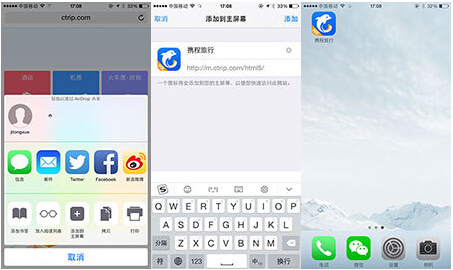
- Ignore Automatic Recognition of Numbers as Phone Numbers
<meta content="telephone=no" name="format-detection" />
- Ignore Email Recognition
<meta content="email=no" name="format-detection" />
- Add Smart App BannerTells the browser the app corresponding to this website and displays a download banner on the page (as shown below).Reference Documents
<meta name="apple-itunes-app" content="app-id=myAppStoreID, affiliate-data=myAffiliateData, app-argument=myURL">
- Other Reference Documents
<!-- 针对手持设备优化,主要是针对一些老的不识别viewport的浏览器,比如黑莓 -->
<meta name="HandheldFriendly" content="true">
<!-- 微软的老式浏览器 -->
<meta name="MobileOptimized" content="320">
<!-- uc强制竖屏 -->
<meta name="screen-orientation" content="portrait">
<!-- QQ强制竖屏 -->
<meta name="x5-orientation" content="portrait">
<!-- UC强制全屏 -->
<meta name="full-screen" content="yes">
<!-- QQ强制全屏 -->
<meta name="x5-fullscreen" content="true">
<!-- UC应用模式 -->
<meta name="browsermode" content="application">
<!-- QQ应用模式 -->
<meta name="x5-page-mode" content="app">
<!-- windows phone 点击无高光 -->
<meta name="msapplication-tap-highlight" content="no">
Web Page Related
- Declare Encoding
<meta charset='utf-8' />
- Prefer the Latest Version of IE and Chrome
<meta http-equiv="X-UA-Compatible" content="IE=edge,chrome=1" />
<!-- 关于X-UA-Compatible -->
<meta http-equiv="X-UA-Compatible" content="IE=6" ><!-- 使用IE6 -->
<meta http-equiv="X-UA-Compatible" content="IE=7" ><!-- 使用IE7 -->
<meta http-equiv="X-UA-Compatible" content="IE=8" ><!-- 使用IE8 -->
- Browser Engine ControlMany domestic browsers are dual-engine (WebKit and Trident). The WebKit engine provides high-speed browsing, while the IE engine ensures compatibility with web pages and older websites. Websites with the meta tag can control which engine the browser uses for rendering.Reference Documents
<meta name="renderer" content="webkit|ie-comp|ie-stand">
The default engine modes of domestic dual-core browsers are as follows:
1. Sogou High-Speed Browser, QQ Browser: IE engine (compatibility mode)
2. 360 Speed Browser, Maxthon Browser: WebKit engine (speed mode)
- Prevent the browser from accessing page content from the local computer's cacheWith this setting, visitors will not be able to browse offline.
<meta http-equiv="Pragma" content="no-cache">
- Windows 8
<meta name="msapplication-TileColor" content="#000"/> <!-- Windows 8 磁贴颜色 -->
<meta name="msapplication-TileImage" content="icon.png"/> <!-- Windows 8 磁贴图标 -->
- Site AdaptationMainly used for the corresponding relationship between PC and mobile pages.
<meta name="mobile-agent"content="format=[wml|xhtml|html5]; url=url">
<!--
[wml|xhtml|html5]根据手机页的协议语言,选择其中一种;
url="url" 后者代表当前PC页所对应的手机页URL,两者必须是一一对应关系。
 -->
- Transcoding DeclarationWhen opening a web page with Baidu, it may be transcoded (for example, ads may be inserted). To avoid transcoding, you can add the following meta.
<meta http-equiv="Cache-Control" content="no-siteapp" />
Other Reference Documents
COMPLETE LIST OF HTML META TAGS
W3C META TAGS
METATAGES in HTML5
MDN META TAGS
Source: http://segmentfault.com/a/1190000002407912