1. Check if yum is installed
Type yum in the terminal. If it is already installed, the yum parameters will be displayed. If it is not installed, it will prompt that yum is not installed or is an invalid command...
2. Install svn
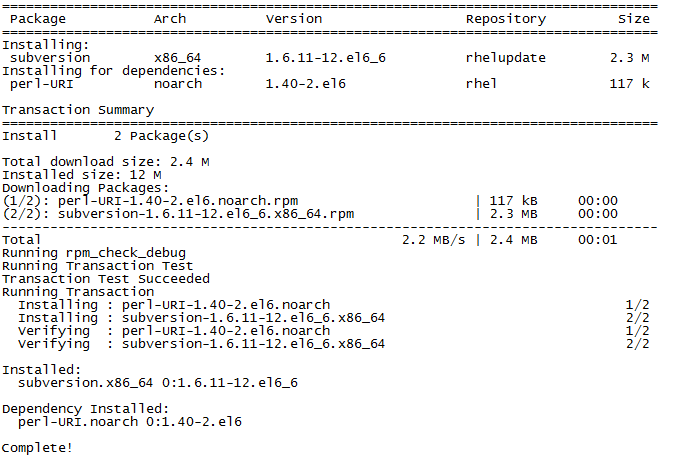
yum -y install subversion
When the screenshot below appears, it means the installation is complete.
3. Create directory and configure
Create repository directory
mkdir -p /data/svn/repo
Configure/p>
svnadmin create /data/svn/repo
After executing the above commands, the repo test repository is automatically created. Checking the /data/svn/repo folder, it contains files such as conf, db, format, hooks, locks, README.txt, etc., indicating that an SVN repository has been established.
4. Configure user password passwd
[root@localhost password]# cd /data/svn/repos/conf
[root@admin conf]# vim passwd
Modify passwd to the following content:
[users]
# harry = harryssecret
# sally = sallyssecret
hello=123
username=password
In this way, we have created the hello user with the password 123
The above statements must be written at the beginning of the line, with no spaces left on the left side, otherwise errors will occur.
5. Configure permission control authz
[root@admin conf]# vi authz
The purpose is to set which users can access which directories. Append the following content to the authz file:
#设置[/]代表根目录下所有的资源   或者写成[repl:/]
[/]
hello = rw
This means the hello user has read and write permissions for all directories under the repo test repository. Of course, it can also be restricted. If you are using it for yourself, just set it to read and write.
The above statements must be written at the beginning of the line, with no spaces left on the left side, otherwise errors will occur.
6. Configure svnserve.conf service
[root@admin conf]# vim svnserve.conf
Append the following content:
[general]
#匿名访问的权限,可以是read,write,none,默认为read
anon-access=none
#使授权用户有写权限
auth-access=write
#密码数据库的路径
password-db=passwd
#访问控制文件
authz-db=authz
#认证命名空间,subversion会在认证提示里显示,并且作为凭证缓存的关键字
realm=/data/svn/repositories
The above statements must be written at the beginning of the line, with no spaces left on the left side, otherwise errors will occur.
7. Start svn service
Check whether the svn service is started
ps -ef|grep svn
If it is not started, execute the following command:
svnserve -d -r /data/svn/repo --listen-port=3690
8. Open port
 /sbin/iptables -I INPUT -p tcp --dport 3690 -j ACCEPT
 /etc/rc.d/init.d/iptables save
 /etc/init.d/iptables restart
 /etc/init.d/iptables status
9. Access
svn://IP address
The default port is 3690. Enter the configured username and password.
Note: Do not use svn://IP address/repo here, otherwise it cannot be accessed.