For viewing port occupancy on Linux, you can use thelsofandnetstatcommand.
lsof
lsof (list open files) is a tool that lists open files on the current system.
lsof syntax for checking port occupancy:
lsof -i:端口号
Example
Check the occupancy of port 8000 on the server:
# lsof -i:8000
COMMAND   PID USER   FD   TYPE   DEVICE SIZE/OFF NODE NAME
nodejs  26993 root   10u  IPv4 37999514      0t0  TCP *:8000 (LISTEN)
It can be seen that port 8000 is already occupied by a lightweight nodejs service.
lsof -i requires root user privileges to execute, as shown below:
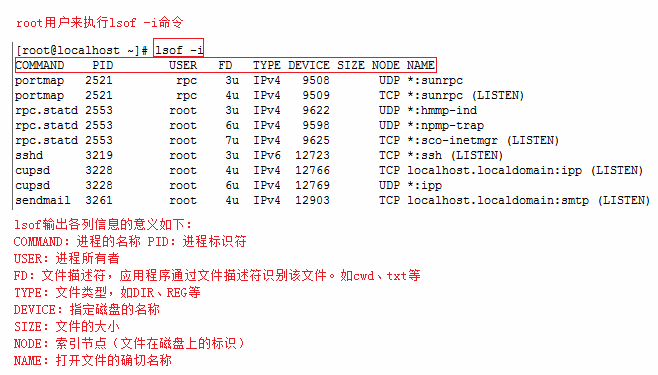
More lsof commands are as follows:
lsof -i:8080:查看8080端口占用
lsof abc.txt:显示开启文件abc.txt的进程
lsof -c abc:显示abc进程现在打开的文件
lsof -c -p 1234:列出进程号为1234的进程所打开的文件
lsof -g gid:显示归属gid的进程情况
lsof +d /usr/local/:显示目录下被进程开启的文件
lsof +D /usr/local/:同上,但是会搜索目录下的目录,时间较长
lsof -d 4:显示使用fd为4的进程
lsof -i -U:显示所有打开的端口和UNIX domain文件
netstat
netstat -tunlpUsed to display related information such as TCP, UDP ports and processes.
netstat syntax for checking port occupancy:
netstat -tunlp | grep 端口号
- -t (tcp) only show tcp-related options
- -u (udp) only show udp-related options
- -n refuse to display aliases, convert everything that can be displayed as a number to a number
- -l only list services in Listen (listening) state
- -p display the program name that established the related connection
# netstat -tunlp | grep 8000
tcp        0      0 0.0.0.0:8000            0.0.0.0:*               LISTEN      26993/nodejs
More commands:
netstat -ntlp   //查看当前所有tcp端口
netstat -ntulp | grep 80   //查看所有80端口使用情况
netstat -ntulp | grep 3306   //查看所有3306端口使用情况
kill
After finding the process occupying the port, if you want to kill the process, you can use the kill command:
kill -9 PID
In the above example, we can see that the PID corresponding to port 8000 is 26993. Use the following command to kill the process:
kill -9 26993