Actually, it is a very simple thing. Read carefully for ten minutes and you will go from looking completely confused to fully understanding it!
First, understand the following:
Example 1
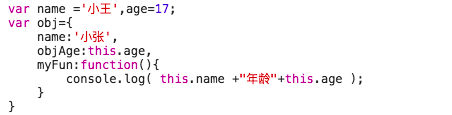
obj.objAge;  // 17
obj.myFun()  // 小张年龄 undefined
Example 2

shows() // 盲僧
Compare the difference in `this` between the two. In the first one, `this` inside the printed output points to `obj`; in the second one, the globally declared `shows()` function has `this` as `window`;
1. `call()`, `apply()`, and `bind()` are all used to redefine the `this` object!
For example:
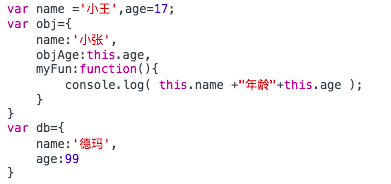
obj.myFun.call(db);    // 德玛年龄 99
obj.myFun.apply(db);    // 德玛年龄 99
obj.myFun.bind(db)();   // 德玛年龄 99
Apart from the extra `()` after the `bind` method, the returned results are all the same!
From this we can conclude that `bind` returns a new function, and you must call it for it to be executed.
2. Comparing `call`, `bind`, and `apply` when passing parameters
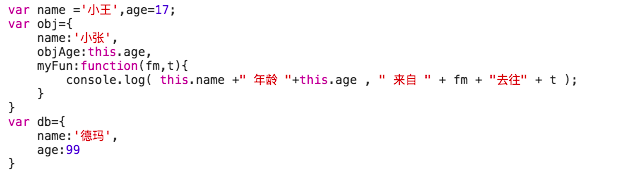
obj.myFun.call(db,'成都','上海');     // 德玛 年龄 99  来自 成都去往上海
obj.myFun.apply(db,['成都','上海']);      // 德玛 年龄 99  来自 成都去往上海
obj.myFun.bind(db,'成都','上海')();       // 德玛 年龄 99  来自 成都去往上海
obj.myFun.bind(db,['成都','上海'])();   // 德玛 年龄 99  来自 成都, 上海去往 undefined
A subtle difference!
It is not hard to see from the four results above:
The first parameter of `call`, `bind`, and `apply` is the object that `this` points to. The difference comes with the second parameter:
The parameters of `call` are placed directly. The second, third, and nth parameters are all separated by commas and put directly after it.obj.myFun.call(db,'Chengdu', ... ,'string' )。
All parameters of `apply` must be put into an array and passed in.obj.myFun.apply(db,['Chengdu', ..., 'string' ])。
Besides returning a function, `bind` takes parameters in the same way as `call`.
Of course, the parameters of these three are not limited to the `string` type. They can be various types, including functions, objects, and so on!
Original address: https://www.cnblogs.com/Shd-Study/p/6560808.html