1. Overview:
This article provides the principles and Java implementations of several common sorting algorithms, including common simple sorting and advanced sorting algorithms, as well as other commonly used algorithm knowledge.
- Simple sorting: Bubble sort, Selection sort, Insertion sort
- Advanced sorting: Quick sort, Merge sort, Shell sort
- Related algorithm knowledge: Partitioning, Recursion, Binary search
2. Bubble Sort:
(1) Principle:
- 1. Starting from the first data, compare it with the second data. If the second data is smaller than the first data, swap the positions of the two data.
- 2. The pointer moves from the first data to the second data, and the second data is compared with the third data. If the third data is smaller than the second data, swap the positions of the two data.
- 3. And so on, completing the first round of sorting. After the first round, the largest element has been moved to the far right.
- 4. Perform the second round of sorting according to the above process, placing the second largest in the second-to-last position.
- 5. Repeat the above process. Each time a round is completed, the number of comparisons decreases by one.
(2) Example:
Data to be sorted: 7, 6, 9, 8, 5, 1
First round sorting process:
指针先指向7,7和6比较,6<7,交换6和7的位置,结果为:6,7,9,8,5,1
指针指向第二个元素7,7和9比较,9>7,不用交换位置,结果仍为:6,7,9,8,5,1
指针指向第三个元素9,比较9和8,8<9,交换8和9的位置,结果为:6,7,8,9,5,1
指针指向第四个元素9,比较9和5,5<9,交换5和9,结果为:6,7,8,5,9,1
指针指向第五个元素9,比较9和1,1<9,交换1和9的位置,结果为6,7,8,5,1,9
After the first round of sorting, the largest number, 9, is moved to the far right.
Proceed to the second round of sorting. The process is the same as above, except that since the largest number 9 is already on the far right, there is no need to compare 9 again, saving one comparison. The result after the second round is: 6,7,5,1,8,9
Third round result: 6,5,1,7,8,9
Fourth round comparison result: 5,1,6,7,8,9
Fifth round comparison result: 1,5,6,7,8,9
The final sorting result is: 1,5,6,7,8,9. From the above, it can be seen that sorting N data items requires N-1 rounds of sorting; the number of comparisons needed in the i-th round is N-i.
(3) Coding approach:
Two layers of loops are needed. The first loop, i, represents the number of sorting rounds, and the second loop, j, represents the number of comparisons.
(4) Code Implementation:
Example
(5) Selection Sort Summary:
N elements require N-1 rounds of sorting;
The i-th round requires N-i comparisons;
Sorting N elements requires n(n-1)/2 comparisons;
The algorithmic complexity of selection sort is still O(n*n);
Compared with bubble sort, selection sort has greatly reduced the number of swaps, so it is faster than bubble sort.
4. Insertion Sort
Insertion sort is the fastest sorting algorithm among simple sorts. Although its time complexity is still O(n*n), it is much faster than bubble sort and selection sort.
(1) Principle:
- 1. Point the pointer at an element. Assume all elements to its left are in order. Extract this element, then compare it with the elements on its left from right to left. If an element larger than it is encountered, move that element to the right. Stop when finding an element smaller than it, or when reaching the far left and finding that all elements on its left are larger than it.
- 2. At this point, an empty position appears. Place the element into this empty position. Now all elements to the left of this element are smaller than it, and all elements to the right are larger than it.
- 3. Move the pointer back one position and repeat the above process. After each round of operation, the number of ordered elements on the left increases by one, and the number of unordered elements on the right decreases by one.
(2) Example:
Data to be compared: 7, 6, 9, 8, 5, 1
- First round: The pointer points to the second element, 6. Assume the elements to the left of 6 are ordered. Extract 6, forming 7,_,9,8,5,1. Starting from 7, compare 6 with 7 and find 7>6. Move 7 to the right, forming _,7,9,8,5,1. Insert 6 into the empty position before 7. Result: 6,7,9,8,5,1
- Second round: The pointer points to the third element, 9. At this time, the elements to its left, 6,7, are ordered. Extract 9, forming 6,7,_,8,5,1. Starting from 7, compare each element with 9 in turn, and find that all elements to the left of 9 are smaller than 9, so there is no need to move. Put 9 into the empty position. The result is still: 6,7,9,8,5,1
- Third round: The pointer points to the fourth element, 8. At this time, the elements to its left, 6,7,9, are ordered. Extract 8, forming 6,7,9,_,5,1. Starting from 9, compare each element with 8 in turn, and find that 8<9. Move 9 to the right, forming 6,7,_,9,5,1. Insert 8 into the empty position. Result: 6,7,8,9,5,1
- Fourth round: The pointer points to the fifth element, 5. At this time, the elements to its left, 6,7,8,9, are ordered. Extract 5, forming 6,7,8,9,_,1. Starting from 9, compare each element with 5 in turn, and find that 5 is smaller than all elements to its left. All elements to the left of 5 move to the right, forming _,6,7,8,9,1. Place 5 into the empty position. Result: 5,6,7,8,9,1.
- Fifth round: Same as above. 1 is moved to the far left. Final result: 1,5,6,7,8,9.
(3) Coding analysis:
Two layers of loops are needed. The first loop, index, represents the pointer in the above example, that is, it traverses every element starting from coordinate 1. The second loop starts from leftindex=index-1 and traverses to the left with leftindex--, comparing each element with the element at i, until the element at j is smaller than the element at i or leftindex<0. Traverse every element from i to j to move it to the right, and finally place the element at index into the empty position at leftindex.
(4) Code Implementation:
Example
(5) Insertion Sort Analysis:
Time complexity: Since two layers of loops are still needed, the time complexity of insertion sort is still O(n*n).
Number of comparisons: In the first round of sorting, insertion sort compares at most once; in the second round, at most twice; and so on. In the last round, it compares at most N-1 times. Therefore, the maximum number of comparisons for insertion sort is 1+2+...+N-1=N*(N-1)/2. Nevertheless, insertion sort rarely actually makes this many comparisons, because once an element smaller than the target element is found on the left, the comparison stops. Therefore, the average number of comparisons for insertion sort is N*(N-1)/4.
Number of moves: The number of moves in insertion sort is almost the same as the number of comparisons, but moving is much faster than swapping.
In summary, insertion sort is about twice as fast as bubble sort (half the number of comparisons), and somewhat faster than selection sort. For nearly ordered data, insertion sort is very fast, making it the most efficient sorting algorithm among simple sorts.
Quick Sort, Bubble Sort, Selection Sort, Insertion Sort, Merge Sort
1. Overview:
The previous article introduced common simple algorithms: bubble sort, selection sort, and insertion sort. This article introduces advanced sorting algorithms: quick sort and merge sort. Before introducing the algorithms, we first introduce the basic knowledge required by advanced algorithms: partitioning and recursion, and also cover the binary search algorithm.
2. Partitioning:
Partitioning is the premise of quicksort, that is, dividing the data into two groups: data greater than a specific value in one group, and data less than a specific value in the other group. Quicksort is accomplished through partitioning and recursive operations.
(1) Principle:
Define a threshold. Traverse elements from the far left and far right toward the middle. Stop when you find data greater than the threshold on the left, and stop when you find data less than the threshold on the right. If the left and right sides have not yet reached the middle, swap the data greater than the threshold on the left with the data less than the threshold on the right. Repeat the above process until the left and right pointers meet. At this point, the data on the left are all less than the threshold, and the data on the right are all greater than the threshold, and the partition ends. After partitioning, the data are still unordered, but closer to ordered.
(2) Example:
Data to be partitioned: 7, 6, 9, 8, 5, 1, assuming the threshold is 5
First round: The left pointer points to 7, the right pointer points to 1. The left pointer moves backward, and the right pointer moves left. It finds that the first element greater than 5 on the left is 7, and the first element less than 5 on the right is 1. Swap 7 and 1. Result: 1, 6, 9, 8, 5, 7;
Second round: Starting from 6, find a number greater than 5, and find 6. On the right, starting from 5, find a number less than 5, and find 1. But now, since 6 is to the right of 1, that is, right pointer < left pointer, the left and right pointers cross, and the partition ends. The original sequence is divided into two parts. The left subsequence has only one element, 1, which is the subsequence less than the threshold; the right subsequence includes 5 elements, all greater than the threshold 5.
(3) Code implementation:
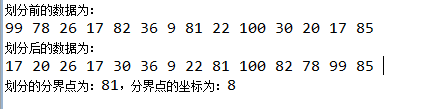
Example
The running result is:
Original link: https://www.cnblogs.com/bjh1117/p/8335628.html