A lightweight Canvas class library with MVC encapsulation and data-driven design, providing a Dom-like event model, making canvas drawing completely different!
Architecture
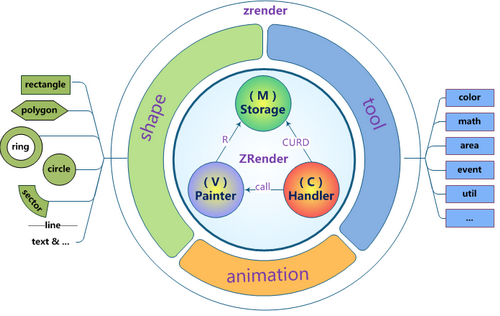
MVC core encapsulation implements graphic repository, view rendering, and interaction control:
- Stroage(M) : Shape data CRUD management
- Painter(V) :Canvas element lifecycle management, view rendering, drawing, and update control
- Handler(C) :Event interaction handling, implementing complete dom event simulation encapsulation
- shape :Graphic entities, divide-and-conquer graphic strategies, definable and extensible
- tool :Practical methods, utilities, and scaffolding for drawing extension
Features
Simple
No canvas foundation required, streamlined interface methods, compliant with AMD standards, easy to learn and use.
require(
    ['zrender/zrender'],
    function(zrender) {
        // just init to get a zrender Instance
        var zr = zrender.init(document.getElementById('main'));
        // zr can be used now!
        ...
    }
);
Data-driven
When drawing with zrender, all you need to do is define the graphic data, leave the rest to zrender~
Oh, right, I almost forgot to tell you, just set the draggable property to true when defining your graphic data, and graphic dragging is already available!
zr.addShape({
    shape : 'circle',
    style : {
        x : 100,
        y : 100,
        r : 50,
        color : 'rgba(220, 20, 60, 0.8)'
    }
});
zr.render();
Complete event encapsulation
Using the dom event model you are most familiar with to operate canvas graphic elements is a really cool thing~
You can not only respond to zrender global events, you can even add specific events to specific shapes, and everything that happens afterward will run just as you expect~
zr.addShape({
shape : 'circle',
style : {...},
    // 图形元素上绑定事件
    onmouseover : function(params) {concole.log('catch you!')}
});

// 全局事件
zr.on('click', function(params) {alert('Hello, zrender!')});
Efficient layered refresh
Just like the role of zlevel in css, you can define different shapes in different layers. This not only achieves visual overlay from top to bottom, but more importantly, when graphic elements change, the refresh will be limited to the graphic layer that changed. This will be very useful when you use zrender to make various animation effects, and the performance will naturally be even better~
zr.addShape(shapeA);    // shapeA.zlevel = 0; (default)
zr.addShape(shapeB);    // shapeB.zlevel = 1;
zr.render();

zr.modShape(shapeB.id, {color:'red'});
// Don't worry! Is merge!

zr.refresh();
// Just the level 1 canvas has been refresh~
Rich graphic options
Currently built-in with multiple graphic elements (circle, ellipse, ring, sector, rectangle, polygon, line, curve, heart, droplet, path, text, image, etc.), with unified and rich graphic attributes to fully meet your personalization needs!
var myShape = {
    shape : 'circle',   // sector | ring | rectangle | ...
    zlevel : 1,
    style : {
        ... // color | strokeColor | text | textFont | ...
    },
    draggable : true
};
Powerful animation support
Provides promise-style animation interfaces and common easing functions, making it easy to achieve various animation needs~
var circle = {
    shape : 'circle',
    id : zr.newShapeId(),
    style : {
        x : 0,
        y : 0,
        r : 50
    }
};
zr.addShape(circle);
zr.animate(circle.id)
    .when(1000, {
        position : [100, 100]
    })
    .when(2000, {
        rotation : [Math.PI*2, 0, 0]
    })
    .start();
Easy to extend
The divide-and-conquer graphic definition strategy allows you to extend your own unique graphic elements. You can either fully implement the three interface methods (brush, drift, isCover), or derive from base and only implement the graphic details you care about.
function MyShape() { ... }

var shape = require('zrender/shape');
shape.define('myShape', new MyShape());     // define your shape

zr.addShape({                               // and use it!
    shape : 'myShape',
    ...
});
Related Resources
- ZRender download:https://github.com/ecomfe/zrender
- ZRender official website:http://ecomfe.github.io/zrender/
- HTML5 Canvas Tutorial:https://www.example.com/html/html5-canvas.html