
First, let's look at the list of commonly used tags, which will be introduced one by one later:
<!DOCTYPE html> <!-- 使用 HTML5 doctype,不区分大小写 -->
<html lang="zh-cmn-Hans"> <!-- 更加标准的 lang 属性写法 http://zhi.hu/XyIa -->
<head>
    <meta charset='utf-8'> <!-- 声明文档使用的字符编码 -->
    <meta http-equiv="X-UA-Compatible" content="IE=edge,chrome=1" /> <!-- 优先使用 IE 最新版本和 Chrome -->
    <meta name="description" content="不超过150个字符" /> <!-- 页面描述 -->
    <meta name="keywords" content=""/> <!-- 页面关键词 -->
    <meta name="author" content="name, email@gmail.com" /> <!-- 网页作者 -->
    <meta name="robots" content="index,follow" /> <!-- 搜索引擎抓取 -->

    <!-- 为移动设备添加 viewport -->
    <meta name ="viewport" content ="initial-scale=1, maximum-scale=3, minimum-scale=1, user-scalable=no"> <!-- `width=device-width` 会导致 iPhone 5 添加到主屏后以 WebApp 全屏模式打开页面时出现黑边 http://bigc.at/ios-webapp-viewport-meta.orz -->

    <!-- iOS 设备 begin -->
    <meta name="apple-mobile-web-app-title" content="标题"> <!-- 添加到主屏后的标题(iOS 6 新增) -->
    <meta name="apple-mobile-web-app-capable" content="yes" /> <!-- 是否启用 WebApp 全屏模式 -->
    <meta name="apple-mobile-web-app-status-bar-style" content="black-translucent" /> <!-- 设置状态栏的背景颜色,只有在 `"apple-mobile-web-app-capable" content="yes"` 时生效 -->
    <meta name="format-detection" content="telephone=no" /> <!-- 禁止数字识自动别为电话号码 -->
    <meta name="apple-itunes-app" content="app-id=myAppStoreID, affiliate-data=myAffiliateData, app-argument=myURL"> <!-- 添加智能 App 广告条 Smart App Banner(iOS 6+ Safari) -->

    <!-- iOS 图标 begin -->
    <link rel="apple-touch-icon-precomposed" href="../apple-touch-icon-57x57-precomposed.png.html" /> <!-- iPhone 和 iTouch,默认 57x57 像素,必须有 -->
    <link rel="apple-touch-icon-precomposed" sizes="114x114" href="../apple-touch-icon-114x114-precomposed.png.html" /> <!-- Retina iPhone 和 Retina iTouch,114x114 像素,可以没有,但推荐有 -->
    <link rel="apple-touch-icon-precomposed" sizes="144x144" href="../apple-touch-icon-144x144-precomposed.png.html" /> <!-- Retina iPad,144x144 像素,可以没有,但推荐有 -->
    <!-- iOS 图标 end -->

    <!-- iOS 启动画面 begin -->
    <link rel="apple-touch-startup-image" sizes="768x1004" href="../splash-screen-768x1004.png.html" /> <!-- iPad 竖屏 768 x 1004(标准分辨率) -->
    <link rel="apple-touch-startup-image" sizes="1536x2008" href="../splash-screen-1536x2008.png.html" /> <!-- iPad 竖屏 1536x2008(Retina) -->
    <link rel="apple-touch-startup-image" sizes="1024x748" href="../Default-Portrait-1024x748.png.html" /> <!-- iPad 横屏 1024x748(标准分辨率) -->
    <link rel="apple-touch-startup-image" sizes="2048x1496" href="../splash-screen-2048x1496.png.html" /> <!-- iPad 横屏 2048x1496(Retina) -->

    <link rel="apple-touch-startup-image" href="../splash-screen-320x480.png.html" /> <!-- iPhone/iPod Touch 竖屏 320x480 (标准分辨率) -->
    <link rel="apple-touch-startup-image" sizes="640x960" href="../splash-screen-640x960.png.html" /> <!-- iPhone/iPod Touch 竖屏 640x960 (Retina) -->
    <link rel="apple-touch-startup-image" sizes="640x1136" href="../splash-screen-640x1136.png.html" /> <!-- iPhone 5/iPod Touch 5 竖屏 640x1136 (Retina) -->
    <!-- iOS 启动画面 end -->

    <!-- iOS 设备 end -->
    <meta name="msapplication-TileColor" content="#000"/> <!-- Windows 8 磁贴颜色 -->
    <meta name="msapplication-TileImage" content="icon.png"/> <!-- Windows 8 磁贴图标 -->

    <link rel="alternate" type="application/rss+xml" title="RSS" href="../rss.xml.html" /> <!-- 添加 RSS 订阅 -->
    <link rel="shortcut icon" type="image/ico" href="../favicon.ico" /> <!-- 添加 favicon icon -->

    <title>标题</title>
</head>
Basic Tags
Use the HTML5 doctype, case-insensitive.
<!DOCTYPE html> <!-- 使用 HTML5 doctype,不区分大小写 -->
Declare the character encoding used by the document
<meta charset='utf-8'> <!-- 声明文档使用的字符编码 -->
A more standard way to write the lang attributehttp://zhi.hu/XyIa
-
Simplified Chinese
<html lang="zh-cmn-Hans"> <!-- 更加标准的 lang 属性写法 http://zhi.hu/XyIa -->
-
Traditional Chinese
<html lang="zh-cmn-Hant"> <!-- 更加标准的 lang 属性写法 http://zhi.hu/XyIa -->
Only in rare cases do you need to add a region code, usually to emphasize differences in Chinese usage across different regions, for example:
<p lang="zh-cmn-Hans">
<strong lang="zh-cmn-Hans-CN">菠萝</strong>和<strong lang="zh-cmn-Hant-TW">鳳梨</strong>其实是同一种水果。只是大陆和台湾称谓不同,且新加坡、马来西亚一带的称谓也是不同的,称之为<strong lang="zh-cmn-Hans-SG">黄梨</strong>。
</p>
Prefer the latest version of IE and Chrome
<meta http-equiv="X-UA-Compatible" content="IE=edge,chrome=1" /> <!-- 优先使用 IE 最新版本和 Chrome -->
SEO Optimization
Page Description
Each webpage should have a description tag that is no more than 150 characters and accurately reflects the page content.Documentation
<meta name="description" content="不超过150个字符" /> <!-- 页面描述 -->
Page Keywords
<meta name="keywords" content=""/> <!-- 页面关键词 -->
Define the page title
<title>标题</title>
Define the webpage author
<meta name="author" content="name, email@gmail.com" /> <!-- 网页作者 -->
Define the search engine indexing method for the webpage. robotterms is a set of values separated by English commas ",", typically with the following values: none, noindex, nofollow, all, index, and follow.Documentation
<meta name="robots" content="index,follow" /> <!-- 搜索引擎抓取 -->
Optional Tags
Add viewport for mobile devices
<meta name ="viewport" content ="initial-scale=1, maximum-scale=3, minimum-scale=1, user-scalable=no"> <!-- `width=device-width` 会导致 iPhone 5 添加到主屏后以 WebApp 全屏模式打开页面时出现黑边 http://bigc.at/ios-webapp-viewport-meta.orz -->
content parameters:
-
widthviewport width (value/device-width) -
heightviewport height (value/device-height) -
initial-scaleInitial zoom scale -
maximum-scaleMaximum zoom scale -
minimum-scaleMinimum zoom scale -
user-scalableWhether to allow user zooming (yes/no) -
minimal-uiiOS 7.1 beta 2Newly added attributes in (Note: removed in iOS8), it can minimize the top and bottom status bars when the page loads. This is a boolean value and can be written directly like this:<meta name="viewport" content="width=device-width, initial-scale=1, minimal-ui">
iOS Devices
Title after adding to the home screen (new in iOS 6)
<meta name="apple-mobile-web-app-title" content="标题"> <!-- 添加到主屏后的标题(iOS 6 新增) -->
Whether to enable WebApp full-screen mode
<meta name="apple-mobile-web-app-capable" content="yes" /> <!-- 是否启用 WebApp 全屏模式 -->
Set the background color of the status bar
<meta name="apple-mobile-web-app-status-bar-style" content="black-translucent" /> <!-- 设置状态栏的背景颜色,只有在 `"apple-mobile-web-app-capable" content="yes"` 时生效 -->
content parameters:
-
defaultDefault value. -
blackThe status bar background is black. -
black-translucentThe status bar background is black and semi-transparent.
If set todefaultorblack, the webpage content starts from the bottom of the status bar.
If set toblack-translucent, the webpage content fills the entire screen, and the top will be covered by the status bar.
Prevent numbers from being automatically recognized as phone numbers
<meta name="format-detection" content="telephone=no" /> <!-- 禁止数字识自动别为电话号码 -->
iOS Icons
rel parameters:
apple-touch-iconThe image is automatically processed with effects such as rounded corners and highlights.
apple-touch-icon-precomposedPrevent the system from automatically adding effects and directly display the original design image.
iPhone and iTouch, default 57x57 pixels, required
<link rel="apple-touch-icon-precomposed" href="../apple-touch-icon-57x57-precomposed.png.html" /> <!-- iPhone 和 iTouch,默认 57x57 像素,必须有 -->
iPad, 72x72 pixels, optional but recommended
<link rel="apple-touch-icon-precomposed" sizes="72x72" href="../apple-touch-icon-72x72-precomposed.png.html" /> <!-- iPad,72x72 像素,可以没有,但推荐有 -->
Retina iPhone and Retina iTouch, 114x114 pixels, optional but recommended
<link rel="apple-touch-icon-precomposed" sizes="114x114" href="../apple-touch-icon-114x114-precomposed.png.html" /> <!-- Retina iPhone 和 Retina iTouch,114x114 像素,可以没有,但推荐有 -->
Retina iPad, 144x144 pixels, optional but recommended
<link rel="apple-touch-icon-precomposed" sizes="144x144" href="../apple-touch-icon-144x144-precomposed.png.html" /> <!-- Retina iPad,144x144 像素,可以没有,但推荐有 -->
iOS Launch Screens
Official documentation:https://developer.apple.com/library/ios/qa/qa1686/_index.html
Reference articles:http://wxd.ctrip.com/blog/2013/09/ios7-hig-24/
The iPad launch screen does not include the status bar area.
iPad portrait 768 x 1004 (standard resolution)
<link rel="apple-touch-startup-image" sizes="768x1004" href="../splash-screen-768x1004.png.html" /> <!-- iPad 竖屏 768 x 1004(标准分辨率) -->
iPad portrait 1536x2008 (Retina)
<link rel="apple-touch-startup-image" sizes="1536x2008" href="../splash-screen-1536x2008.png.html" /> <!-- iPad 竖屏 1536x2008(Retina) -->
iPad landscape 1024x748 (standard resolution)
<link rel="apple-touch-startup-image" sizes="1024x748" href="../Default-Portrait-1024x748.png.html" /> <!-- iPad 横屏 1024x748(标准分辨率) -->
iPad landscape 2048x1496 (Retina)
<link rel="apple-touch-startup-image" sizes="2048x1496" href="../splash-screen-2048x1496.png.html" /> <!-- iPad 横屏 2048x1496(Retina) -->
The launch screens for iPhone and iPod touch include the status bar area.
iPhone/iPod Touch portrait 320x480 (standard resolution)
<link rel="apple-touch-startup-image" href="../splash-screen-320x480.png.html" /> <!-- iPhone/iPod Touch 竖屏 320x480 (标准分辨率) -->
iPhone/iPod Touch portrait 640x960 (Retina)
<link rel="apple-touch-startup-image" sizes="640x960" href="../splash-screen-640x960.png.html" /> <!-- iPhone/iPod Touch 竖屏 640x960 (Retina) -->
iPhone 5/iPod Touch 5 portrait 640x1136 (Retina)
<link rel="apple-touch-startup-image" sizes="640x1136" href="../splash-screen-640x1136.png.html" /> <!-- iPhone 5/iPod Touch 5 竖屏 640x1136 (Retina) -->
Add Smart App Banner (iOS 6+ Safari)Documentation
<meta name="apple-itunes-app" content="app-id=myAppStoreID, affiliate-data=myAffiliateData, app-argument=myURL"> <!-- 添加智能 App 广告条 Smart App Banner(iOS 6+ Safari) -->
Android
Chrome 39 in Android Lollipop adds the theme-color meta tag, used to control the tab color.
http://updates.html5rocks.com/2014/11/Support-for-theme-color-in-Chrome-39-for-Android
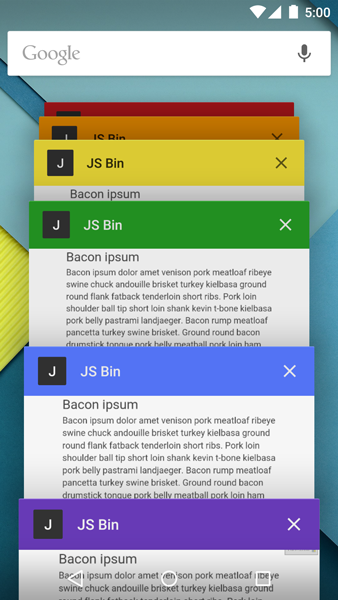
<meta name="theme-color" content="#DB5945">
Windows 8
Windows 8 Tile Color
<meta name="msapplication-TileColor" content="#000"/> <!-- Windows 8 磁贴颜色 -->
Windows 8 Tile Icon
<meta name="msapplication-TileImage" content="icon.png"/> <!-- Windows 8 磁贴图标 -->
Others
Add RSS subscription
<link rel="alternate" type="application/rss+xml" title="RSS" href="../rss.xml.html" /> <!-- 添加 RSS 订阅 -->
Add favicon icon
<link rel="shortcut icon" type="image/ico" href="../favicon.ico" /> <!-- 添加 favicon icon -->
Disable automatic translation prompts in Chrome browser
More:http://www.w3.org/International/questions/qa-translate-flag
<meta name="google" value="notranslate">