This article mainly introduces Hello World programs in 24 programming languages, including well-known programming languages such as Java, C, C++, C#, Ruby, Python, PHP, etc. Friends in need can refer to it.
Hello World is almost the first program programmers learn in various languages. On a whim, I summarized and organized how mainstream development languages implement it, including a rough and quick understanding of the language, development, compilation, environment setup, running, simple syntax, etc. In fact, many languages are related. Nowadays, mastering only one language is not enough. For example, Python has the advantages of concise syntax and fast development, but its disadvantage is relatively slow speed. C/C++/Java development is slower, but program execution is faster. If you want to combine the advantages of both, you need to write Python extensions, which involves languages such as C, C++, Java, Fortran, etc. Python's GUI Tkinter also involves the TCL language. Therefore, for Python development, you must be familiar with C (CPython is developed in C), and ideally also familiar with Java (Jython is a Java-based implementation of Python), C++/C# (IronPython is based on C# and .NET), and communication between different languages may use CORBA. Also, Python may call commands in the SHELL or Perl commands. Therefore, it is necessary to be proficient in one or two languages and familiar with multiple languages.
Below, multiple languages are used to implement printing Hello World, including the required environment (mainly how to compile, link, etc.), code, language description, and introduction to language features.
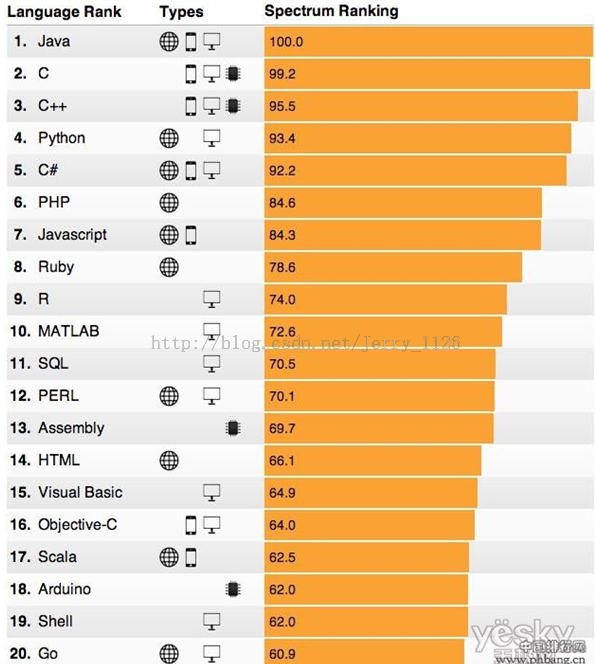
Also includes an appendix: the top 20 programming languages in the 2014 overall ranking, the top 10 web development languages, and the top 10 mobile application development languages.
01. Java
Environment: JDK1.7
C:\>java -version
java version "1.7.0_51"
Java(TM) SE Runtime Environment (build 1.7.0_51-b13)
Java HotSpot(TM) Client VM (build 24.51-b03, mixed mode, sharing)
Code:
#FileName: HelloWorld.java
public class HelloWorld   #如果有 public 类的话,类名必须和文件同名,注意大小写
{
  #Java 入口程序,程序从此入口
  public static void main(String[] args)
  {
  #向控制台打印一条语句
    System.out.println("Hello,World!");
  }
}
Description:
D:\HelloWorld>javac HelloWorld.java    #用 javac 编译成字节码文件(HelloWorld.class)
D:\HelloWorld>java HelloWorld          #用 java 解释执行成特定平台的机器码
Hello,World!
02. C
Environment: MinGW or various C/C++ compilers
D:\HelloWorld>gcc -v
Reading specs from C:/Perl/site/lib/auto/MinGW/bin/../lib/gcc/mingw32/3.4.5/specs
Configured with: ../gcc-3.4.5-20060117-3/configure --with-gcc --with-gnu-ld --with-gnu-as --host=min
gw32 --target=mingw32 --prefix=/mingw --enable-threads --disable-nls --enable-languages=c,c++,f77,ad
a,objc,java --disable-win32-registry --disable-shared --enable-sjlj-exceptions --enable-libgcj --dis
able-java-awt --without-x --enable-java-gc=boehm --disable-libgcj-debug --enable-interpreter --enabl
e-hash-synchronization --enable-libstdcxx-debug
Thread model: win32
gcc version 3.4.5 (mingw-vista special r3)
Code:
#include <stdio.h>
int main()                #main 入口函数
{
  printf("Hello,World!"); #printf 函数打印
  return 1;               #函数返回值
}
Description:
D:\HelloWorld>gcc HelloWorld.c -o output   #文件名 HelloWorld.c,-o 输出文件名 output
HelloWorld.c:6:2: warning: no newline at end of file

D:\HelloWorld>output                       #直接运行输出文件
Hello,World!
#如果未安装 GCC,那么必须按照 http://gcc.gnu.org/install/ 上的详细说明安装 GCC。
#为了在 Windows 上安装 GCC,需要安装 MinGW。
#为了安装 MinGW,请访问 MinGW 的主页 www.mingw.org,进入 MinGW 下载页面,下载最新版本的 MinGW 安装程序,命名格式为 MinGW-<version>.exe。
#当安装 MinWG 时,至少要安装 gcc-core、gcc-g++、binutils 和 MinGW runtime,但是一般情况下都会安装更多其他的项。
#添加您安装的 MinGW 的 bin 子目录到您的 PATH 环境变量中,这样您就可以在命令行中通过简单的名称来指定这些工具。
#当完成安装时,就可以从 Windows 命令行上运行 gcc、g++、ar、ranlib、dlltool 和其他一些 GNU 工具。
03. C++
Environment: MinGW or various C++ compilers
Header file extensions: .h, .hpp, .hxx
Source file extensions: .cpp, .c++, .cxx, .cc, .C
Code:
#include <iostream>               //std::cout 要用到的头文件
#include <stdio.h>                //标准输入输出头文件

int main()
{
  printf("Hello,World!--Way 1\n");    //printf 语句打印
  puts("Hello,World!--Way 2");        //puts 语句
  puts("Hello," " " "World!--Way 3"); //字符串拼接
  std::cout << "Hello,World!--Way 4" << std::endl; //C++ 教科书上写法
  return 1;                                        //作为注释
}
Description:
D:\HelloWorld>g++ HelloWorld.c++ -o output   //源文件后缀也可为 .cpp、.C

D:\HelloWorld>output
Hello,World!--Way 1
Hello,World!--Way 2
Hello,World!--Way 3
Hello,World!--Way 4
04. Python
Environment: Python 2.x or Python 3.x
D:\HelloWorld>python
Python 2.7.4 (default, Apr  6 2013, 19:55:15) [MSC v.1500 64 bit (AMD64)] on win32
Type "help", "copyright", "credits" or "license" for more information.
Code:
>>>> print "Hello,World!"   #Python 2.x
Hello,World!
>>> print("Hello,World!")  #Python 3.x
Hello,World!
Description:
1. In Python 3.x, the print statement is a function, so it is print().
2. It can also be written in a .py file and executed the same way.
3. Python 2.6 and above are basically the same as Python 3.x, and can also use print() to print.
05. C#
Environment: Windows
d:\HelloWorld>csc -v
Microsoft (R) Visual C# 2005 Compiler version 8.00.50727.4927
for Microsoft (R) Windows (R) 2005 Framework version 2.0.50727
Copyright (C) Microsoft Corporation 2001-2005. All rights reserved.
Code:
//FileName: HelloWorld.cs
using System;
class TestApp
{
  public static void Main()
  {
    Console.WriteLine("Hello,World!");
    Console.ReadKey();
  }
}
//执行如下:
d:\HelloWorld>csc HelloWorld.cs
Microsoft (R) Visual C# 2005 Compiler version 8.00.50727.4927
for Microsoft (R) Windows (R) 2005 Framework version 2.0.50727
Copyright (C) Microsoft Corporation 2001-2005. All rights reserved.

d:\HelloWorld>HelloWorld.exe
Hello,World!
Description:
C# is actually very similar to Java. Just now we used the command-line method, which requires setting environment variables. You can refer to: http://www.jb51.net/article/67171.htm.
If you directly download Microsoft Visual Studio, you can compile and run with shortcuts in the IDE.
06. PHP
Environment: XAMPP 1.8.3, environment setup guide: http://www.cnblogs.com/wangkangluo1/archive/2011/07/19/2110943.html
Code:
<!DOCTYPE html>
<body>
<?php
echo "Hello,World!";            //打印语句
echo "The first php program!";  //打印语句
echo phpinfo();                 //phpinfo()系统函数,输出环境信息
?>
</body>
</html>
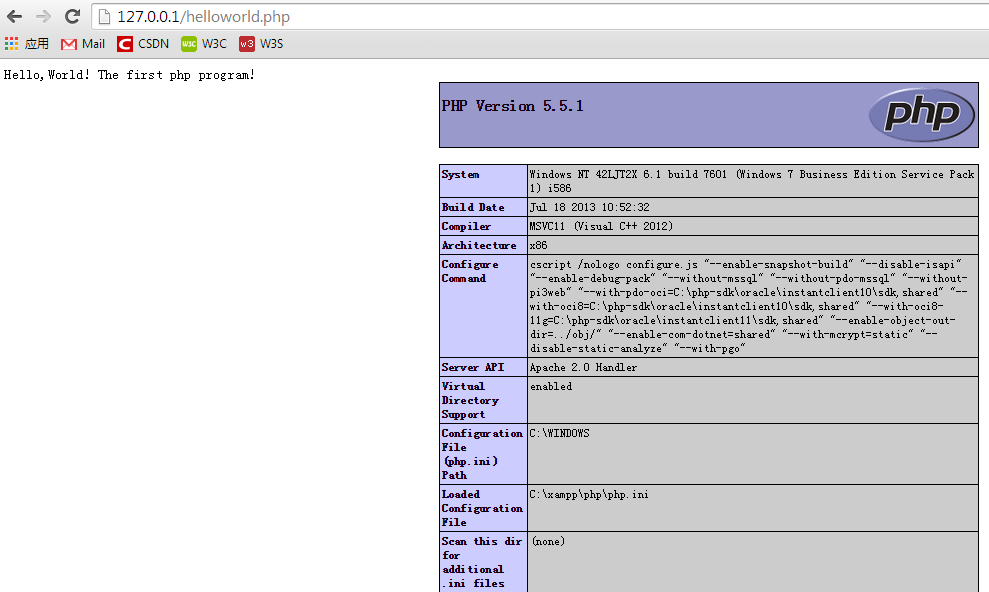
Description:
#PHP(Hypertext Preprocessor)。
#PHP 是一种 HTML 内嵌式的语言,PHP 与微软的 ASP 颇有几分相似,都是一种在服务器端执行的嵌入 HTML 文档的脚本语言。
#PHP 语言的风格类似于 C 语言,现在被很多的网站编程人员广泛地运用。
#PHP 独特的语法混合了 C、Java、Perl 以及 PHP 自创新的语法。它可以比 CGI 或者 Perl 更快速地执行动态网页。
#与其他的编程语言相比,PHP 是将程序嵌入到 HTML 文档中去执行,执行效率比完全生成 HTML 标记的 CGI 要高许多。
#与同样是嵌入 HTML 文档的脚本语言 JavaScript 相比,PHP 在服务器端执行,充分利用了服务器的性能。
#PHP 执行引擎还会将用户经常访问的 PHP 程序驻留在内存中,其他用户再一次访问这个程序时就不需要重新编译程序了,只要直接执行内存中的代码就可以了,这也是 PHP 高效率的体现之一。
#PHP 具有非常强大的功能,所有的 CGI 或者 JavaScript 的功能,PHP 都能实现,而且几乎支持所有流行的数据库以及操作系统。
07. JavaScript
Environment: node.js or jaxer
Node download link:http://nodejs.org/download/Just follow the prompts and download the file you want.
D:\>node -v
v0.10.33
Code:
var sys = require("sys");    #导入需要的 sys 模块
sys.puts("Hello,World!");    #调用里面的 puts 函数来打印字符串
Description:
D:\>node HelloWorld.js       #node + *.js,执行
Hello,World!
#JavaScript 是 Web 的编程语言。
#所有现代的 HTML 页面都使用 JavaScript。
#JavaScript 非常容易学。
08. Ruby
Environment: ruby 1.9.3
D:\HelloWorld>ruby -v
ruby 1.9.3p429 (2013-05-15) [i386-mingw32]
Code:
#可用 print 语句打印
print "Hello,World!\n"
#可用 puts 语句打印
puts  "Hello,World!\n"
#可以先声明一个变量,然后再用 puts 语句
a = "Hello,World!\n"
puts a
#可以先写个函数再调用
def say(name)
   "Hello,#{name}"
end
puts say("World!")
Description:
D:\HelloWorld>ruby HelloWorld.rb     #运行方式类似 Python、Perl
Hello,World!
Hello,World!
Hello,World!
Hello,World!
09. R
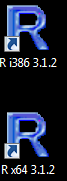
Environment: R-3.1.2-win (for 32-bit and 64-bit), each with corresponding GUI
C:\>R                  #安装好了之后,输入 R 后显示

R version 3.1.2 (2014-10-31) -- "Pumpkin Helmet"
Copyright (C) 2014 The R Foundation for Statistical Computing
Platform: i386-w64-mingw32/i386 (32-bit)

R

'license()''licence()'

R.
'contributors()'
'citation()'RR

'demo()''help()'
'help.start()'HTML
'q()'R.
Code:
print("Hello,World!")
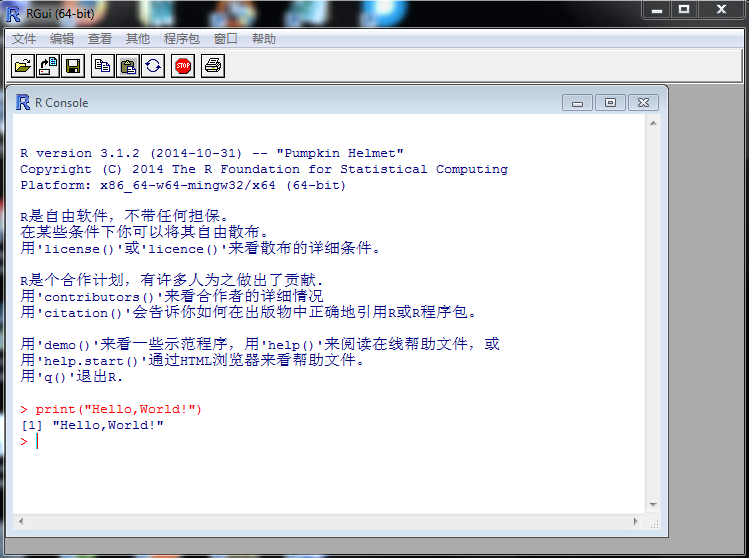
Description:
R language, a free software programming language and operating environment, mainly used for statistical analysis, plotting, and data mining.
The following are more detailed installation and download steps, see:
http://www.jb51.net/os/RedHat/335436.html
10. SQL
Environment: ORACLE SQL/PLUS
Code:
SQL> select 'Hello,World!' from dual;

'HELLO,WORLD
------------
Hello,World!
Description:
You can also create a table, insert into it, query it, and finally drop the table.
SQL> CREATE TABLE MESSAGE (TEXT CHAR(15));            #创建表
INSERT INTO MESSAGE (TEXT) VALUES ('Hello, world!');  #插入表
SELECT TEXT FROM MESSAGE;                             #查询表
DROP TABLE MESSAGE;                                   #删除表
Table created.

SQL>
1 row created.

SQL>
TEXT
---------------
Hello, world!
11. Perl
Environment: Perl 5.16 or MinGW
Download URL:http://www.activestate.com/activeperl/downloads
D:\HelloWorld>perl -v

This is perl 5, version 16, subversion 3 (v5.16.3) built for MSWin32-x86-multi-thread
(with 1 registered patch, see perl -V for more detail)

Copyright 1987-2012, Larry Wall

Binary build 1603 [296746] provided by ActiveState http://www.ActiveState.com
Built Mar 13 2013 11:29:21

Perl may be copied only under the terms of either the Artistic License or the
GNU General Public License, which may be found in the Perl 5 source kit.

Complete documentation for Perl, including FAQ lists, should be found on
this system using "man perl" or "perldoc perl".  If you have access to the
Internet, point your browser at http://www.perl.org/, the Perl Home Page.
Code:
#!C:\Perl\bin                    #Windows 平台下
#!/usr/bin/env perl              #Linux 环境下
print "Hello,World!\n";          #print("Hello,World") 也可
Output result:
D:\HelloWorld>perl HelloWorld.pl #类似于 python file.py
Hello,World!
Description:
#Perl 5.10 及以上的版本可以用
use 5.010;
say "Hello,World!";
12. HTML
Environment: HTML or HTML 5.0
Code:
<!DOCTYPE html>
<html>
<body>
<h1>This is the first program!</h1>
<p>Hello,World!</p>
</body>
</html>
Description:
Most mainstream browsers support HTML4.0, and some browsers only support some features of HTML5.0.
13. VB
Environment:
VBC version 8.0.5
D:\Learn\C>vbc -v
Microsoft (R) Visual Basic Compiler version 8.0.50727.5483
for Microsoft (R) .NET Framework version 2.0.50727.5485
Copyright (c) Microsoft Corporation.  All rights reserved.

vbc : Command line warning BC2007 : unrecognized option 'v'; ignored
vbc : Command line error BC2008 : no input sources specified
Code:
'FileName: HelloWorld.rb  rb 作为 VB 源文件的后缀
Module Hello
  Sub Main()               '程序人口函数
    MsgBox("Hello,World!") '计算机屏幕上显示信息
  End Sub                  'End 作为程序块结尾
End Module                 '单引号作为注释
Description:
D:\>vbc HelloWorld.vb      #vbs 来编译,生成 HelloWorld.exe 可执行文件
Microsoft (R) Visual Basic Compiler version 8.0.50727.5483
for Microsoft (R) .NET Framework version 2.0.50727.5485
Copyright (c) Microsoft Corporation.  All rights reserved.
D:\>HelloWorld
14. Scala
Environment: scala-2.11.4.msi compiler
d:\>scala
Welcome to Scala version 2.11.4 (Java HotSpot(TM) Client VM, Java 1.7.0_51).
Type in expressions to have them evaluated.
Type :help for more information.

scala> println("Hello,World!");   #可在交互式界面执行 println 语句,很像 java
Hello,World!
Code:
object HelloWorld
{
  def main(args:Array[String])
  {
     println("Hello,World!");
  }
}
//编译
d:\HelloWorld>scala HelloWorld.scala
Hello,World!
Description:
Scala is a programming language that incorporates object-oriented and functional programming ideas into static types, aiming to express common programming patterns in a concise, elegant, and type-safe manner. It smoothly integrates the features of object-oriented and functional languages, making programmers using Java and other languages more productive when using Scala.
15. Shell
Environment: Linux/Unix platform, or Windows platform with MinGW and MSYS installed
Code:
#安装了MinGW和MSYS的Windows平台
D:\HelloWorld>echo "Hello,World!"
"Hello,World!"
#Linux平台下
#echo "Hello,World!"   或 printf "Hello,World!"
#如果是写在文件中:
chmod +x  HelloWorld.sh
./HelloWorld.sh
Description:
#Shell 诞生于 Unix,是与 Linux/Unix 交互的工具,单独地学习 Shell 是没有意义的,必须先学习 Linux/Unix。
#Shell 虽然是 Unix 的第一个脚本语言,但它是相当优秀的。它结合了延展性与效率,持续保有独具的特色,并不断的被改良,功能更加强大。
#缺点:Shell 需要依赖其他程序才能完成大部分的工作,优点:简洁的脚本语言标记方式,比 C 语言编写的程序执行更快、更有效率。
16. Delphi
Environment: Delphi 7
Code:
[File|New|Application]-->Drag a Button and a Label-->Double-click the Button, code as follows:
procedure TForm1.Button1Click(Sender: TObject);
begin
  label1.Caption := 'Hello,World!';
end;

procedure TForm1.FormCreate(Sender: TObject);
begin

end;

end.
Description:
Delphi is a famous rapid application development tool (Rapid Application Development, RAD for short) on the Windows platform.
It seems many people think Delphi has declined and is outdated (many of my colleagues haven't even heard of Delphi).
But I don't think so. "Real programmers use C, smart programmers use Delphi." The classic needs no further explanation, especially for developing GUI programs, just drag and drop and it's OK!!!
17. Fortran
Environment: Linux or Windows platform with MinGW installed
D:\HelloWorld>gfortran -v
Using built-in specs.
COLLECT_GCC=gfortran
COLLECT_LTO_WRAPPER=c:/mingw/bin/../libexec/gcc/mingw32/4.8.1/lto-wrapper.exe
Target: mingw32
Configured with: ../gcc-4.8.1/configure --prefix=/mingw --host=mingw32 --build=mingw32 --without-pic
 --enable-shared --enable-static --with-gnu-ld --enable-lto --enable-libssp --disable-multilib --ena
ble-languages=c,c++,fortran,objc,obj-c++,ada --disable-sjlj-exceptions --with-dwarf2 --disable-win32
-registry --enable-libstdcxx-debug --enable-version-specific-runtime-libs --with-gmp=/usr/src/pkg/gm
p-5.1.2-1-mingw32-src/bld --with-mpc=/usr/src/pkg/mpc-1.0.1-1-mingw32-src/bld --with-mpfr= --with-sy
stem-zlib --with-gnu-as --enable-decimal-float=yes --enable-libgomp --enable-threads --with-libiconv
-prefix=/mingw32 --with-libintl-prefix=/mingw --disable-bootstrap LDFLAGS=-s CFLAGS=-D_USE_32BIT_TIM
E_T
Thread model: win32
gcc version 4.8.1 (GCC)
Code:
       program hello
          print *, "Hello World!"
       end program hello
Description:
Fortran is the earliest computer language, mainly used in scientific and engineering computing fields. In this respect, it is the same as Python.
D:\HelloWorld>gfortran -ffree-form HelloWorld.f -o out.exe  #-ffree-form 自由格式 -o 后面是输出文件
#后缀名可以为.f, .F, .f90, .fpp. 如果是 .f90 结尾的文件,可以不用 -ffree-form,因为该后缀结尾的文件默认是自由格式
D:\HelloWorld>out      #如果是 .f 结尾的话,必须要加上,否则报错
Hello World!
18. TCL
Environment: Linux or Windows platform with WinGW
Code:
#命令行交互方式
D:\>tclsh
% puts "Hello,World!"
Hello,World!
% exit
D:>
#文件方式运行
#!/usr/local/bin/tcl
puts "Hello, world!"
D:\>tclsh HelloWorld.tcl
Hello,World!
Description:
1. The file name extension is .tcl, and the compiler is tclsh (command-line mode) or wish (GUI mode).
2. TCL (Tool Command Language) is a general-purpose scripting language that can run on almost all platforms and is very powerful.
19. FoxPro
Environment: VFP9.0
Code:
?"Hello,World!"
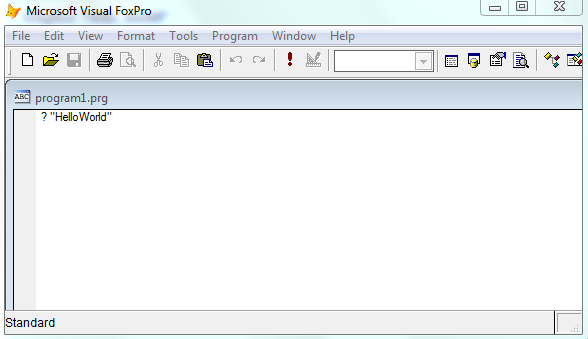
Description:
Although compilation and execution passed, I still don't know how to display the compiled result in the GUI interface. The result was displayed only after running the .FXP file in the command-line interface.
Visual FoxPro, originally named FoxBase, was initially a database product launched by the American company Fox Software in 1988, running on DOS and compatible with the xBase series. FoxPro is an enhanced version of FoxBase, with the highest version reaching 2.6. Later in 1992, Fox Software was acquired by Microsoft, further developed, made able to run on Windows, and renamed Visual FoxPro. Compared with FoxBASE, FoxPro has greatly improved in functionality and performance, mainly introducing controls such as windows, buttons, list boxes, and text boxes, further improving the system's development capability.
20. Ada
Environment: gnat compiler for ADA95
d:\HelloWorld>gnat
GNAT 4.8.1
Copyright 1996-2013, Free Software Foundation, Inc.

List of available commands

gnat bind               gnatbind
gnat chop               gnatchop
gnat clean              gnatclean
gnat compile            gnatmake -f -u -c
gnat check              gnatcheck
gnat elim               gnatelim
gnat find               gnatfind
gnat krunch             gnatkr
gnat link               gnatlink
gnat list               gnatls
gnat make               gnatmake
gnat metric             gnatmetric
gnat name               gnatname
gnat preprocess         gnatprep
gnat pretty             gnatpp
gnat stack              gnatstack
gnat stub               gnatstub
gnat test               gnattest
gnat xref               gnatxref
Code:
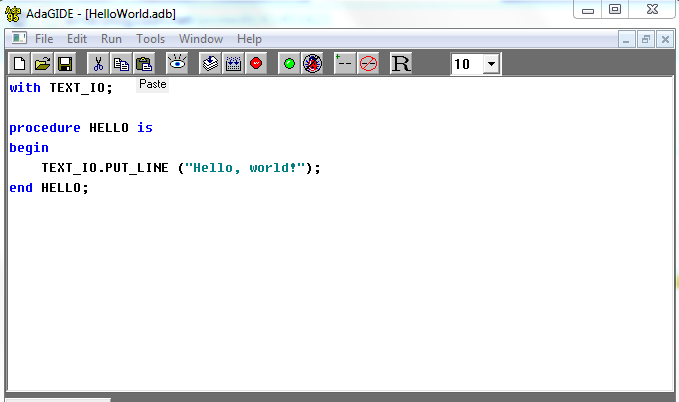
Description:
Ada is a general-purpose programming language with strong expressive power, developed by the U.S. Department of Defense to overcome the software development crisis. After removing the lines starting with # to obtain the final processed file, it can be compiled by GNAT.
21. AWK
Environment: Linux/Unix platform, or Windows platform with MinGW and MSYS installed
Code:
[root@Linux ~]# echo | awk '{print "Hello,World!"}'
Hello,World!
[root@Linux ~]# echo | awk 'BEGIN {print "Hello,World!"}'
Hello,World!
[root@Linux ~]# awk 'BEGIN {print "Hello,World!"}'
Hello,World!
[root@Linux ~]# echo "hello world" | awk '{print}'
hello world
Description:
#AWK 是一种优良的文本处理工具。它不仅是 Linux 中也是任何环境中现有的功能最强大的数据处理引擎之一。<br />
#AWK 名称得自于它的创始人,分别是 Alfred Aho、Peter Weinberger 和 Brian Kernighan 姓氏的首个字母。<br />
#AWK 提供了极其强大的功能:可以进行样式装入、流控制、数学运算符、进程控制语句甚至于内置的变量和函数。它具备了一个完整的语言所应具有的几乎所有精美特性。
22. Sed
Environment: Linux/Unix
Code:
# sed -ne '1s/.*/Hello, world!/p'
Hello,World!                     #第一行为输入
Hello, world!                    #
Description:
sed stream editor, together with awk, regular expressions, etc., is a very useful tool for writing Linux scripts.
23. Pascal
Environment: Free Pascal IDE
Code:
Program HelloWorld(output);
begin
  writeln('Hello, world!')

 {程序块的最后一条语句后不需要";" - 如果添加一个";",会在程序中增加一个“空语句”}
end.
Description:
A Pascal program begins with the program keyword that takes an external file descriptor as a parameter, followed by the main block enclosed by the begin and end keywords. Semicolons separate statements, and a period terminates the entire program (or unit). Pascal source code is case-insensitive. Here is the source code of a very simple "Hello world" program. In actual programming, the output on the first line can usually be omitted. In terms of syntactic organization, it is very similar to Delphi, basically at the same level. In addition, after installing the FPC compiler, it actually displayed garbled text. It seems that downloading (Turbo Pascal) would be more classic, but I heard that Turbo Pascal is relatively difficult to download. Moreover, I don't know whether it can be compiled on a WIN*64-bit platform, so I just downloaded FPC to use.
24. Prolog
Environment: SWI-Prolog Portable compiler
Code:
write("Hello,World!").
#注意,句末有点号
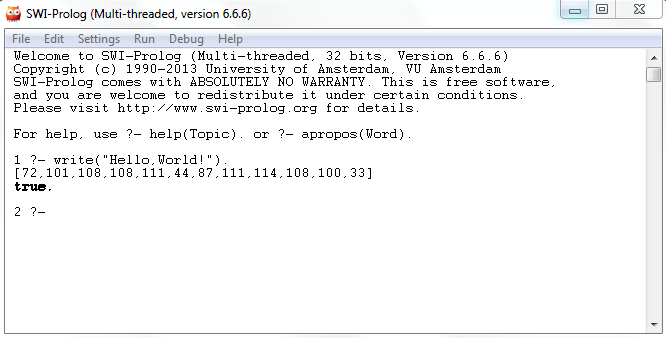
Description:
Prolog (Programming in Logic) is a logic programming language. It is built on the theoretical foundation of logic and was initially used in research fields such as natural language. It is now widely applied in artificial intelligence research and can be used to build expert systems, natural language understanding, intelligent knowledge bases, and more.
Appendix:
Based on more than ten data sources, IEEE Spectrum conducted statistics on the popularity of major programming languages and published the top 20 in the 2014 overall programming language ranking, the top 10 in the web development language ranking, and the top 10 in the mobile app development language ranking. The statistical results are as follows:
Overall ranking:
Web development ranking TOP10:
- Java
- Python
- C#
- PHP
- JavaScript
- Ruby
- Perl
- HTML
- Scala
- Go
Mobile app development language ranking TOP10:
- Java
- C
- C++
- C#
- JavaScript
- Objective-C
- Scala
- Delphi
- Scheme
- ActionScript
The above statistical data come from Google search results, Google Trends analysis, Twitter, GitHub repositories, StackOverflow Q&A, Reddit articles, Hacker News, Career Builder, ice job, and IEEE journal papers, among others.