What is TypeScript?
TypeScript is a free and open-source programming language developed by Microsoft. It is a superset of JavaScript, extending the syntax of JavaScript.
Syntax Features
- Classes
- Interfaces
- Modules
- Type annotations
- Compile time type checking
- Arrow functions (similar to C#'s Lambda expressions)
For more content, please refer to:TypeScript Tutorial。
The Difference between JavaScript and TypeScript
TypeScript is a superset of JavaScript, extending the syntax of JavaScript. Therefore, existing JavaScript code can work with TypeScript without any modification. TypeScript provides compile-time static type checking through type annotations.
TypeScript can handle existing JavaScript code and only compiles the TypeScript code within it.
TypeScript Installation
We can install TypeScript in the following two ways:
- Through the Node.js package manager (npm)
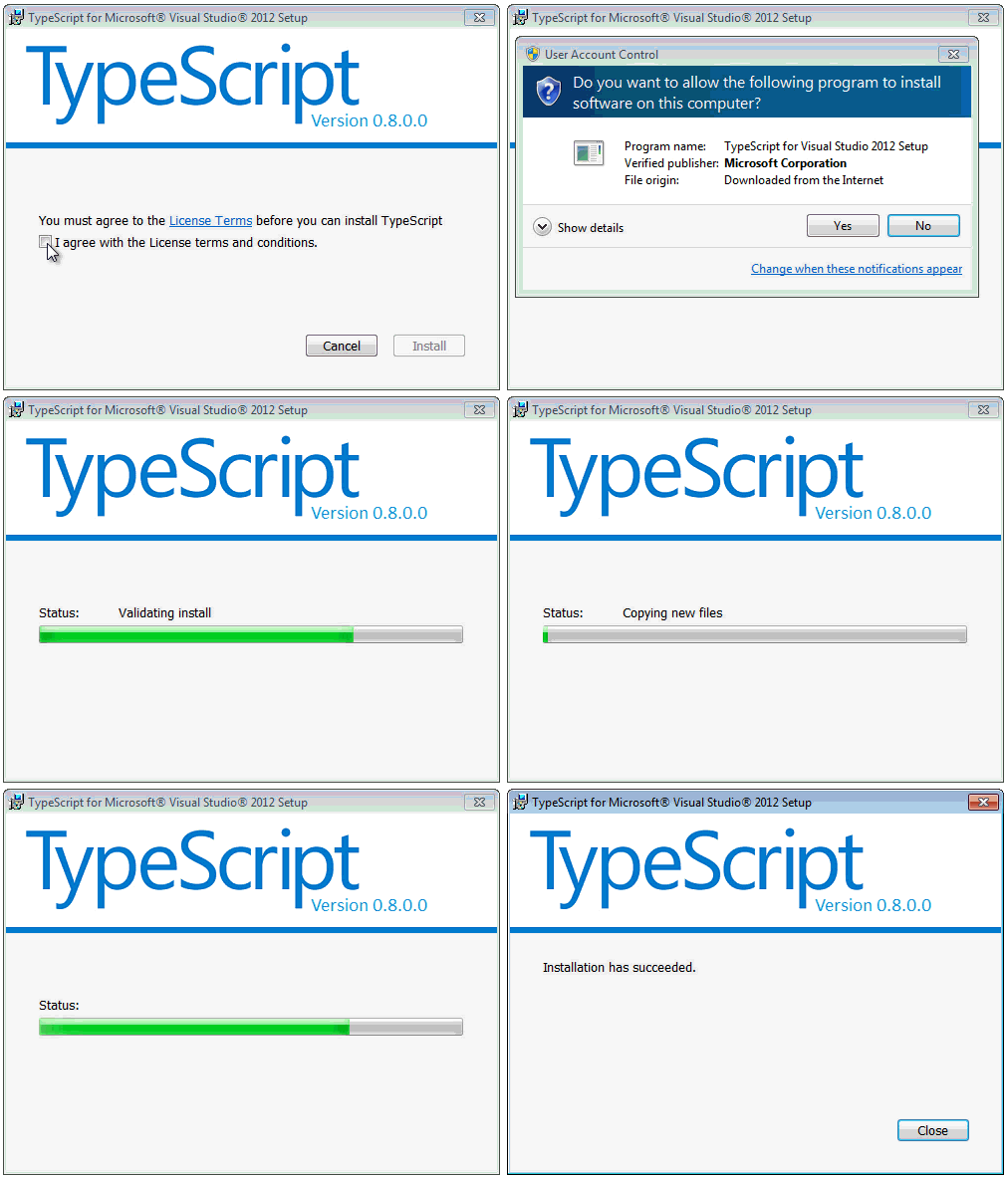
- Through the MSI integrated with Visual Studio 2012. (Click me to download)。
The interface when installing via MSI file:
Steps to install via npm:
1. Install npm
$ curl http://npmjs.org/install.sh | sh
$  npm --version
2.15.1
2. Install the TypeScript npm package:
$ npm install -g typescript
After installation, we can use the TypeScript compiler, named tsc, which can generate js files from the compilation results.
To compile a TypeScript file, use the following command:
tsc filename.ts
Once compilation succeeds, a js file with the same name will be generated in the same directory. You can also modify the default output name through command parameters.
By default, the compiler targets ECMAScript 3 (ES3), but ES5 is also a supported option. TypeScript adds support for features proposed for the upcoming ECMAScript 6 standard.
TypeScript Hello World
First, we create an index.html file:
<!DOCTYPE html>
<html>
<head>
<meta charset="utf-8">
<title>Learning TypeScript</title>
</head>
<body>
    <script src="hello.js.html"></script>
</body>
</html>
Create a hello.ts file. *.ts is the file extension for TypeScript files. Add the following code to the hello.ts file:
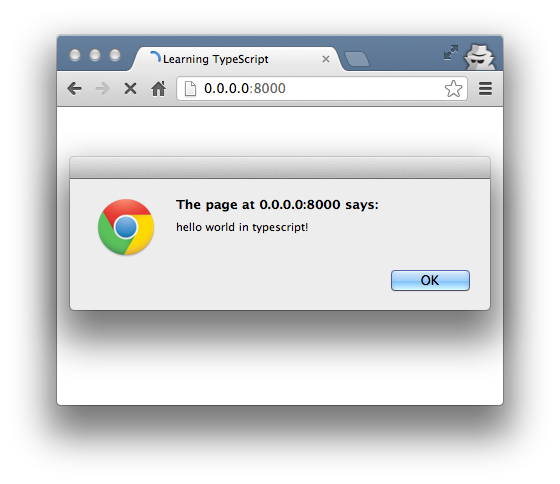
alert('hello world in TypeScript!');
Next, we open the command line and use the tsc command to compile the hello.ts file:
$ tsc hello.ts
A hello.js file will be generated in the same directory. Then open index.html and the output is as follows:
Type Annotations
TypeScript provides static types through type annotations to enable type checking at compile time. This is optional and can be ignored to use JavaScript's regular dynamic types.
function Add(left: number, right: number): number {
    return left + right;
}
The annotations for basic types are number, bool, and string. The weak or dynamic type structure is the any type.
Type annotations can be exported to a separate declaration file to make the type information of TypeScript scripts that use types and have been compiled to JavaScript available. Annotations can be declared for an existing JavaScript library, as has been done for Node.js and jQuery.
When types are not given, the TypeScript compiler uses type inference to infer types. If no type can be inferred due to a lack of declarations, it defaults to the dynamic any type.
Example
Next, we create a simple area() function in the TypeScript file type.ts:
function area(shape: string, width: number, height: number) {
    var area = width * height;
    return "I'm a " + shape + " with an area of " + area + " cm squared.";
}

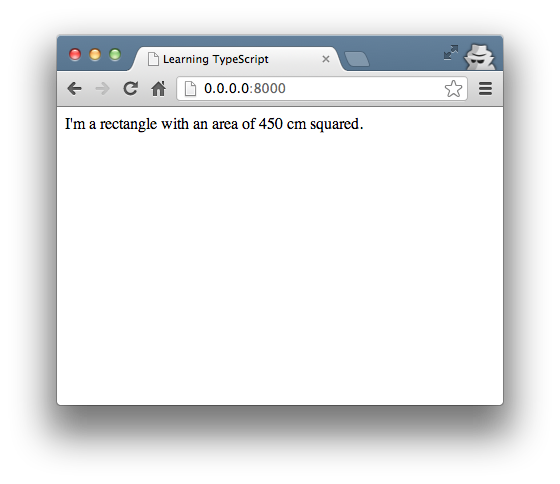
document.body.innerHTML = area("rectangle", 30, 15);
Next, modifyindex.htmlthe js file totype.jsThen compile the TypeScript file:tsc type.ts。
Refresh the index.html file in the browser, and the output is as follows:
Interface
Next, we extend the above example with an interface. Create an interface.ts file and modifyindex.htmlthe js file tointerface.js。
The interface.js file code is as follows:
interface Shape {
    name: string;
    width: number;
    height: number;
    color?: string;
}

function area(shape : Shape) {
    var area = shape.width * shape.height;
    return "I'm " + shape.name + " with area " + area + " cm squared";
}

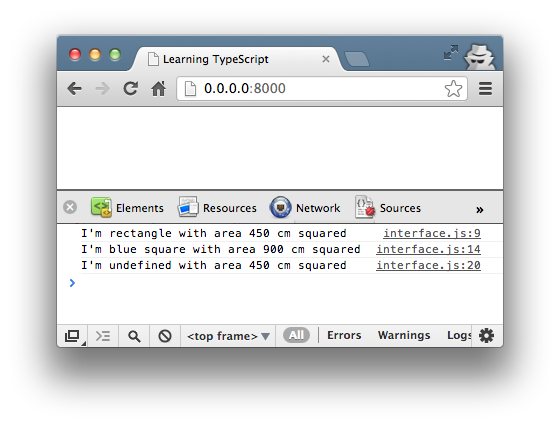
console.log( area( {name: "rectangle", width: 30, height: 15} ) );
console.log( area( {name: "square", width: 30, height: 30, color: "blue"} ) );
An interface can serve as a type annotation.
Compile the above codetsc interface.tsNo errors will occur, but if you add a statement missing the name parameter after the above code, it will report an error during compilation:
console.log( area( {width: 30, height: 15} ) );
Recompile, and the error message is as follows:
$ tsc hello.ts
hello.ts(15,20): error TS2345: Argument of type '{ width: number; height: number; }' is not assignable to parameter of type 'Shape'.
  Property 'name' is missing in type '{ width: number; height: number; }'.
Access it in the browser, and the output is as follows:
Arrow Function Expressions (lambda expressions)
Lambda expression()=>{something} or ()=>somethingIt is equivalent to a function in js. Its advantage is that it can automatically bind this in the function to the context.
Try executing the following:
var shape = {
    name: "rectangle",
    popup: function() {

        console.log('This inside popup(): ' + this.name);

        setTimeout(function() {
            console.log('This inside setTimeout(): ' + this.name);
            console.log("I'm a " + this.name + "!");
        }, 3000);

    }
};

shape.popup();
this.name in the example is an empty value:
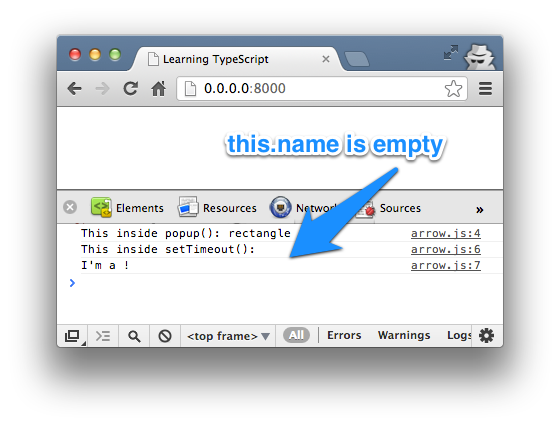
Next, we use TypeScript's arrow function. Replacefunction()with() =>:
var shape = {
    name: "rectangle",
    popup: function() {

        console.log('This inside popup(): ' + this.name);

        setTimeout( () => {
            console.log('This inside setTimeout(): ' + this.name);
            console.log("I'm a " + this.name + "!");
        }, 3000);

    }
};

shape.popup();
The output is as follows:
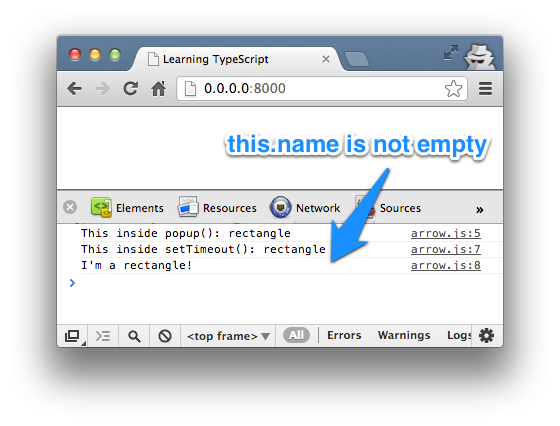
In the compiled js file of the above example, we can see a linevar _this = this;,_thisIn the callback function of setTimeout(), it references the name property.
Class
TypeScript supports ECMAScript 6 classes that integrate optional type annotation support.
Next, we create a class file class.ts, with the following code:
class Shape {

    area: number;
    color: string;

    constructor ( name: string, width: number, height: number ) {
        this.area = width * height;
        this.color = "pink";
    };

    shoutout() {
        return "I'm " + this.color + " " + this.name +  " with an area of " + this.area + " cm squared.";
    }
}

var square = new Shape("square", 30, 30);

console.log( square.shoutout() );
console.log( 'Area of Shape: ' + square.area );
console.log( 'Name of Shape: ' + square.name );
console.log( 'Color of Shape: ' + square.color );
console.log( 'Width of Shape: ' + square.width );
console.log( 'Height of Shape: ' + square.height );
The Shape class above has two properties, area and color, a constructor (constructor()), and a method shoutout().
The parameters (name, width, and height) in the constructor have local variable scope, so when compiling the above file, the error output in the browser is as follows:
class.ts(12,42): The property 'name' does not exist on value of type 'Shape'
class.ts(20,40): The property 'name' does not exist on value of type 'Shape'
class.ts(22,41): The property 'width' does not exist on value of type 'Shape'
class.ts(23,42): The property 'height' does not exist on value of type 'Shape'
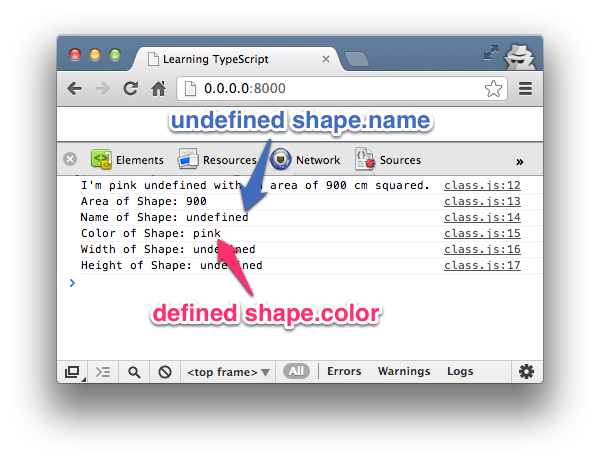
Next, we add the public and private access modifiers. Public members can be accessed anywhere, while private members can only be accessed within the class.
Next, we modify the above code, declaring color as private and the constructor's parameter name as public:
...
private color: string;
...
constructor ( public name: string, width: number, height: number ) {
...
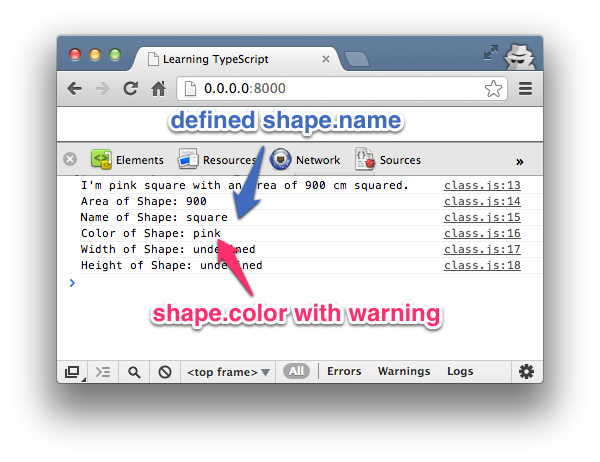
Since the color member variable is set to private, the following message will appear:
class.ts(24,41): The property 'color' does not exist on value of type 'Shape'
Inheritance
Finally, we can inherit an existing class and create a derived class. Inheritance uses the keywordextends。
Next, we add the following code at the end of the class.ts file, as shown below:
class Shape3D extends Shape {

    volume: number;

    constructor ( public name: string, width: number, height: number, length: number ) {
        super( name, width, height );
        this.volume = length * this.area;
    };

    shoutout() {
        return "I'm " + this.name +  " with a volume of " + this.volume + " cm cube.";
    }

    superShout() {
        return super.shoutout();
    }
}

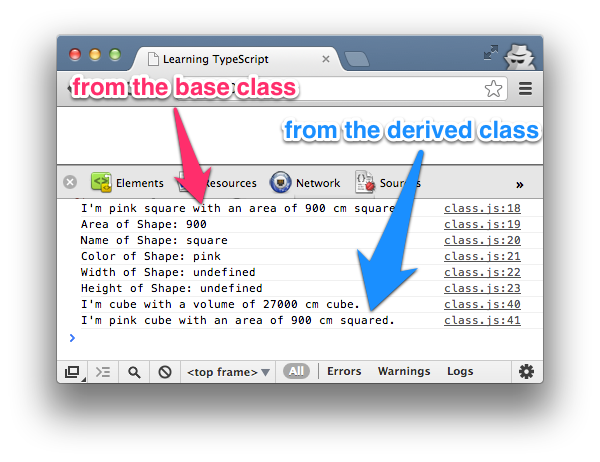
var cube = new Shape3D("cube", 30, 30, 30);
console.log( cube.shoutout() );
console.log( cube.superShout() );
Explanation of the derived class Shape3D:
- Shape3D inherits the Shape class and also inherits the color property of the Shape class.
- In the constructor, the super method calls the constructor Shape of the base class Shape, passing the values of parameters name, width, and height. Inheritance allows us to reuse the code of the Shape class, so we can calculate this.volume by inheriting the area property.
- The shoutout() method of Shape3D overrides the implementation of the base class. The superShout() method directly returns the shoutout() method of the base class by using the super keyword.
- For the rest of the code, we can implement the functionality we want according to our own needs.
Reference Documentation
- TypeScript Chinese Manual:http://www.example.com/manual/gitbook/TypeScript/_book/
- http://code.tutsplus.com/tutorials/getting-started-with-typescript--net-28890
- https://zh.wikipedia.org/wiki/TypeScript