This article is long, but it is indeed full of dry goods. It describes some specifications and suggestions for using HTML, JavaScript, CSS, and jQuery. Front-end developers can read this article carefully and compare their usual habits to see if there is room for improvement...
HTML
What's the deal, DOCTYPE?
Not defining a DOCTYPE is a crime punishable by death. You may have used the following DOCTYPE before, but you should know that a more concise and clear code has now replaced it.
<!DOCTYPE html PUBLIC "-//W3C//DTD XHTML 1.0 Transitional//EN"
    "http://w3.org/TR/xhtml1/DTD/xhtml1-transitional.dtd">
Ideally, use the HTML5 DOCTYPE. All modern browsers support it, and even browsers that do not support HTML5, such as IE6 and IE7, will switch to standards mode because of it. SeeSource。
<!DOCTYPE html>
Write valid and semantically clear markup
Writing website code with clean, semantically clear HTML is something we have always strived for. Sometimes we find that the way previous people configured pages restricts us, or sometimes we write HTML-formatted email templates. But never deviate from HTML standards, even to solve a specific browser compatibility bug.
All headings should start from<h2>and be created hierarchically. Text paragraphs should always be placed in<p>tags, and so on. If you write HTML with clear semantics, the resulting pages will be cleaner, more concise, and easier for search engine crawlers to parse. This is the simplest SEO fix you can do.
Look at the following paragraphs. Which do you think is cleaner? This one?
<span class="sectionHeading">A Heading</span>
<br /> <br />
Lorem ipsum dolor sit amet. ...
<br /> <br />
Or this one?
<h2>A Heading</h2>
<p>
    Lorem ipsum dolor sit amet. ...
</p>
Handling middle mouse button clicks
One of the most frustrating usability flaws in modern web applications is the mutation of hyperlink functionality. Some elements that look like hyperlinks may have their click functionality mapped via JavaScript, which breaks middle mouse button clicks (opening the link page in a new tab). Even if they can open in a new tab, they only carry a#href, which brings you back to the same page.
A popular modern website that perfectly illustrates this problem is Twitter. Throughout its app, middle-clicking a username or avatar yields completely different results.
<!-- 旧的方式,破坏网页语义 -->
<a href="../index.html"></a>

<!-- 如果鼠标点击不能产生一个页面,那就不是超链接 -->
<span class="link" role="link"></span>
Another alternative is to use#guided paths, which map ordinary URLs to#guided links, and then fetch page fragments via AJAX. Libraries that provide this functionality should be able to display the page normally on middle-click, or load the page content into a designated area on left-click. However, proceed with caution; many people believe that# links are breaking web applications。
Use Microformats to represent contact information
Microformats are a way to make contact information machine-readable. The hCard class (not vCard) is used to define the type of content contained in an element. This content can be extracted and highlighted by browsers.
<span class="tel">
    <span class="type">home</span>:
    <span class="value">+1.415.555.1212</span>
</span>
If you have ever browsed a webpage that uses this format, you will notice that programs like Skype can easily detect which numbers on the page are phone numbers. Safari on iOS devices can do something similar.
For more information about Microformats, seehttp://microformats.org/wiki/hcard
Images need 'Alt' text
<img>The tag needsalttext in order to check and meet readability requirements. In thealtattribute, the text must be able to describe what the image displays or the effect it is intended to achieve, unless the image is unimportant.
If the image is merely a bullet in a list or some other insignificant icon, it is best to givealtan empty string for the attribute, but still keep it. This way screen readers will ignore it rather than reading "bullet" 20 times in a row.
<img src="dog.gif.html" alt="Fido and I at the park!" />
<!-- 很好,描述清晰 -->

<img src="bullet.gif.html" alt="bullet" />
<!-- 不好,显得多余 -->

<img src="bullet.gif.html" alt="" />
<!-- 好 -->
Use table tags only for tabular data
The table tag should only ever be used for displaying tabular data. The only exception is when writing HTML-formatted emails, where table may be the only layout method supported by some troublesome email clients.
For readability, table headers should always use<th>elements. Also remember to setcellpadding, cellspacingandborderthe value of ... to0, because these styles are easier to keep consistent when controlled by CSS.
<table cellpadding="0" cellspacing="0" border="0">
    <thead>
        <tr>
            <th>
                Cell Header
            </th>
        </tr>
    </thead>
    <tbody>
        <tr>
            <td>
                Cell Item
            </td>
        </tr>
    </tbody>
</table>
Use jQuery and jQuery UI Widgets
jQuery and jQuery UI are made to behave almost identically in terms of appearance and functionality across different browsers. jQuery UI is designed to conform to WAI WCAG 2.0 and WAI ARIA, so adopting this framework can avoid all the uncertainties of plugins or scripts running on your site.
JavaScript
Code spacing and formatting
Any discussion about code formatting, whitespace, and brace placement can spark heated debate. The simplest rule here, I think, is: unless you are willing to reformat the entire code file, respect and maintain the format of the existing code file. This means that if you see braces in a JS file written without a line break, your code should also keep braces without line breaks. If your code is not consistent with the rest of the code file, then your code should not pass the code review process.
Consistent code formatting makes code more readable and also means it is easy to modify with find/replace commands. Thankfully, the programming habits we have formed are very similar to the officially recommended jQuery style. There are minor differences, but those are personal issues or things we feel are unmaintainable. SeejQuery Core Style Guide
Character spacing
// 不好
if(blah==="foo"){
    foo("bar");
}

// 好 :)
if (blah === "foo") {
    foo("bar");
}
Do not put braces on a new line
// 不好
if (foo)
{
    bar();
}

// 好 :)
if (foo) {
    bar();
}
Always use braces
// 不好
if (foo)
    bar();

// 好 :)
if (foo) {
    bar();
}
String handling
Always use double quotes for quoted strings. Some people really like C-style strings (single quotes), but this habit can cause style conflicts within scripts. C-style string handling requires empty strings and single characters to be wrapped in single quotes, while phrases and words must be wrapped in double quotes.
Comments
The need to add comments to code like crazy is driven by managers, supervisors, and others who rarely touch code. This need is nothing more than a checkbox in employees' performance metrics, and the time spent on it brings almost no return. If those receptive developers could follow the suggestions in this document, their code would become quite readable and obvious, so much so that describing the code with comments would be embarrassingly redundant. Look at the following example. Here, the boolean variable is posed as a question, and the function has an intuitive name.
if (user.hasPermission) {
    editPage();
}
At least in this scenario, comments are completely unnecessary.
Cases where comments are important
In a project, there will always be certain parts that are difficult to look up and understand. For example, a complex regular expression, or a mathematical function that calculates angles or switches between degrees and radians. Without comments above, junior or intermediate readers will have no idea what the script means.
// 校验美国电话号码的正则表达式,号码格式是 (XXX) XXX-XXXX (减号、空格和括号都是可选的,可以有也可以没有)
var phoneRegEx = /^\(?(\d{3})\)?[- ]?(\d{3})[- ]?(\d{4})$/;
Always use the === comparison operator
Using the == comparison operator can make frustrating bugs disappear into thin air. It allows ... inJavaScript GardenThe weak typing is clearly explained in. Using the strict === comparison operator does not perform type coercion, thus allowing strict evaluation of the differences between two objects. Again, for more details seeJavaScript Garden。
var zeroAsAString = "0";

if (zeroAsAString == 0) {
    // 这样也能判断为true,呵呵...
}

if (zeroAsAString === 0) {
    // 判断为false
}
Exception
When comparing with null, the == operator is acceptable, because it checks for both null and undefined. If you don't fully understand this principle, I still recommend using === instead.
var foo = null;

// foo 是 null, 但 bar 是 undefined ,因为它尚未被声明
if (foo == null && bar == null) {
    // 上面的判断还是成立的
}
When using .parseInt(), always specify the second 'radix' parameter
When parsing a string into an integer, a good habit is to specify the second radix parameter -- it determines what base the string is converted into. When the string is prefixed with0at the beginning, by default it triggers16base as the radix.10This base. Thanks to João Moreno for documenting thiserratum.。
alert( parseInt("08") ); // alerts: 2

alert( parseInt("08", 10) ); // alerts: 8
Avoid comparing true and false
It is unnecessary to directly compare the values of true and false. Sometimes being explicit may be beneficial, but it is still extra code.
if (foo === true) {
    // 用了 === 倒是不错,可这是多余的
}

if (foo) {
    // 赞!
}

if (!bar) {
    // 反过来也赞
}
Avoid polluting the global namespace
Over-reliance on global variables is something everyone on our team -- especially myself -- feels particularly guilty about. The discussion of why global variables are bad is quite straightforward: it increases the probability of script and variable conflicts, and source files and the namespace itself become filled with countless ambiguously named variables.
Douglas CrockfordI firmly believe that the code quality of a JavaScript application can be measured by the number of global variables it uses; the fewer, the better. Since not everything can be defined as local (though to be honest, the one you are considering right now can be, so don't be lazy), you need to find ways to organize your variables to avoid conflicts and minimize namespace bloat. The simplest approach is to use a single variable or to minimize the number of modules that use these global variables. Crockford mentioned that YUI uses only one global variable, YAHOO. In his blog post"Global Domination"he discusses more detailed issues.
Consider this situation: for small web applications, global variables are often used to store application-level settings. You can define an object using your project name or settings as the name, which is generally better.
// 被污染的全局命名空间
var settingA = true;
var settingB = false;
var settingC = "test";

// 用 settings 作为对象命名
var settings = {
    settingA: true,
    settingB: false,
    settingC: "test"
}
However, if we can reduce the probability of conflicts by avoiding global variables, but standardize namespaces to the same thing, wouldn't that increase the probability of conflicts between applications? Well, this concern is indeed valid. Therefore, it is recommended that you use your own specific application name as the global variable namespace, or use the same method as jQuery's$.noConflict()pattern to reassign your namespace.
var myAppName = {
    settings: {
        settingA: true
    }
}

//访问全局变量
myAppName.settings.settingA; // true
Use camelCase variable naming
CamelCase naming for JavaScript variables is the standard in most programming environments. A reader pointed out in the comments the only exception: use uppercase letters and underscores to refer to constants.
var X_Position = obj.scrollLeft;

var xPosition = obj.scrollLeft; // 更好,更简洁

SCENE_GRAVITY = 1; // 常量
Loop performance - cache the array length
Loops are probably the most important part of JavaScript performance tuning. Saving a millisecond or two inside a loop may add up to several seconds overall. One trick here is to cache the array length, so that within the loop you don't need to compute it on every iteration.
var toLoop = new Array(1000);

for (var i = 0; i < toLoop.length; i++) {
    // 败家玩意 - 长度会反复算 1000 次你知道不?
}

for (var i = 0, len = toLoop.length; i < len; i++) {
    // 会过日子 - 长度只计算一次,然后缓存了
}
Exception
If you loop over an array to find and remove an element, this changes the array length. Any time you add or remove elements inside a loop to change the array length, you are asking for trouble. In this case, you should either reset the array length after each change, or simply not cache it.
Loop performance - use 'break;' and 'continue;'
The ability to skip and break out of loops is very useful for avoiding costly loop cycles.
If you are searching inside a loop, what do you do after a successful search? For example, in a 1000-element loop, you find what you are looking for halfway through. Do you, no matter what, let the loop continue iterating through the remaining 500 elements even though you know the subsequent if statements won't have a chance to match? No! You should break out of the loop, absolutely!
var bigArray = new Array(1000);

for (var i = 0, len = bigArray.length; i < len; i++) {
    if (i === 500) {
        break;
    }
    console.log(i); // 这样只会输出 0 - 499
}
Another issue is skipping a particular iteration and then continuing the loop. Although conditions like odd/even can be managed byi++replacing withi + 2as a way to manage. Some conditions still need to be specifically detected, and then trigger a skip operation. Anything that can avoid executing the full iteration process is very useful.
var bigArray = new Array(1000);

for (var i = 0, len = bigArray.length; i < len; i++) {
    if (condition) {
        continue;
    }
    doCostlyStuff();
}
Don't pass too many arguments in function calls
For readability, if nothing else, the following approach is terrible:
function greet(name, language, age, gender, hairColour, eyeColour) {
    alert(name);
}
The following example builds an object in advance as an argument, or passes an inline object, which is much better.
function greet(user) {
    alert(user.name);
}

greet({
    name: "Bob",
    gender: "male"
});
Map 'this' to 'self'
When writing object-oriented (OO) JavaScript code, you must understandthisthe scope of. No matter what design pattern you use to build pseudo-classes, the reference tothisis the simplest way to point to an instance. When you start integrating jQuery helper methods with your pseudo-classes, you will noticethisthe change in scope.
Bob.findFriend("Barry");

Person.prototype.findFriend = function(toFind) {
    // this = Bob
    $(this.friends).each(function() {
        // this = Bob.friends[i]
        if (this.name === toFind) {
            // this = Barry
            return this;
        }
    });
}
In the above example,thisit goes through a change from a reference toBobto a reference to its friendBarrythe process of referencing.thisUnderstandingthisthe change in its value over time is important. Inside a prototype function,Bobit points to the current instance of the pseudo-class it belongs to (here$.each()loop,thisit will be remapped to theith element of the array being parsed.
The solution is tothisremap the value ofselfor_self.self(without the underscore) is nota reserved word,it is indeed windowa property of the object.selfThe example is taken from jQuery source code, but they have also recognized this mistake and are planning tofix the current situation,_selfthat is, to switch toself.selfPersonally, I still prefer to use
, for no other reason than its simplicity -- but it may surface some very confusing bugs. In short, using$.each()is risky; use with caution.thisIn the following example, I will make better use of the
Bob.findFriend("Barry");

Person.prototype.findFriend = function(toFind) {

    // 就这一次用到了 "this"
    var _self = this;

    $(_self.friends).each(function(i,item) {
        if (item.name === toFind) {
            return item;
        }
    });

}
Can I use Boolean?
the value.is, canCan I use Boolean?hasBoolean variables must be easily identifiable by their names. You can use prefixes like
isEditing = true;

obj.canEdit = true;

user.hasPermission = true;
Minimize repaints and reflows
as a prefix to form a question.Minimize repaints and reflowsRepaints and reflows are associated with the process of re-rendering the DOM, which occurs when specific properties or elements are changed. A repaint is triggered when an element's appearance is changed without adjusting the layout.
Nicole Sullivan, in a comprehensive
blog post,
describes these changes as style changes such as visibility or background color changes. Reflow, on the other hand, is a more expensive operation, triggered by changes that adjust the page layout. For example, adding or removing elements, changing an element's width or height, or even changing the browser window size. The worst case is that reflow causes a domino effect where ancestor, sibling, and child node elements also need to be reflowed.arrUndoubtedly, repaints and reflows should be avoided as much as possible, but how do we achieve that?
var myList = document.getElementById("myList");

for (var i = 0, len = arr.length; i < len; i++) {

    myList.innerHTML += "<li>" + arr[i].title + "</li>"; //重新布局 -- 增加到元素

}
Reflow exampleforActually, it's not that the code below is terrible. But let us first assume that the array
has 10 elements
var constructedHTML = "";

for (var i = 0, len = arr.length; i < len; i++) {
    constructedHTML += "<li>" + arr[i].title + "</li>"; //没有重新布局 - 增加到字符串
}

document.getElementById("myList").innerHTML = constructedHTML; //在这里重新布局
In the aboveinnerHTMLloop, each iteration triggers a reflow. 10 iterations mean 10 reflows.
Now consider the following code:In this scenario, the elements to be added are built in a string. No reflow occurs inside the loop because the DOM has not changed. Only when the array has been fully iterated and the built string is applied to the object's, only then does the only reflow in the function occur.canvasThere are countless reflows and repaints that can be avoided; hopefully you have been lucky enough to learn those tricks. There is an abundance of reading material on this topic, but most of it will reference Nicole Sullivan's
Don't use microseconds to generate unique IDs
, which is a perfect starting point. Besides the lessons here, there are other important lessons worth learning when it comes to various technical terms in the 'web 3.0' and HTML5 era. The above analysis directly applies to writing jQuery code. When tinkering with
var myID = "static" + new Date().getTime();
these principles are also important, and also try to keep the frame rate within the 30-60 range.
This can cause bugs that are difficult to debug with traditional methods. Because your DOM is created at runtime, traditional testing of the page source cannot catch errors from multiple duplicate IDs. JavaScript and jQuery error handling will treat the first match as the ID and ignore other duplicate IDs. So it won't even throw a JS error!
That won't work. The only real way is to set breakpoints and log line by line, but if you place the breakpoint in the wrong spot, your millisecond values won't collide anymore!
The good news is that there are many alternative ways to generate unique IDs. To be pedantic, a computer's random number function isn't truly random, since it still comes from the system time. While that's worth noting, the chance of a random collision is minuscule.
var myID = "static" + Math.round(Math.random() * 10000);
Personally, I prefer manually generating GUIDs. Technically speaking, GUIDs are created based on your hardware, but the following JavaScript function does a pretty good job. I stole this froma Stack Overflow post— it's a quite handy function.
function S4() {
   return (((1+Math.random())*0x10000)|0).toString(16).substring(1);
}
function guid() {
   return (S4()+S4()+"-"+S4()+"-"+S4()+"-"+S4()+"-"+S4()+S4()+S4());
}
var myID = "static" + guid();
Detect features, not browser types
Does the user's browser support geolocation? Does it support Web Workers? HTML5 video? HTML5 audio? The answer used to be like this:
if ($.browser.msie) {
    // 哦,是IE啊,那肯定不支持
}
But the world is changing fast. The latest version of IE can almost be considered a modern browser, but it still brings pain to front-end development. Earlier versions of IE were basically just as bad as the ones before them, which made lazy JavaScript programmers accustomed to detectingif (ie)and then executing some Microsoft-only broken syntax. Now IE9 has deprecated those proprietary functions, so the oldif (ie)relics end up causing problems instead.
So, how about detecting each feature without checking the user-agent (which is both unreliable and spoofable)?
If your answer is"That's pretty reliable", then you're right.
useModernizrWell, this is a JavaScript library co-developed by the industry's dream-level master Paul Irish. It combines wide applicability, lightweight design, and massivedocumentationin one, and requires no brainpower to implement—truly a must-have for staying home, traveling, and silencing people. It produces anModernizrobject that contains the results of all its detection tests, making it as simple as the example below to check whether a feature is supported:
// 检测浏览器是否支持canvas的老办法
if (!!document.createElement('canvas').getContext) { ... }

// 用 Modernizr 检测
if (Modernizr.canvas) { ... }
Use readable milliseconds
One convenient way to write millisecond numbers is in a readable form. This is great for beginners, but in most cases it's really just a gimmick.
// 这是3秒,30秒还是300秒啊?
var timeout = 30000;

// 增加了额外的计算开销,但是读和修改会更容易
var timeout = 30 * 1000;
About jQuery code
Chain like a mad dog
One of jQuery's best features is function chaining. You may have used it a bit, maybe stringing together simple calls one after another... but have you ever traversed up and down the DOM like a mad dog? Take some time to get familiar with the.end()function. It will be crucial when you're jumping around the DOM from your starting selector.
$(".quote")
    .hide()
    .find("a").text("Click here").bind("click",doStuff).end()
    .parent().removeClass().addClass("testimonial").draggable().end()
    .fadeIn("slow");
In the example above, whenever we finish operating on a DOM object and need to traverse back up the DOM to return to the original object we referenced, we need to use the.end()function. Then we follow the trail back to our original place in the DOM.
Use data-* attributes
Those of you who have been writing JavaScript (native, not jQuery) for a long time are probably familiar with attributes. You find ways to set them, get them, or abuse them.relandtitle ...
Don't say HTML5 or jQuery didn't help. The new specification allows the use of thedata-prefix in HTML elements to indicate data-containing attributes. jQuery does a great job converting the specified strings into the correct JavaScript data types. Let's create an element with some data attributes.DIV 。
<div id="test" data-is-bool="true" data-some-number="123"></div>
Now, even though our values are wrapped in quotes, they won't be treated as strings:
typeof $("#test").data("isBool"); // boolean

typeof $("#test").data("someNumber"); // number
Special casing
Note that for these code snippets to work, the attribute definitions (in HTML) must use lowercase letters. This is important. But if you're a strong front-end developer, you'll still want to use camelCase to name your data variables. As appears in many places in JavaScript, the leading hyphen means the next letter is subject to camelCase capitalization. However, using camelCase in HTML attribute definitions in the example below isnot allowed, and will cause the JavaScript above to returnundefined。
doesn't work :(
<div id="test" data-isBool="true" data-someNumber="123"></div>
works :)
<div id="test" data-is-bool="true" data-some-number="123"></div>
'.stop()' stops cooperation and listening
Binding jQuery animation effects to mouse events is a key part of modern web-based user interaction, but even some of the most famous websites do this poorly.This articleprovides a direct example of implementing animations and demonstrates how visually disharmonious these animations look when put together. Fortunately, this problem can be easily solved by using a function prefix or in the$.animatecall, adding a parameter to easily solve it.
When using$.animate, you can addqueue: falseto the parameters to avoid chaining. Animation shortcuts such as$.fadeInor$.slideDowndon't acceptqueuesettings; you must use$.stopthis method to stop those animations in advance.clearQueueandjumpToEndrelated to these two parametersdocumentation, because for heaven's sake, I can't help you otherwise.
$("selector").stop(true,true).fadeOut();

$("selector").animate({
    property: value
}, {
    duration: 1000,
    queue: false
}
Optimize your selectors
jQuery is very cool. It can do almost anything, but it still can't make coffee for you yet—I heard that feature is on the roadmap for version 2.0. One thing you need to watch out for is not overusing itssizzleJSselector engine's power. To avoid this problem, there are two strategies:Cache selector resultsanduse efficient selectors。
Cache selector results
Should you perform an expensive DOM query every time you want to change a little something, or keep a reference to the elements? The choice is obvious.
// before
$(".quote a").bind("click", doStuff); // DOM查询

// now
$(".quote a").addClass("quoteLink"); // DOM查询!!

// later
$(".quote a").fadeIn("slow"); // 又一次DOM查询!!!
Ignore chaining; this is better:
// before
var $quoteLinks = $(".quote a");  // 只需一次DOM查询
$quoteLinks.bind("click", doStuff);

// now
$quoteLinks.addClass("quoteLink");

// later
$quoteLinks.fadeIn("slow");
Use efficient selectors
Okay, jQuery/SizzleJS can easily use CSS3 selectors, but what's the real cost? In this scenario, the browser may usedocument.querySelector(), but it may also split your selector string and then manually query the DOM.
// ID搜索是最快的查询方式,然后它获取孩子节点的列表,匹配其中class为'quotes'的元素
$("#quoteList").children(".quotes");

// 只在预先确定的bar元素下查找'foo'class
$(".foo",bar);
'for' loops are always faster than 'each()' loops
No matter what happens in browser development in the coming years, nativeforloops will always be faster than jQuery's$.each()loops. When you ponder the big question of what jQuery really is (a library that wraps native JS functions), you start to realize that native JavaScript code will always be faster. Using a library versus native is a trade-off between runtime speed and coding speed.
It's very important to always useforloops for performance-critical functions that might be called hundreds of times per second. For example:
- mouse movement
- time intervals
- loops inside loops
CSS
Understanding the box model is key
The "box model" is a critical, decisive factor in understanding how browsers render pages. A full understanding of its complexity can miraculously simplify your work. The box model describes the way physical dimensions of HTML elements are calculated. If a block element has a fixed width, say 100px, how should its padding, border, and margin be determined?
Many websites have in-depth explanations, but let's keep it simple: in standards-compliant browsers, border and padding are placed outside the specified width. This is best explained with a diagram. For example, the following code:
.foo {
    width: 150px;
    height: 150px;
    padding: 25px;
    border: 25px solid;
    margin: 20px;
}
What you might expect (Quirks mode)
Padding and border are both calculated inward, keeping both height and width at 150px.

What you actually see (standards mode)
However, the actual resulting width and height are 250px. That is, 150px + (2 * 25) + (2 * 25).

If you find this result strange, you're not alone (well, you are a person, just saying others think so too). Now there's a fix at hand: you need to introduce a CSS property calledbox-sizing, whichIE8 and abovesupports. It allows you to choose the exact way element dimensions are calculated, which can save you from trouble. The specific supported parameters vary by browser, and vendor prefixes are needed. For details, seecaniuse.com 。
/* 旧方法 (178 + 20 + 2 = 200) */
.foo {
    width: 178px;
    padding: 10px;
    border: 1px;
}

/* 更好的方法 */
.foo {
    width: 200px;
    padding: 10px;
    border: 1px;
        -webkit-box-sizing: border-box;
        -moz-box-sizing: border-box;
        box-sizing: border-box;
}
Although you can always do mental math on widths, subtracting pixel values here and there (as that first method did), when different width units are involved (like percentages or EMs), nobody can figure out what to do. Currently, apart from wrapping elements in a parent element to ensure that the width andpadding/margin/borderscan be completely separated, there is no other solution.
Know when to use float and when to use position
The era of table-based layout is over. Now it's time to admit that we can focus on understanding how float and position work. This requires mastering a particular mental model, and I believe this is best learned through hands-on practice.
Using float to take elements out of the DOM and force them to the left or right is quite reliable. They have become the panacea of the post-table-layout era in front-end development, perhaps because browsers in the past had poor support fordisplay: inlineandinline-blockit, and because of the bugs that emerged in support for position.z-indexbugs. But now there is really no excuse. inline-block is already well supported, and a simple tweak can make it work in IE7.
Thank goodness the old arguments against using CSS to absolutely position elements have died out. In theory, the positioning property allows you to place elements on the page with X and Y coordinates, a simple and direct approach that Flash developers should be familiar with.
Understanding Position
When positioning elements with CSS, it is very important to understand a fact: the positioning is always relative to the nearest parent element that has a positioning property. When people first start using CSS, there is a common misconception thatposition: absolute;it is positioned relative to the root element of the page. I think this misconception comes from cases where an element has no parent element with a position style -- in that case, their conclusion is right. Traversing up the DOM tree without finding any element with a positioning style will position it relative to the root element of the page.
So, ifposition: absolute;it takes elements out of the flow they are in, how do you position an element relative to its parent? The method is straightforward. The parent element needs to defineposition: relative;style, and then all child elements will be placed in the order top, right, bottom, left. Using this knowledge, how would you implement the following intuitive layout?
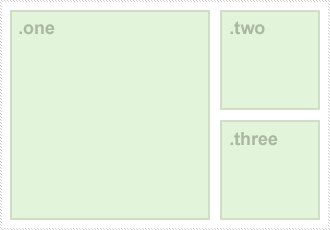
Usingfloat, you would need to wrap these elements in a parent element, and then put.onefloat left, and then change.twoand.threeoffloatandmargin. In the end, you should write something like the following:
.parent {
    /* ghetto clearfix */
    width: 310px;
    overflow: auto;
}
.one {
    width: 200px;
    height: 210px;
    float: left;
}
.two {
    width: 100px;
    height: 100px;
    float: right;
    margin-bottom: 10px;
}
.three {
    width: 100px;
    height: 100px;
    float: right;
}
As we said earlier, usingpositionlets us display elements on the screen in a very explicit way, according to X and Y coordinates. The float approach above will separate long text on the page, while the following method ensures all elements are in normal positions, no matter what content is on the page.
.parent {
    position: relative;
    width: 310px;
    height: 210px;
}
.one, .two, .three {
    position: absolute;
}
.one {
    top: 0;
    left: 0;
    width: 200px;
    height: 210px;
}
.two {
    top: 0;
    right: 0;
    width: 100px;
    height: 100px;
}
.three {
    bottom: 0;
    right: 0;
    width: 100px;
    height: 100px;
}
As mentioned before, somez-indexissues need to be considered. Although the example above may seem a bit excessive, once you start thinking about positioning, it opens up a new world of possibilities.
Whitespace
If we keep switching between single-line and multi-line CSS parameter formats, the whitespace in CSS will also differ. I'm not going to go into too much detail on this.
Proper Whitespace
/* 不好 */
.selector {display:none;background:#FF0000;color:#000000;}

/* 好 -- 单行 */
.selector { display: none; background: #FF0000; color: #000000; }

/* 好 -- 多行 */
.selector {
    display: none;
    background: #FF0000;
    color: #000000;
}
Braces on the Same Line
.selector {
    display: none;
    background: #FF0000;
    color: #000000;
}
Indent Child Elements
Whether to use this is a matter of opinion; personally, I would only use this format in CSS documents with single-line definitions.
.selector { display: none; background: #FF0000; color: #000000; }
    .selector a { text-decoration: none; }
    .selector span { font-weight: bold; }
Group and Indent Vendor-Prefixed Properties
.selector {
    background: #FFF; border: 1px solid #000; color: #EAEAEA;
        -webkit-border-radius: 3px;
        -moz-border-radius: 3px;
        border-radius: 3px;
}
CSS shorthand format
Property Grouping
Grouping properties together is the most effective way to greatly reduce CSS file size. It is very important to understand how properties are ordered (clockwise -- top, right, bottom, left) and how to further shorten them (top and bottom, left and right).
/* 逐个定义,太长了 */
padding-top: 1px;
padding-right: 2px;
padding-bottom: 1px;
padding-left: 2px;

/* 上,右,下,左,好很多 */
padding: 1px 2px 1px 2px;

/* 上和下,左和右,最优 */
padding: 1px 2px;
From 0px to Hero
Giving a value of0to a property is redundant. Whether an element is from the left0pxor0 elephantsdoesn't matter at all; as long as you know it is flush against the left.
/* 不好 */
padding: 0px 10px;
/* 好 */
padding: 0 10px;
Comment blocks
For the task of maintaining multiple style sections in a stylesheet, adding comments to large sections of CSS is a great way. Obviously this works better in combination with single-line CSS style, but it is not completely useless in multi-line CSS style either. Whether to use dashes, equals signs, or underscores for emphasis in comments is a matter of opinion, but here is the way I like:
/* === HORIZONTAL NAV === */
#horizNav { width: 100%; display: block; }
#horizNav li { display: block; float: left; position: relative; }
#horizNav li a { display: block; height: 30px; text-decoration: none; }
#horizNav li ul { display: none; position: absolute; top: 30; left: 0; }

/* === HOME PAGE - CAROUSEL === */
#carousel { width: 960px; height: 150px; position: relative; }
#carousel img { display: none; }
#carousel .buttons { position: absolute; right: 10px; bottom: 10px; }
Clearing floats
Clearing a<div>used to mean extra DOM, because it involved adding an extra clearing element. A better method is to set an explicit width on the parent element ('auto' is not effective in all browsers and scenarios) and set the overflow property to 'auto' or 'hidden'. 'hidden' clearly has better compatibility, but in some IE-compatible versions 'auto' works better.
HTML:
<div class="parentElement">
    <div class="childElement">
        I'm floated left!
    </div>
    I'm normal text that wraps around the float
</div>
CSS:
.parentElement {
    width: 100%;
    overflow: hidden;
}
.childElement {
    float: left;
}
A contributor to this project reminded me to pay attention to the latest clearfix.micro clear-fixis considered stable and cross-browser compatible enough to be included in the latest HTML5 boilerplate release. Istronglyrecommend you take a look. Although I'm not a big fan of browser-specific CSS and:afterthis kind of pseudo-element, this micro clearfix is indeed more robust. It also avoids the problem of top margin collapsing.
Vertical and horizontal centering
Horizontally centering elements is actually not rocket science, and I'm sure most of you are familiar with the following code snippet:
.class {
    width: 960px;
    margin: 0 auto;
}
Front-end developers have used this code for a long time and haven't figured out why this approach doesn't work for vertical centering. From my understanding, it is important to remember that the parent element usually has aheight: auto;style, and also doesn't have the 100% height needed for vertical centering. Applyingposition: absolute;can effectively shift the element into positioning mode, and margins set to auto will automatically help it adjust its position to achieve centering.
.exactMiddle {
    width: 100px;
    height: 100px;
    position: absolute;
    top: 0;
    right: 0;
    bottom: 0;
    left: 0;
    margin: auto;
}
The shortcomings of this method include lack of support in IE6 and IE7, and no scrollbar appearing when the browser is shrunk smaller than the centered object. Atthis webpagemore methods are listed (this one is currently the 4th), but the current one is the best at present.
Vertically centering text in an element is also straightforward. If the text is single-line, such as a horizontal navigation element, you can setline-heightto the physical height of the element.
#horizNav li {
    height: 32px;
    line-height: 32px;
}
Detect features, not browser types
In the earlier discussion of JavaScript feature detection, detecting that the browser isany versionof IE and then applying certain attributes has become increasingly problematic. The Iron Man Paul Irish led the use ofIE version detectionmethods to solve these problems, butModernizrhas saved us since then. Modernizr puts in the root<html>element some classes describing whether certain features are supported. Then progressive styles can easily cascade from or be removed from these classes.
.my_elem {
   -webkit-box-shadow: 0 1px 2px rgba(0,0,0,0.25);
   -moz-box-shadow: 0 1px 2px rgba(0,0,0,0.25);
   box-shadow: 0 1px 2px rgba(0,0,0,0.25);
}

/* 如果 box shadow 不支持, 就应用 borders 属性 */
.no-boxshadow .my_elem {
   border: 1px solid #666;
   border-bottom-width: 2px;
}
Don't misuse !important
Relying on!importantthe tag is a dangerous practice. The situations where you absolutely must use it are few and far between, and are special cases. These situations generally involve overriding another stylesheet that you cannot edit or do not have permission to edit. Another scenario is hardcoding an element's styles to prevent JavaScript-generated styles from having higher priority. But in reality,!importantit is often used as a lazy shortcut to make one style override others, which will cause many problems in the future.
Pair!importantMost uses of the tag can be avoided by better understanding CSS selector specificity and how to target elements more accurately. The more specific the selector, the more likely it will be accepted as the applicable style. The example below from vanseodesign shows specificity in action.
p { font-size: 12px; }
p.bio { font-size: 14px; }
Regarding style precedence,their articleis better than anything I could write in explaining inheritance, so please give it a thumbs up.
Aggressive backward compatibility
It is worth noting that this is my personal opinion and only applies to specific situations. In large commercial projects or enterprise solutions that rely on old browsers, the stance of progressive enhancement will not be easily accepted.
Progressive enhancement means that if a particular (older) browser cannot render a particular effect, it should simply be ignored. CSS3 buttons are a good example. Effects such asborder-radius, box-shadow, text-shadowandgradientswill be displayed in advanced browsers. For slightly older browsers, you can use a.PNGimage as a harmless fallback, and the most elegant of all solutions would be providing a PNG-Fix for IE6, or usingfilterparameters to replace properties like gradients and shadows. In this case, however, progressive enhancement will make you ignore older browsers and present a flat, acceptable object in them.
Simply put, progressive enhancement is:If your browser can't render gradients or box shadows, that's just your tough luck.。
Although this is not ideal for all situations, this approach ensures that the project is delivered on time and the core product is usable, without relying on browser hacks.
CSS3 and HTML5
I think I've said enough on this topic. UseModernizrto detect whether specific HTML5 and CSS3 features are available.
Use and abuse of @font-face
Before you consider embedding a custom font, it is very important that you checkEULAand see whether web embedding is allowed. Font library vendors naturally don't want designers and developers to be able to store font library files directly on a server, where savvy end users can copy them away. Some vendors also prohibit embedding specific file types, such as.TTFand.OTF。
If, after careful consideration, you believe the font you want is embeddable, then go check out Font Squirrel's@font-face generator. It leverages Fontspring'sbulletproof @font-face structureand can automatically generate all the required file formats.
Backward compatibility
Thankfully, browsers have reached a graceful degradation in handling HTML5 and CSS3 features they don't support. Added to<input />New tag types such as "email", "search", etc., generally degrade gracefully to normal text inputs when not natively supported by the browser.<input type="text" />. Similarly, unsupported CSS3 features won't appear, and responsive layouts controlled by height and width media queries won't be applied.
Sophisticated CSS3 effects should be applied as a reward for users on modern browsers.
In the "Resources" section below, we've included some libraries that help keep HTML5 and CSS3 functionality working in a range of older browsers.
Resources
The following resources are important for code standardization and interaction in modern web pages. They ensure that CSS3 and HTML5 features work in a range of browsers that previously lacked support.
- jQuery JavaScript helper libraries
- jQuery UI Does for user interaction/interface what jQuery does for JavaScript
- Modernizr Detect features, not browsers!
- RespondJS Brings responsive layouts to older browsers
- @font-face Generator Comprehensive font embedding
- RaphaelJS Easy-to-use cross-browser vector graphics
- HTML5 Boilerplate It's a good starting point for any project. However, even its "slim" version is a bit bloated.
- Twitter Bootstrap Lets you quickly prototype and style simple web applications.
This article was written by Tait Brown (@taitems), and this Chinese version wascoderLMNtranslated.