Chrome is a modern web browser developed by Google. As one of the three major browsers, it is equipped with a high-efficiency JavaScript engine called V8.

Due to its clean interface and convenient, easy-to-use features, Chrome's market share has risen to 45%, surpassing Internet Explorer and Mozilla Firefox to become the world's largest browser. (Data from Wikipedia)
As a modern browser, it is like apps on a smartphone: every app you install means your phone has another function. The Chrome browser is the same. Google also provides aChrome Web Storefor people to download extensions and customize their use.
Next, I will introduce some commonly used extensions.
ABP Ad Filtering / Adblock Plus
Used by over 50 million people, it is a free ad blocker for Chrome that blocks all annoying ads, malware, and tracking.
Enjoy a web without annoying ads.
Better History
Replaces the browser's built-in history viewing page. This extension lets you view your history better, bringing the best search experience, the clearest interface, and the most helpful filters for viewing your history.
Evernote Web Clipper
Use the Evernote extension to save great web content to your Evernote account with one click.
Evernote Web Clipper helps you save web pages, capture screenshots, add annotations, and easily archive, at the fastest speed, so you can quickly find everything you need anytime, anywhere.
Hangouts
Hangouts makes conversations more lively and fun: you can send photos and emojis, and even video chat for free.
Hangouts integrates photos, emojis, and video to make one-on-one and group conversations more lively and fun, and it is completely free. You can communicate with friends via phone, computer, or tablet.
Sina Weibo Out of Sight, Out of Mind
Sina Weibo (weibo.com) unofficial feature enhancement plug-in. It can block keywords, users, sources without limits, remove page ads and promoted posts, and prevent spam, giving you a clean and tidy Weibo!
Sina Weibo Image Hosting
A simple and easy-to-use Sina Weibo image hosting tool. Supports selecting, dragging, and pasting to upload local images, and generates image URLs in three formats: HTML and Markdown.
Webpage Screenshot: Annotations & Markups
Capture the entire page or any part. Rectangles, circles, arrows, lines, and text. Blur sensitive information, and share annotations with one-click upload. Supports PNG and link.
- NetEase Cloud Music
Listen to NetEase Cloud Music without opening a web page. Simpler and easier to use.
The NetEase Cloud Music Chrome extension pursues a simple experience. You can listen to NetEase Cloud Music, playlists, top DJs, and your favorites without opening a web page or client. Synced with other devices, simpler and easier to use.
Stylish
Stylish is a user style manager that lets you adjust the styling of web pages.
SimpleUndoClose
Simply restore website tabs that you previously closed.
Proxy SwitchyOmega
Easily and quickly manage and switch between multiple proxy settings. You know what I mean~
Xiaole Image Tool (ZIG)
Image extraction (batch download of web page images) + screenshot (vector markup) + beautify + collage
Prism Pretty
Front-end artifact - code highlighting for web pages HTML/CSS/JS
Eye Dropper
Designer's artifact - web page color picker
Google Input Tools
Google's conscientious cloud input method. Supports input of more than 90 countries' languages and characters.
Fawave
A microblog plug-in for Chrome that supports multiple microblogs. Truly real-time synchronized posting to microblogs, making posting to multiple microblogs no longer a hassle. Currently supported microblogs include Tencent Weibo (QQ), Sina Weibo (Sina), Sohu Weibo (Sohu), Fanfou, Zuosa, Digu, Renjian, Leihou, Douban, Google Buzz, NetEase Weibo (163), and some websites that don't exist. It is comprehensive and powerful, and can also send images in batches.
Pocket
Easily save articles, videos, etc. for later viewing. With Pocket, all your content can be gathered in one place for viewing anytime on any device. You don't even need a network connection.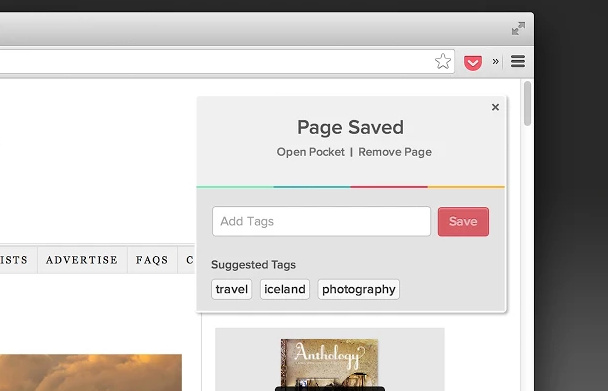
tampermonkey
User script manager - the Tampermonkey script manager for Chrome
To add your custom features, go tohttps://greasyfork.org/zh-CN/Search
Huihui Shopping Assistant
A must-have extension for shopaholics. While you browse products online, it automatically compares prices of the same products from other quality e-commerce sites and provides price history, helping you easily buy at the lowest price, shop smartly and not get ripped off!
Google Translate
Suitable for language learners. Wherever you don't know, just select it. So easy~
- rikaikun
Can display the Japanese kanji in web pages with hiragana and romaji. Suitable for Japanese learners.
My two favorite Chrome extensions are Evernote and Pocket.
The former can record your notes in detail; the latter is a powerful online bookmarking service. Although the former also has a bookmarking function, free users are limited to 60MB of traffic per month. If the web pages you want to save have many images, it may not be enough. So I chose Pocket to store all my favorite pages, and they are easy to find. Using the two together is simply amazing, and it can also improve study and work efficiency.
Being behind the Great Firewall, many people may not be used to this foreign browser product. There are many browsers that "suit" Chinese users' habits, such as 360 Speed/Safe Browser, Maxthon Browser, Sogou Browser, Cheetah Browser, and even the famous Opera browser—all are "shell" browsers based on Chromium (the open-source version of Chrome). Because it is open source, many third-party versions are easily derived. At the same time, Chrome extensions are basically (unless some are changed beyond recognition ←_←) also applicable to them.
Below are some custom optimization settings for Chrome.
For example, I like to force my browser to use Google's Noto font for displayed text. You can use the Stylish extension introduced earlier to customize CSS.
*:not([class*="icon"]):not([class*="mui-amount"]):not([class*="chaoshi"]):not([class*="top-nav"]):not([href*="ju.taobao.com"]):not([class*="Icon"]):not([class*="prev"]):not([class*="next"]):not([class*="pay-"]):not([class*="tm-shop-list-"]):not(b):not(ins):not(i):not(s){font-family:"Noto Sans CJK SC Regular"!important;}
Or make underlines under text URL links disappear.
* {text-decoration:none!important;}Or customize the browser's scrollbar style.Reference links*Newer versions of Chrome may have removed this feature.
::-webkit-scrollbar{
width:3px;
height:6px;
background-color:#fff;
}
::-webkit-scrollbar:hover{
background-color:#eee;
}
::-webkit-scrollbar-thumb{
min-height:5px;
min-width:5px;
-webkit-border-radius:20px;border:1px solid#888;
::-webkit-border-radius:1px;
background-color: #AAA;
}
::-webkit-scrollbar-thumb:hover{
min-height:4px;
min-width:4px;
-webkit-border-radius:20px;border:1px solid#444;
background-color: #AAA;
}
::-webkit-scrollbar-thumb:active{
-webkit-border-radius:20px;border:1px solid#444;
background-color: #AAA;
}
For more CSS styles, you can go tohttps://userstyles.orgGet
Chrome itself has many powerful features. Below are some commonly used hidden settings.
I am not a professional front-end developer. Below is a brief introduction to a few commonly used tools.
The built-in developer tools inherit some features of WebKit.
The phone icon button in the upper-left corner is the developer tools emulator. You can change settings such as UA to simulate the compatibility of web pages displayed on mobile devices.
At the bottom there are more emulator settings.
Developer tools also have a commonly used web element inspector feature.
You can use this feature to find certain elements in the page, such as images, audio, videos that are protected from being saved.
You can also see the loading status of elements in the page.
If page content displays incorrectly or functions abnormally, you can try clearing cookies (this file records some user information, blurred here (//∇//)) or the page's cache.
With developer tools open, to clear the page cache, you can long-click the refresh button in the upper-left corner, and a clear cache menu option will appear.
Also, long-pressing the back button lets you select previously opened pages. (This does not require enabling developer tools.)
Next, I will introduce some hidden debugging settings in Chrome.
Open in the address barchrome://flags
PressCtrl+ForCommand+FSearch within pagequic
Enable the experimental QUIC protocol and SPDY/4 (HTTP/2 standard). It may speed up access to those websites that don't exist. You know~

Non-Mac users are advised to enable overlay scrollbars.
After enabling it, the scrollbar in the page will disappear and only gradually appear when you scroll the page.
Non-Windows users are strongly recommended to disable the Flash plug-in to ensure the browser runs smoothly and stably _(:з」∠)_
Openchrome://pluginsFind the Adobe Flash Player plug-in and disable it.
And switch to an HTML5 player.http://zythum.sinaapp.com/youkuhtml5playerbookmark/
Or add a bookmark
javascript:(function(){var l = document.createElement('link');l.setAttribute('rel','stylesheet');l.setAttribute('media','all');l.setAttribute('href','http://zythum.sinaapp.com/youkuhtml5playerbookmark/youkuhtml5playerbookmark2.css');document.body.appendChild(l);var s = document.createElement('script');s.setAttribute('src','http://zythum.sinaapp.com/youkuhtml5playerbookmark/youkuhtml5playerbookmark2.js');document.body.appendChild(s);})();
Open a web page containing video, click the bookmark and you can use the HTML5 player.
Don't demand too much on video quality either. Domestic video sites are all of the same poor quality. That foreign video site that doesn't exist has already abandoned the damn Flash player and fully moved to HTML5, with video quality up to 4K._(:з」∠)_ For domestic 1080p, you have to buy a membership. Without a membership, you must obediently watch 60 seconds of ads. Even for a short video of just over ten seconds, you have to watch a 60-second ad first. If the ad gets stuck loading, sorry, refresh the page and watch another 60-second ad~ Damn it.←
If you need to force HTTPS when accessing certain websites that don't exist, you can installHTTPS Everywherethis extension.
You can alsochrome://net-internals/#hstsset a URL list inside
For example, add Wikipediahttps://wikipedia.org/and all subdomains (remember to check the two options about subdomains) to the HSTS list

Then when you open the page, it will force the use of HTTPS encrypted connection.
Openchrome://chrome-urls/You can find many hidden settings entries
Take your time to explore, young folks~
A line of code can also turn the Chrome browser into a temporary text editor (fromJobbole Online
data:text/html, <html contenteditable>

This uses the Data URI's format and tells the browser to render HTML. However, contenteditable is a new global attribute of HTML5, so this trick only works in modern browsers that support this attribute.
Besides copying and pasting text, you can also paste images.
The master jakeonrails then modified it to support code highlighting. Seehttps://gist.github.com/jakeonrails/4666256
data:text/html, <style type="text/css">#e{position:absolute;top:0;right:0;bottom:0;left:0;}</style><div id="e"></div><script src="http://d1n0x3qji82z53.cloudfront.net/src-min-noconflict/ace.js" type="text/javascript" charset="utf-8"></script><script>var e=ace.edit("e");e.setTheme("ace/theme/monokai");e.getSession().setMode("ace/mode/python");</script>

The tip says: If you change ace/mode/python above to ace/mode/ruby, then you get a Ruby version of the editor. Other languages follow the same pattern.
To modify it to support syntax highlighting for other languages, you can replace ace/mode/ruby with:
Python -> ace/mode/python
C/C++ -> ace/mode/c_cpp
Javscript -> ace/mode/javascript
Java -> ace/mode/java
Scala -> ace/mode/scala
Markdown -> ace/mode/markdown
CoffeeScript -> ace/mode/coffee
Others...
jakeonrails uses the monokai style for syntax highlighting.
If you want to switch to another style, you can replace ace/theme/monokai with:
Eclipse -> ace/theme/eclipse
TextMate -> ace/theme/textmate
Others...
Lazy guys who don't want to copy and paste code can directly click the links below:
Ruby editor 、Python editor、PHP editor 、JavaScript editor 、Java editor 、C/C++ editor(You can also bookmark these links in your browser.)
For Chrome shortcuts, refer toOfficial documentationandZhihu
- Want to save a webpage as PDF? Press Ctrl+P, then on the print page that appears, change the target printer to "Save as PDF", and finally click Save. Full of style.
- Ctrl+Shift+N opens incognito mode. Your browsing history and cookies won't be kept. Enjoy.
- Suffering from Chrome having too many pages open and being laggy? Just press Shift+Esc to open the Task Manager. Close whatever you want, no need to press Ctrl+W one by one anymore.
- The shortcut Ctrl+Shift+T is used to restore accidentally closed pages.
- Alt+Home quickly returns to your homepage.
- Ctrl+H quickly views browsing history.
- Ctrl+J quickly views download history.
- Want to quickly select the address bar? Press F6, same as Ctrl+L, and also same as Alt+D.
- Want to quickly delete your browsing history? Just press Ctrl+Shift+Delete to delete it quickly.
- Ctrl+Tab switches page tabs from left to right; Ctrl+Shift+Tab switches from right to left.
- Ctrl+1 quickly goes to the first (i.e., the leftmost) page, Ctrl+9 quickly goes to the rightmost page.
- Want to read various novels but complain the screen is too small? Press F11 to instantly enjoy the thrill of fullscreen.
No PDF viewer? No problem. Just drag the PDF file into the Chrome window and you can view it~
Important tabs can be pinned to prevent accidental closing.
More Chrome tips and tricks are waiting for you to discover~
This blog is licensed underAttribution-ShareAlike 4.0 LicenseLicense.
This site is licensed under a Creative Commons Attribution-ShareAlike 4.0 International License.