Markdown Advanced Tips
Supported HTML Elements
Tags that are not covered by Markdown can be written directly in HTML in the document.
Currently supported HTML elements are:<kbd> <b> <i> <em> <sup> <sub> <br>etc., such as:
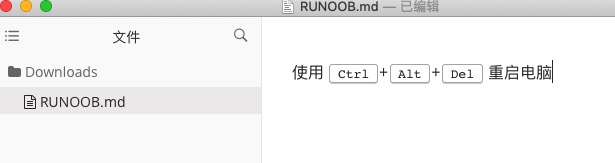
使用 <kbd>Ctrl</kbd>+<kbd>Alt</kbd>+<kbd>Del</kbd> 重启电脑
The output result is:
Escaping
Markdown uses many special symbols to represent specific meanings. If you need to display specific symbols, you need to use escape characters. Markdown uses backslashes to escape special characters:
**bold text**
\*\* asterisks display normally \*\*
The output result is:

Markdown supports adding a backslash before the following symbols to help insert ordinary symbols:
\   反斜线
`   反引号
*   星号
_   下划线
{}  花括号
[]  方括号
()  小括号
#   井字号
+   加号
-   减号
.   英文句点
!   感叹号
Formulas
Markdown Preview EnhancedUseKaTeXorMathJaxto render mathematical expressions.
KaTeX has faster performance than MathJax, but it lacks many of the features that MathJax has. You can check KaTeX supported functions/symbols to learn which symbols and functions KaTeX supports.
Default delimiters:
$...$or\(...\)Mathematical expressions within ... will be displayed inline.$$...$$or\[...\]or```mathMathematical expressions within ... will be displayed in a block.

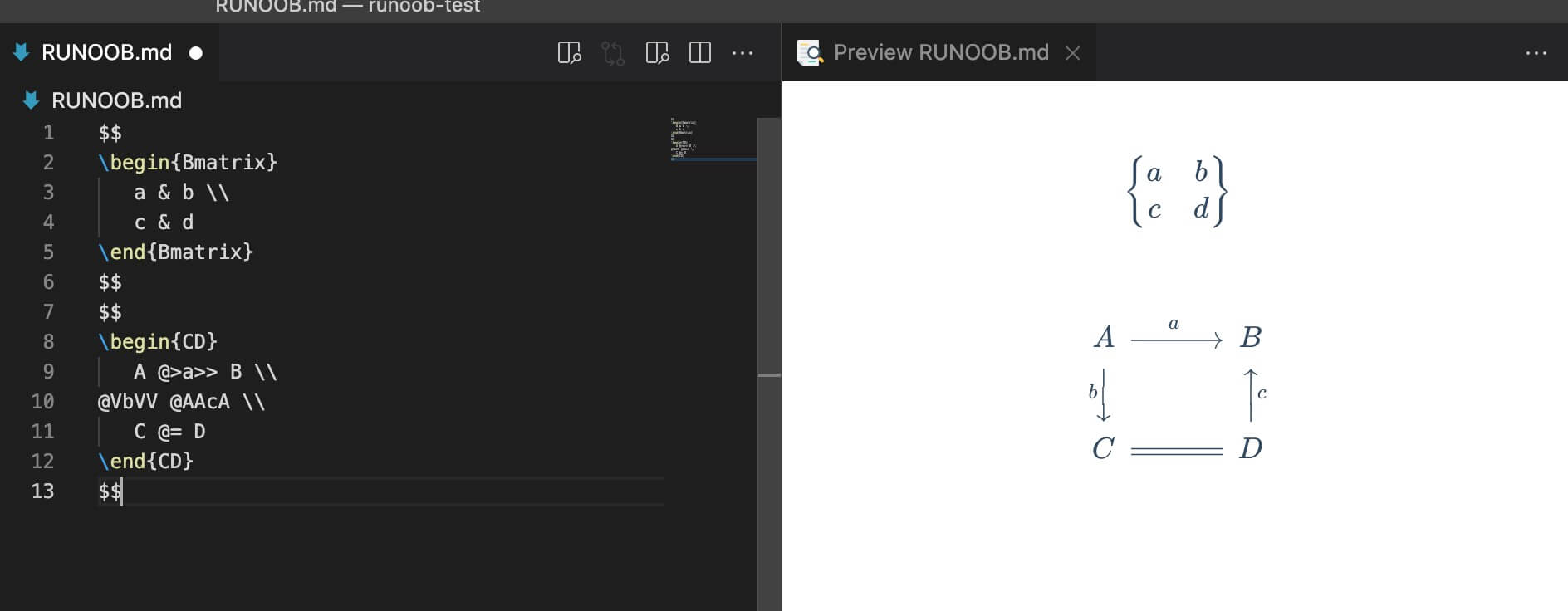
$$
\begin{Bmatrix}
   a & b \\
   c & d
\end{Bmatrix}
$$
$$
\begin{CD}
   A @>a>> B \\
@VbVV @AAcA \\
   C @= D
\end{CD}
$$
The output result is: