Creating a Java Interface in Eclipse
Opening the New Java Interface Wizard
The New Java Interface wizard can create a new Java interface. There are several ways to open the wizard:
- Click the File menu and select New > Interface
- In the Package Explorer window, right-click and select New > Interface
- In the dropdown button on the toolbar (
 ) Select (
 )
)
Before opening the New Java Interface wizard, it is best to select the package name to which the Java interface belongs, so that the Package field will be automatically filled in when creating the Java interface.
Using the New Java Interface Wizard
In the Java Interface wizard pop-up window, you can perform the following operations:
- Confirm that the Source Folder and Package names are correct.
- Enter interface name
- Click the Add button and select the desired interface, which will be inherited.
- Choosing whether to automatically generate comments
- Click the Finish button.

Viewing the newly created Java interface
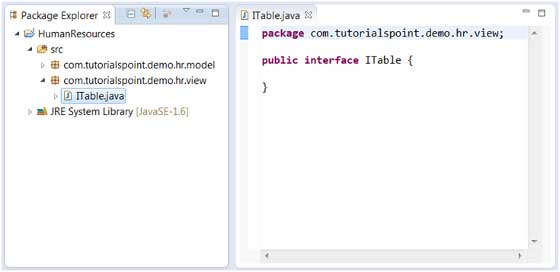
In the Package Explorer view, we can see the newly created interface, and we can modify the interface code using the Java editor on the right.
 other extensions