Visitor Pattern
In the Visitor Pattern, we use a visitor class that changes the execution algorithm of element classes. In this way, the execution algorithm of elements can change as the visitor changes. This type of design pattern is a behavioral pattern. According to the pattern, element objects accept visitor objects, so that visitor objects can process operations on element objects.
Introduction
intent
It aims to separate the data structure from the operations performed on it, making it easier to add new operations without modifying the data structure itself.
Main problems addressed
- It solves the coupling problem between stable data structures and variable operations, allowing operations to change independently of the data structure.
Use Case
- When you need to perform multiple different and unrelated operations on objects in an object structure, especially when these operations need to avoid "polluting" the object classes themselves.
Implementation Approach
- Define the visitor interface: Declares a series of visit methods, one visit method corresponding to each element class in the data structure.
- Create concrete visitors: Implements the visitor interface and provides concrete implementations for each visit method.
- Define the element interface: Declares a method that accepts a visitor.
- Create concrete elements: Implements the element interface; each concrete element class corresponds to a concrete object in the data structure.
Key code
- Visitor interface: Contains methods for visiting different elements.
- Concrete Visitor: Implements the visitor interface and contains the visit logic for each element class.
- Element Interface: Contains a method that accepts a visitor.
- Concrete Element: Implements the element interface and provides an entry point for visitors to access.
Application example
- Guest Scene: A visitor (such as you) visits a friend's home. The friend, as an element, provides information, and the visitor makes judgments based on the information.
Advantages
- Single Responsibility Principle: The Visitor Pattern conforms to the Single Responsibility Principle; each class has only one responsibility.
- Extensibility: It is easy to add new operations to the data structure.
- Flexibility: Visitors can change independently of the data structure.
Disadvantages
- Violates the Law of Demeter: Elements need to expose their internal information to visitors.
- Element classes are hard to change: Element classes need to maintain compatibility with visitors.
- Depend on concrete classes: The Visitor Pattern depends on concrete classes rather than interfaces, violating the Dependency Inversion Principle.
Usage suggestions
- When the object structure is stable, but multiple new operations need to be defined on it, consider using the Visitor Pattern.
- When it is necessary to avoid operations "polluting" object classes, use the Visitor Pattern to encapsulate the operations.
Notes
- The Visitor Pattern can be used for unified functionality, such as report generation, user interface display, interceptors, and filters.
The main roles included
-
Visitor:
- Defines the interface for visiting elements.
-
Concrete Visitor:
- Implement the visitor interface to provide access and corresponding operations for each concrete element class.
-
Element:
- Defines a method that accepts a visitor.
-
Concrete Element:
- Implements the element interface, providing a
acceptmethod, allowing the visitor to access and operate.
- Implements the element interface, providing a
-
Object Structure (Optional):
- Defines how to assemble concrete elements, such as a composite class.
-
Client (Optional):
- Use the Visitor Pattern to perform operations on the object structure.
Implementation
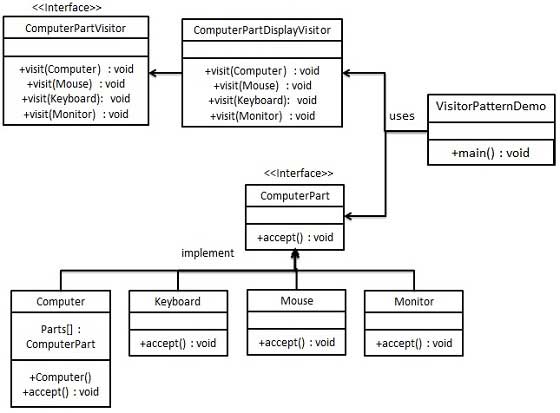
We will create a [class] that defines accepting operationsComputerPartInterface.Keyboard、Mouse、MonitorandComputerImplementsComputerPartConcrete class of the interface. We will define another interface.ComputerPartVisitor, which defines the operations of the visitor class.ComputerUse concrete visitors to perform corresponding actions.
VisitorPatternDemo, our demonstration class usesComputer、ComputerPartVisitorclass to demonstrate the usage of the Visitor pattern.
Step 1
Define an interface representing an element.
ComputerPart.java
Step 2
Create entity classes that extend the above classes.
Keyboard.java
Monitor.java
Mouse.java
Computer.java
Step 3
Define an interface representing a visitor.
ComputerPartVisitor.java
Step 4
Create concrete visitors that implement the above classes.
ComputerPartDisplayVisitor.java
Step 5
UsageComputerPartDisplayVisitorTo displayComputerComponents of.
VisitorPatternDemo.java
Step 6
Run the program and output the results:
Displaying Mouse.
Displaying Keyboard.
Displaying Monitor.
Displaying Computer.
other extensions