MVC Pattern
MVC pattern stands for Model-View-Controller pattern. This pattern is used for layered development of applications.
- ModelThe model represents an object that accesses data or a JAVA POJO. It can also contain logic to update the controller when data changes.
- View- View represents the visualization of the data contained in the model.
- ControllerThe controller acts on the model and the view. It controls the flow of data to model objects and updates the view when data changes. It separates the view from the model.
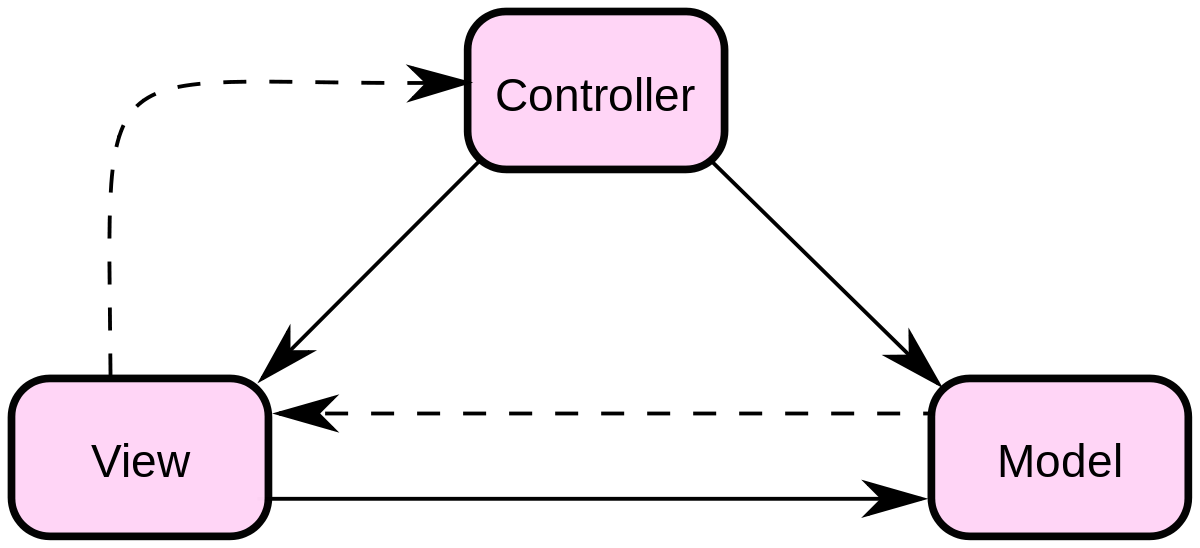
summary
intent
Divides the application into three core components: Model, View, and Controller, to achieve separation of concerns.
Main problems solved
- It solves the coupling problem among business logic, data, and interface display in applications, making development and maintenance clearer and simpler.
Use Case
- When data, business logic, and interface display need to be separated for independent development and maintenance.
Implementation Approach
- Model: Responsible for data and business logic, usually including data storage, retrieval, and business rules.
- View: Responsible for displaying the user interface of the data (model), without business logic.
- Controller: Receives user input, calls the model and view to complete the user's request.
Key code
- Model: Contains business logic and data state.
- view: Contains presentation logic, renders the model's data as a user interface.
- Control unit: Contains logic to respond to user input and update the model and view.
Application example
- Web application: The user sends a request through the browser (view), the server-side controller processes the request, and the model performs data processing.
Advantages
- Separation of Concerns: Separates data, business logic, and interface display to reduce coupling.
- Easy to maintain: Each component is responsible for a specific task, making it easier to develop and maintain independently.
- Extensibility: Can independently replace or update the model, view, or controller.
Disadvantages
- May increase complexity: For simple projects, introducing MVC may add unnecessary complexity.
- Performance issues: If not used correctly, it may cause performance issues.
Usage suggestions
- When developing large applications that require clear separation of data, business logic, and user interface, consider using the MVC pattern.
Notes
- Ensure clear interaction among the model, view, and controller, avoiding mutual dependencies.
Several main roles included
-
Model:
- Manages data and business logic.
-
View:
- Displays data in the model and provides a user interface.
-
Controller:
- Receives user input, calls the model and view for processing.
-
User (optional):
- Interacts with the view and triggers the application flow.
Implementation
We will create a ... as the modelStudentObject.StudentViewIs a view class that outputs student details to the console,StudentControlleris responsible for storing data toStudentthe controller class in the object, and updates the view accordingly.StudentView。
MVCPatternDemo, our demo class usesStudentControllerto demonstrate the usage of the MVC pattern.

Step 1
Create model.
Student.java
Step 2
Create view.
StudentView.java
Step 3
Create a controller.
StudentController.java
Step 4
UsageStudentControllermethod to demonstrate the usage of the MVC design pattern.
MVCPatternDemo.java
Step 5
Run the program, output the results:
Student:
Name: Robert
Roll No: 10
Student:
Name: John
Roll No: 10
other extensions