Front Controller Pattern
Front Controller Pattern is used to provide a centralized request handling mechanism, where all requests are handled by a single handler. The handler can perform authentication/authorization/logging, or track requests, and then pass the request to the corresponding handler. The following are the entities of this design pattern.
- Front Controller- A single handler that processes all types of requests for an application, which may be a web-based application or a desktop-based application.
- Dispatcher- The front controller may use a dispatcher object to dispatch requests to the corresponding concrete handlers.
- View- Views are objects created for requests.
summary
intent
Uses a central controller (or handler) to forward client requests to the appropriate handlers.
Main Problems Solved
- Solves the problem of scattered request handling in web applications, providing a unified request processing entry point.
Use Case
- When requests need to be centrally managed and dispatched in a web application.
Implementation Approach
- Front Controller: Acts as the single entry point for requests, responsible for receiving and forwarding requests.
- view: Used to render the processing results.
- Handler: The component that actually executes request handling.
Key code
- Front Controller: Contains logic to decide which handler to forward the request to.
- Handler Mapping: Maps requests to the corresponding handlers.
Application example
- Web FrameworkAn example is the DispatcherServlet in Spring MVC, which acts as the front controller.
Advantages
- Centralized Request Handling: Simplifies the request processing flow, making it easy to manage and maintain.
- Reduce Code Duplication: Reduces duplicate code in views and handlers by reusing controllers.
- Easy to Extend: When adding new request handling logic, only a new handler needs to be added.
Disadvantages
- May become a performance bottleneck.: All requests pass through the front controller, which may affect performance.
Usage suggestions
- When building a web application that requires a clear request processing flow, consider using the Front Controller Pattern.
Notes
- Ensure that the front controller does not become a performance bottleneck due to centralized handling of all requests.
Contains several main roles.
Front Controller:
- : Acts as the single entry point for requests, responsible for receiving requests and deciding how to handle them.
Handler:
- The component that actually executes request handling.
View:
- Used to render the response generated by the handler.
Handler Mapping (optional):
- Maps requests to the corresponding handlers.
Client (optional):
- : The web browser or API client that issues requests.
The Front Controller Pattern helps build web applications that are easy to maintain and extend by providing a centralized request handling mechanism.
Implementation
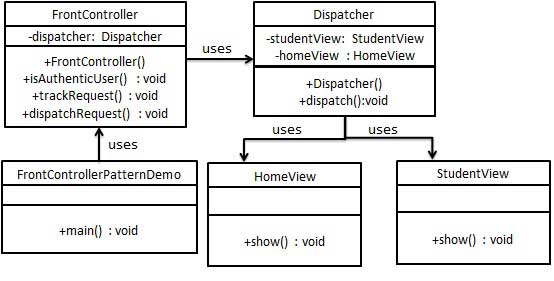
We will createFrontController、DispatcherTreated as the front controller and dispatcher respectively.HomeViewandStudentViewRepresents various views created for requests received by the front controller.
FrontControllerPatternDemo, our demonstration class usesFrontControllerto demonstrate the front controller design pattern.
Step 1
Create view.
HomeView.java
StudentView.java
Step 2
Create a Dispatcher.
Dispatcher.java
Step 3
Create a FrontController.
FrontController.java
Step 4
UsageFrontControllerto demonstrate the front controller design pattern.
FrontControllerPatternDemo.java
Step 5
Execute the program, output results:
Page requested: HOME
User is authenticated successfully.
Displaying Home Page
Page requested: STUDENT
User is authenticated successfully.
Displaying Student Page
other extensions