Data Access Object Pattern
The Data Access Object Pattern or DAO pattern is used to separate low-level data access APIs or operations from high-level business services. The following are the participants of the Data Access Object Pattern.
- Data Access Object Interface- This interface defines the standard operations to be performed on a model object.
- Data Access Object concrete class- This class implements the interface mentioned above. This class is responsible for retrieving data from a data source, which can be a database, XML, or other storage mechanisms.
- Model Object/Value Object- This object is a simple POJO, containing get/set methods to store data retrieved by using the DAO class.
summary
intent
Separate data access logic from business logic, and encapsulate data access operations in a dedicated class.
Main issues solved
- Solve the problem of tight coupling between business logic and data access logic, improving code maintainability and reusability.
Use Case
- When the application's data access logic needs to be centrally managed in order to simplify business logic and facilitate data operations.
Implementation Approach
- Define DAO interface: Declares methods for data access operations.
- Implement DAO class: Implement the DAO interface, encapsulating all access logic to the data source (such as a database).
- Data Transfer Object (DTO): Optional, used to encapsulate data retrieved from the data source.
Key code
- DAO Interface: Declares methods for data access and operations.
- DAO Implementation: Provides a concrete implementation of the DAO interface, containing database access code.
Application example
- User management application: The user DAO class is responsible for interacting with the database, managing CRUD operations for user data.
Advantages
- Separation of Concerns: Separate data access logic from business logic, reducing system coupling.
- Easy to maintain: Centralizes data access logic for easy maintenance and updates.
- Extensibility: When changing the data source or modifying data access logic, the business logic layer is not affected.
Disadvantages
- May increase complexity: For simple applications, introducing the DAO pattern may add an extra layer of abstraction.
Usage suggestions
- When the application needs to interact with multiple data sources, or the data access logic is relatively complex, use the DAO pattern.
Notes
- DAO classes should be as simple as possible, containing only data access logic and no business logic.
Several main roles included
-
DAO interface (DAO Interface):
- Declares methods for data access and operations.
-
DAO Implementation:
- Implement the DAO interface, encapsulating all access logic to the data source.
-
Data Transfer Object (DTO) (optional):
- Encapsulate data retrieved from the data source for data transfer between the business logic layer and the data access layer.
-
Business Logic Layer (Business Logic Layer):
- Use the DAO interface to interact with the data source, without directly depending on the specific implementation of data access.
-
Data Source:
- Database or other persistent storage, with which DAO implementations interact to access and store data.
The Data Access Object Pattern helps keep an application clean and manageable by providing a clear data access layer.
Implementation
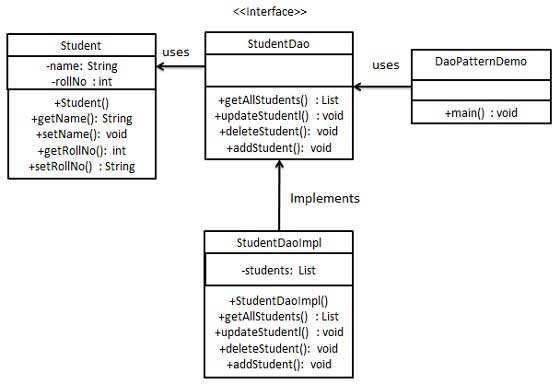
We will create an object that serves as a model object or value object,StudentObject.StudentDaoIs the Data Access Object interface.StudentDaoImplwhich is an entity class that implements the Data Access Object interface.DaoPatternDemo, our demo class usesStudentDaoto demonstrate the usage of the Data Access Object Pattern.
Step 1
Create value object.
Student.java
Step 2
Creates the Data Access Object interface.
StudentDao.java
Step 3
Creates entity classes that implement the above interface.
StudentDaoImpl.java
Step 4
UsageStudentDaoto demonstrate the usage of the Data Access Object Pattern.
DaoPatternDemo.java
Step 5
Execute the program and output the result:
Student: [RollNo : 0, Name : Robert ]
Student: [RollNo : 1, Name : John ]
Student: Roll No 0, updated in the database
Student: [RollNo : 0, Name : Michael ]
other extensions