DeepSeek Harness community plugin
The core design of DeepSeek Harness (dsh for short)Yes, Everything is a Plugin (everything is a plugin)。
In dsh, model adapters, tool registration, session logs, Agent Loop, sandbox, storage, task scheduling, UI, and even permission policies can all exist as Cordis plugins.
Cordis is a lightweight plugin-based application framework that uniformly handles plugin registration, dependency resolution, and lifecycle management.
DeepSeek Harness is not an Agent with fixed, written-in-stone functionality, but rather an Agent infrastructure that can be continuously assembled and expanded.
Traditional LLM Agent structures are usually fairly fixed: Prompt, model, Agent, and tools are connected in sequence, with most capabilities encapsulated within the framework core.

A more accurate way to understand it is: dsh is not an Agent that comes with many built-in features, but rather aA runtime that can continuously assemble Agent capabilities through plugins。
We don't need to modify dsh's core source code to change its behavior.
Common requirements and corresponding approaches are as follows:
| Requirements | Method | Corresponding plugin examples |
|---|---|---|
| Switch to another interface | Install the UI plugin | dsh-web-ui、dsh-TUI |
| Adding visual capabilities | Installing visual plugins | modlens、dsh-vision-toolkit |
| Multi-agent collaboration | Install the Agent Teams plugin | dsh-agent-teams |
| Browser automation | Install the Browser plugin | dsh-browser、BrowserSkill |
| Context management | Install the Context plugin | dsh-context |
Plugins can also be stacked on top of each other to create completely different working environments.
In dsh, model adapters, tool registries, session logs, Agent Loop, sandbox, storage, scheduling, UI, and even permission policies all exist in the form of Cordis plugins.
The diagram below shows dsh's overall plugin-based architecture. The host is only responsible for organizing capabilities; all capabilities themselves are provided by plugins:

Profile: determines which environment plugins run in
There is an obvious difference between installing plugins in dsh and installing ordinary npm packages or Python packages: after a plugin is installed, the environment it runs in is determined by the Profile.
The same dsh can load different plugin combinations depending on the usage scenario, and different Profiles do not interfere with each other.
The three commonly used Profiles are as follows:
| Profile | Form | Applicable scenarios |
|---|---|---|
| web | Web workbench accessed via browser | Daily interactive development, task board, remote access |
| tui | Terminal full-screen interface | SSH remote development, for users accustomed to the command line |
| headless | Headless background operation | Automation scripts, CI integration, scheduled tasks |
For example, a typical Web Profile plugin combination:
Web Profile
├── dsh-web-ui          # Web 工作台
├── dsh-better-sidebar  # 侧边栏工作区
├── modlens             # 视觉能力
└── dsh-market          # 插件市场
End users may only keep:
TUI Profile
└── dsh-TUI             # 全屏终端界面
Plugin installation
dsh provides a unified installation entry point for plugins, which can be done with a single command.
# 安装插件到 web profile(--profile 指定目标环境,必填)
dsh plugin --profile web add <源>

# 安装插件到 tui 终端环境
dsh plugin --profile tui add <源>
Take installing dsh-web-ui (open source addresshttps://github.com/zhu1090093659/dsh-web-ui) as an example:
dsh plugin --profile web add @linxin666/dsh-web-ui-all@latest
After installation and restart, we can view the installed plugins in the plugin list in Settings:
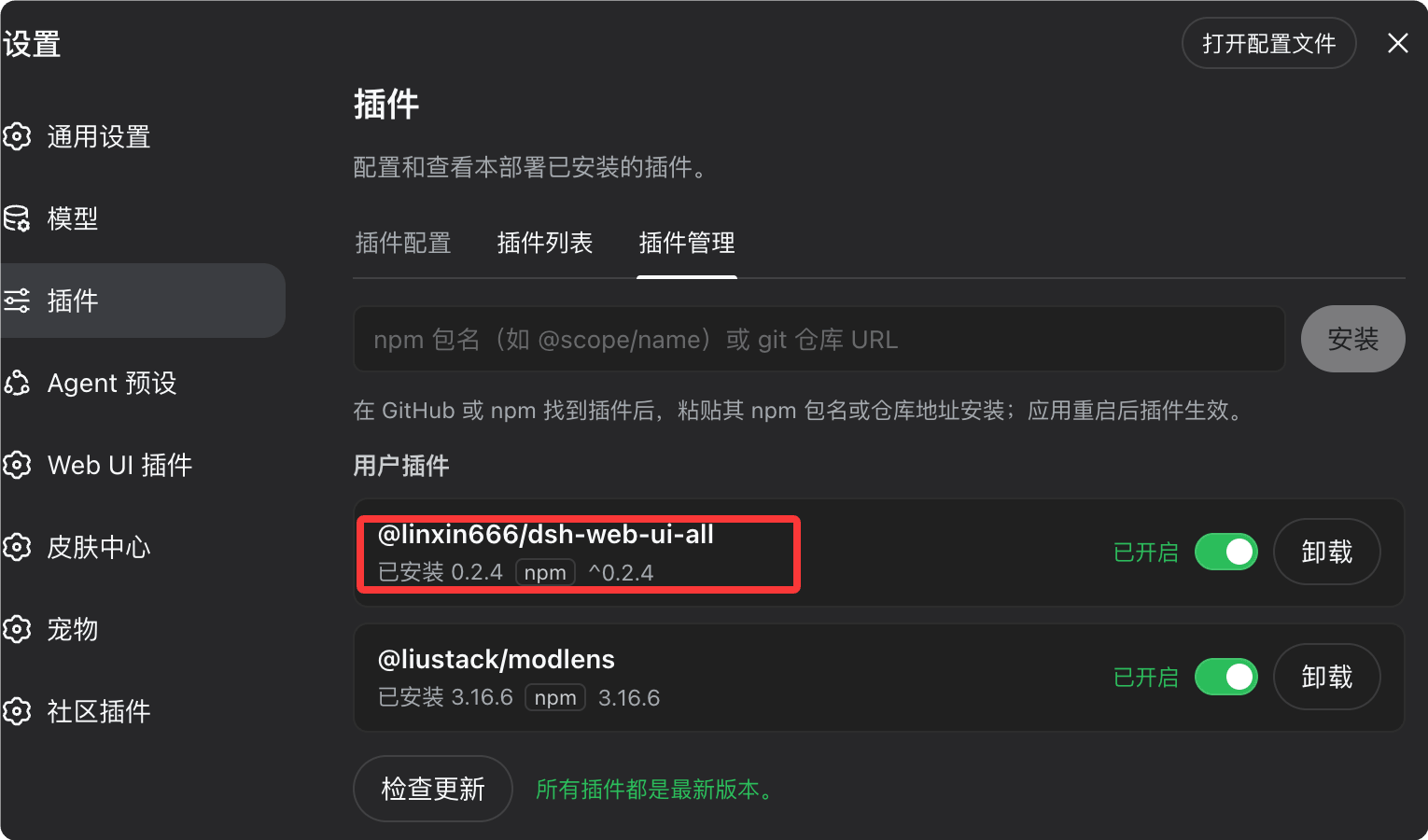
Then we can view the plugin's features in the left list and try installing skins:

A complete installation process is usually:
选择 Profile
    ↓
安装插件
    ↓
检查依赖 / README
    ↓
重启对应服务
    ↓
验证插件是否加载
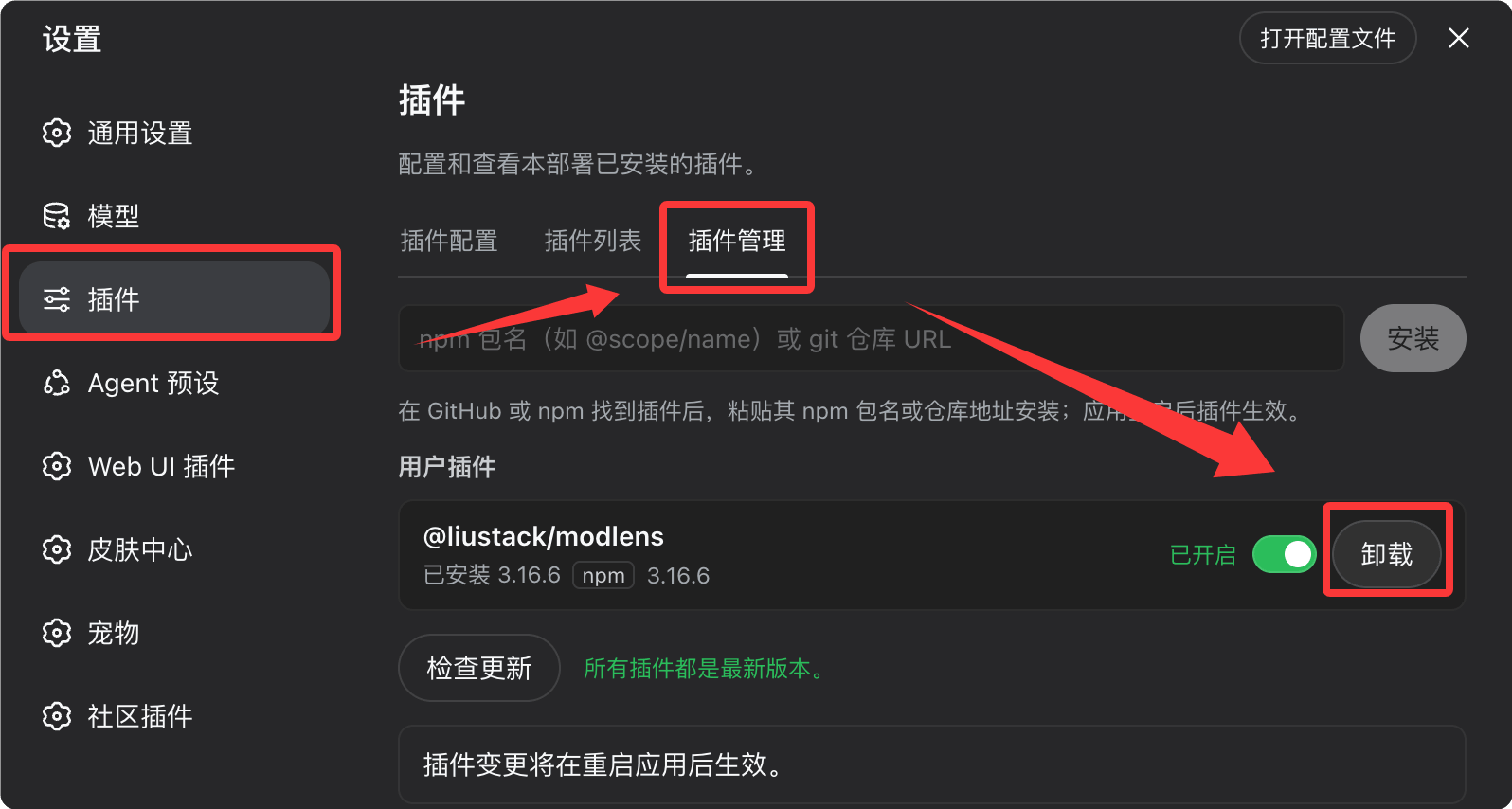
To uninstall a plugin, simply click the uninstall button in the plugin list in the Settings menu:
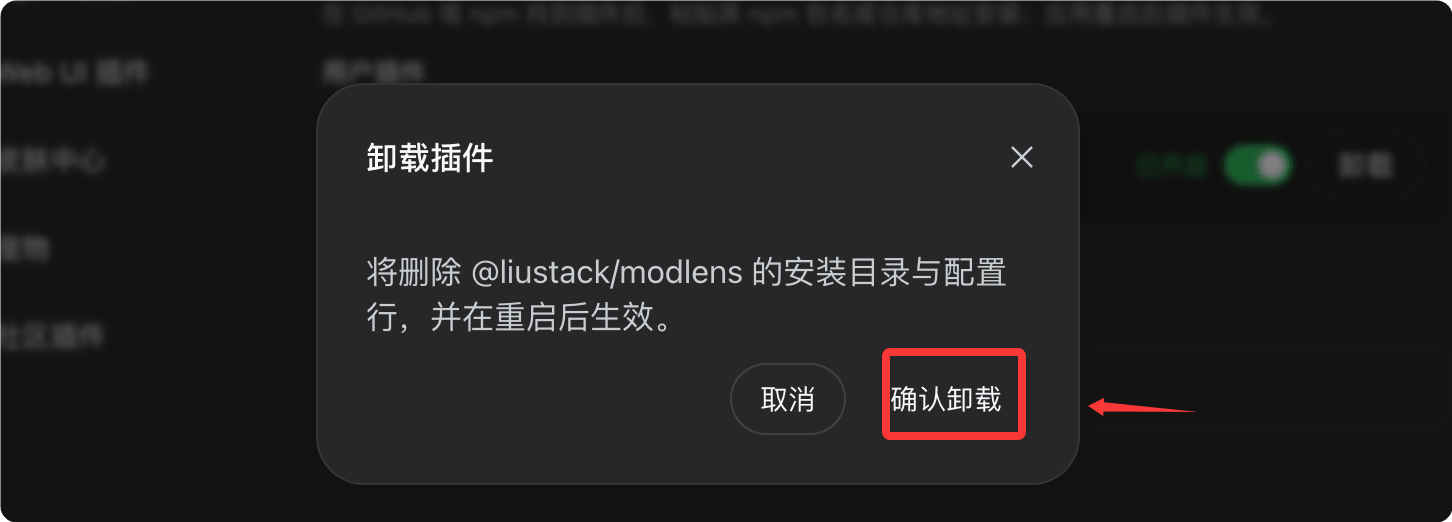
Click confirm to uninstall and complete the uninstallation:
Next, let's introduce some plugins that are currently open source. For more community plugins, you can follow:https://github.com/topics/dsh-plugin。
UI enhancements and workbench
This type of plugin solves the "interface isn't good enough" problem, upgrading dsh from a command-line tool to a complete workbench close to an IDE.
Among these, dsh-web-ui and DSH-better-sidebar are the most popular combination in the community; the former rounds out the Web interface's feature set, while the latter provides a persistent sidebar.
| Plugin | Introduction | Installation command |
|---|---|---|
| dsh-web-ui | Web UI complete package: task board, Git graph, right panel, remote mobile, desktop pet, real-time Token statistics, skin center | dsh plugin --profile web add github:zhu1090093659/dsh-web-ui |
| DSH-better-sidebar | Full sidebar workbench: file tree / editor, terminal, Git, subagents, supports third-party plugins registering new tabs | dsh plugin --profile web add dsh-better-sidebar |
| dsh-TUI | Claude Code-style full-screen terminal TUI: streaming thinking, double-press Esc to trace back, status bar, model switching | dsh plugin --profile tui add @deepseek-harness-tui/dsh-tui |
| dsh-at-file | Enter @ in the input box to quickly search and reference workspace files / directories | dsh plugin --profile web add github:omdsh-dev/dsh-at-file |
dsh-web-ui doesn't just simply swap in a new interface; it fills in workbench capabilities such as task board and Git graph around the Agent workflow.
DSH-better-sidebar solves the "workspace organization capability" problem, suited for users who want to turn dsh into an "AI IDE."
The usage of dsh-at-file is very intuitive: enter @ in the input box to search and reference workspace files:
请分析 @example-demo/src/main.py

比较 @example-demo/src/api 和 @example-demo/src/service
For coding agents, this interaction method is much more natural than manually copying file contents.
For terminal users, dsh-TUI is more recommended. It provides streaming output and message tracing in the terminal, with an experience close to Claude Code.
Vision and multimodality
dsh can use plugins to "bolt on" visual processing capabilities to what was originally a text-centric Agent.
modlens's core idea is to convert images into structured visual evidence, then hand it over to a text model for processing.
With the same paste of a webpage screenshot, what you get is not "this is a webpage screenshot," but a combination of OCR text, layout information, coordinates, and semantic labels.
| Plugin | Introduction | Installation command |
|---|---|---|
| modlens | Pure text models instantly become multimodal: paste an image and output structured OCR, layout, and semantic evidence | dsh plugin --profile web add @liustack/modlens |
| dsh-vision-toolkit | Complete vision toolbox: intent Q&A, long screenshot OCR, UI reproduction, grounding, pixel diff | dsh plugin --profile web add @anionex/dsh-vision-toolkit |
| dsh-vision-router | Free vision chain and pixel-level tools, supporting local Ollama / LM Studio | dsh plugin --profile web add dsh-vision-router |
This type of plugin is suitable for tasks such as OCR, webpage screenshot analysis, document understanding, and image content extraction.
If your main work involves frontend development, UI replication, or screenshot analysis, dsh-vision-toolkit is more practical than OCR alone.
Users who want full local deployment of vision capabilities can pay special attention to dsh-vision-router.
Skins, themes, and desktop pets
This type of plugin may not improve the Agent's core capabilities, but it best demonstrates how thorough "everything is a plugin" really is: even skins and desktop pets are plugins.
| Plugin | Introduction | Installation command |
|---|---|---|
| dsh-deep-whale | Whale Girl skin series (Deep Sea Maid Workshop, etc.), supporting light / dark modes | dsh plugin --profile web add github:Small-tailqwq/dsh-deep-whale |
| whale-girl / dsh-pet series | Draggable, feedable, interactive desktop pet little whale (multiple community repositories) | Install according to each repository's README |
If you feel the Agent workbench is too serious, this type of plugin is essentially the entertainment proof of "pluginization."
Multi-agent and workflows
If UI plugins solve "how to use dsh," then multi-Agent plugins solve "how to get multiple Agents working together."
The idea behind dsh-agent-teams is very intuitive: the current session acts as the team leader, breaking tasks down among multiple sub-Agents that can continue the conversation.

| Plugin | Introduction | Installation command |
|---|---|---|
| dsh-agent-teams | Current session becomes team leader: create sub-Agents that can continue chatting, tasks with dependencies, automatic scheduling, real-time panel | dsh plugin --profile web add @nanmicoder/dsh-agent-teams |
| dsh_workflow | Workflow layer that can be generated, saved, restored, observed, and governed | dsh plugin --profile web add "github:dsh-external/dsh_workflow#main" |
The division of labor between the two can be understood this way: agent-teams solves "multiple Agents working together," while workflow solves "fixing the Agent workflow in place and executing it repeatedly."
Combined, they can form a complete execution chain:
需求
 ↓
Leader Agent(任务拆分)
 ├── Frontend Agent
 ├── Backend Agent
 ├── Test Agent
 └── Review Agent
 ↓
Workflow(流程固化、反复执行)
 ↓
最终结果
At this point, dsh begins to shift from "AI helps me write code" toward "AI Agent organizes multiple execution units on its own to complete tasks."
Browser and automation
Once agents truly enter production environments, being able to read and write code alone is usually not enough. They also need to open web pages, read pages, click and input, and execute tasks while carrying a login state.
Unlike headless browser solutions, dsh-browser directly drives the local Chrome, preserving all existing login states and cookies, so agents don't have to log in from scratch every time.
| Plugin | Introduction | Installation command |
|---|---|---|
| dsh-browser | Control real Chrome (preserving login / cookies), control web pages with structured text | The repository provides a one-click installation script (including browser extension) |
| BrowserSkill | Tencent's open-source real logged-in browser automation solution (CLI + extension) | Install according to the repository instructions |
Browser plugins are suitable for tasks that require a login state, such as website automation, backend operations, data collection, and web testing.
This type of plugin usually also involves additional components such as browser extensions. It's recommended to install via the official script or README, rather than manually piecing together commands.
Memory, context, and session migration
The longer you use an Agent, the real problem often isn't that the model isn't smart enough, but that the context gets increasingly messy.
This type of plugin revolves around "context": either bringing in sessions from elsewhere, or making the composition of the current context clear to see.
| Plugin | Introduction | Installation command |
|---|---|---|
| dsh-chat-import | from Claude Code / Codex / ChatGPT / Cursor / Gemini waitNone损Import历史Session | dsh plugin --profile web add dsh-chat-import |
| dsh-context | Context composition, Token trends, compression / trimming visualization panel | dsh plugin --profile web add dsh-context |
If you've already heavily used other Coding Agents, migration plugins like dsh-chat-import will be very valuable.
For long-running coding agents, the importance of context management will keep increasing.
Agent effectiveness largely depends on "model capability + context quality + tool capability + task state," rather than simply looking at model benchmarks.
Plugin discovery and management
As the number of plugins grows, a new problem arises: where to find plugins.
dsh-market includes a built-in plugin marketplace in the settings page, supporting search, categorization, and one-click install/update; dsh-find-plugin goes further by letting you find plugins directly in a session using natural language.
| Plugin | Introduction | Installation command |
|---|---|---|
| dsh-market / dshmarket | Plugin marketplace built into the settings page: search, categorization, one-click install / update | dsh plugin --profile web add dshmarket |
| dsh-find-plugin | Search plugins by natural language within a session, returning descriptions and install commands | dsh plugin --profile web add dsh-find-plugin |
For example, if you directly ask "is there a plugin that can analyze webpage screenshots," it will return the plugin name, feature description, and installation command.
If you plan to use dsh long-term, it's recommended to research the plugin market first, rather than manually searching through dozens of GitHub repositories at the start.
"Finding plugins" is itself a plugin, which is a direct reflection of the Everything is a Plugin design philosophy.
Other practical plugins
Besides the core categories above, the community also has some projects that are quite popular and not easy to categorize.
| Plugin | Introduction | Installation command |
|---|---|---|
| deepseek-harness desktop version | Desktop client, one-click launch | Download and install |
| DeepSeek Harness plugin featured list | Collected a list of selected plugins | Install following the plugin documentation |
| archify | Generate beautiful, verifiable architecture diagrams / flowcharts (in Skill form) | Install using the repository's Skill installation method |
| dsh-plugin-subscriptions | Log in via OAuth and reuse existing ChatGPT / Claude / Grok subscriptions in dsh (community repository) | Install according to the repository README |
The desktop client suits users who don't want to deal with the command line and runtime environment themselves, while archify is useful for users who often have agents analyze code repositories and design system architectures.
Subscription-type plugins involve account authorization and third-party services, with security risks significantly higher than ordinary UI plugins. Don't install them just based on keywords like "free model" or "free subscription." Be sure to first review the source code, permission scope, and actual authorization process.
Contextual recommendation
dsh's advantage isn't "the more plugins, the stronger," but freely combining them according to your own workflow.
Don't install a dozen plugins right away. You can set things up according to the following groups of typical scenarios.
| Use Case | Recommended combination | Coverage capability |
|---|---|---|
| Starter combo for beginners | dsh-web-ui + DSH-better-sidebar + dsh-market + modlens | Workbench + sidebar + plugin market + vision |
| Terminal users | dsh-TUI | Fullscreen terminal interface, streaming thinking, message backtracking |
| Multi-agent development | dsh-agent-teams + dsh_workflow | Task splitting, automatic scheduling, workflow solidification |
| Migrating from other tools | dsh-chat-import + dsh-at-file + dsh-context | Historical session import, quick file referencing, context management |
Getting started suggestions:First install dsh-market, then use the marketplace to install the remaining plugins as needed, and leave subsequent update management to it as well.
First get the core workflow running smoothly, then gradually add other capabilities.
Precautions for installing third-party plugins
The biggest advantage of the dsh plugin ecosystem is also its biggest risk: plugins have very large expansion capabilities.
A UI skin plugin and a browser automation plugin are clearly not on the same level of security. Before installing, at least do the following four checks.
Look at the source code first
In particular, prioritize reviewing plugins involving Shell, browser, OAuth, API Key, file system, and network permissions.
Don't just look at the marketing claims in the README.
Check the license
Confirm what License the project uses.
When preparing for commercial use, secondary development, or enterprise internal deployment, be sure to confirm license restrictions in advance.
Check dependencies
Focus on checking npm / Python dependencies, browser extensions, and external services.
A project that looks like just a UI plugin, but introduces a large number of unnecessary dependencies, is worth being wary of.
Pin the version or commit
dsh is still in a phase of rapid iteration, and community plugin APIs may also change. In production environments, it's not recommended to always track latest or main.
# 不推荐:始终追踪 main 分支
github:dsh-external/dsh_workflow#main

# 推荐:固定到具体 commit(具体语法以插件管理器当前版本为准)
github:xxx/xxx@a1b2c3d
This can avoid the situation where "it runs today, but after the plugin author updates it, it suddenly breaks tomorrow."
If you want to continue exploring more plugins, you can start with the following channels:
| Channel | Description |
|---|---|
| GitHub topic:dsh-plugin | Browse community open-source plugin repositories by topic |
| awesome-dsh-plugin | Community-maintained curated plugin list |
| dshhub.dev、dsh.so | Community plugin directory site |
Architecture ideas behind pluginization
If you only see dsh as "DeepSeek built an Agent tool similar to Claude Code," you're actually underestimating it.
Traditional Agents encapsulate Model, Tool, Memory, Loop, and UI within themselves, while the Harness is only responsible for "organizing capabilities" without hard-coding any abilities.
This means that what the community will truly compete on in the future may not be who wrote a prettier chat window, but who can provide better underlying capability plugins:
| Capability dimension | Description |
|---|---|
| Agent Loop | Session loop and execution strategy |
| Coding Agent | Code understanding and generation |
| Browser Agent | Web operations and automation |
| Memory | Long-term memory management |
| Context Engineering | Context organization and compression |
| Multi-Agent | Multi-intelligent-agent collaboration |
| Workflow | Workflow orchestration and governance |
| Evaluation | Effect evaluation |
| Sandbox | Secure isolated execution |
| Tool Router | Tool routing |
| Model Router | Model routing |
What ultimately takes shape may not be a single Agent product, but rather an Agent Plugin Ecosystem.
Gradually build your own agent runtime
The most suitable way to use dsh is not "install, open, done," but progressive construction.
安装 Harness
    ↓
选择 Profile
    ↓
安装基础插件
    ↓
搭建自己的工作台
    ↓
增加工具
    ↓
增加 Agent
    ↓
增加 Workflow
    ↓
增加 Memory / Context
    ↓
形成自己的 Agent Runtime
Previously, choosing an AI coding tool meant choosing among Claude Code, Codex, and Cursor; after pluginization, the thinking has begun to shift: the underlying Runtime can be fixed, while capabilities are assembled by yourself.
One person can choose a Web UI, another can choose a TUI; some focus on using the browser, others focus on multi-Agent, and one can even develop plugins to integrate tools, workflows, or Agents.
The core runtime is responsible for connecting capabilities, plugins for providing capabilities, Profile for organizing capabilities, and developers ultimately for defining their own agents.
If this ecosystem continues to develop, dsh may ultimately become more than just an "AI coding tool"—it may be more like a composable Agent Operating Environment (agent runtime environment).
And this is precisely what makes "Everything is a Plugin" most worth studying.