DeepSeek Harness Multimodal
DeepSeek has launched an experimental multimodal vision understanding model, DeepSeek-V4-Flash-Vision-Exp, and simultaneously opened multimodal API services and a free Files API.
Install the latest version before use:
npm install -g @deepseek-ai/dsh@latest
After updating to the latest version, you can see that the model list already includes DeepSeek-V4-Flash-Vision-Exp:
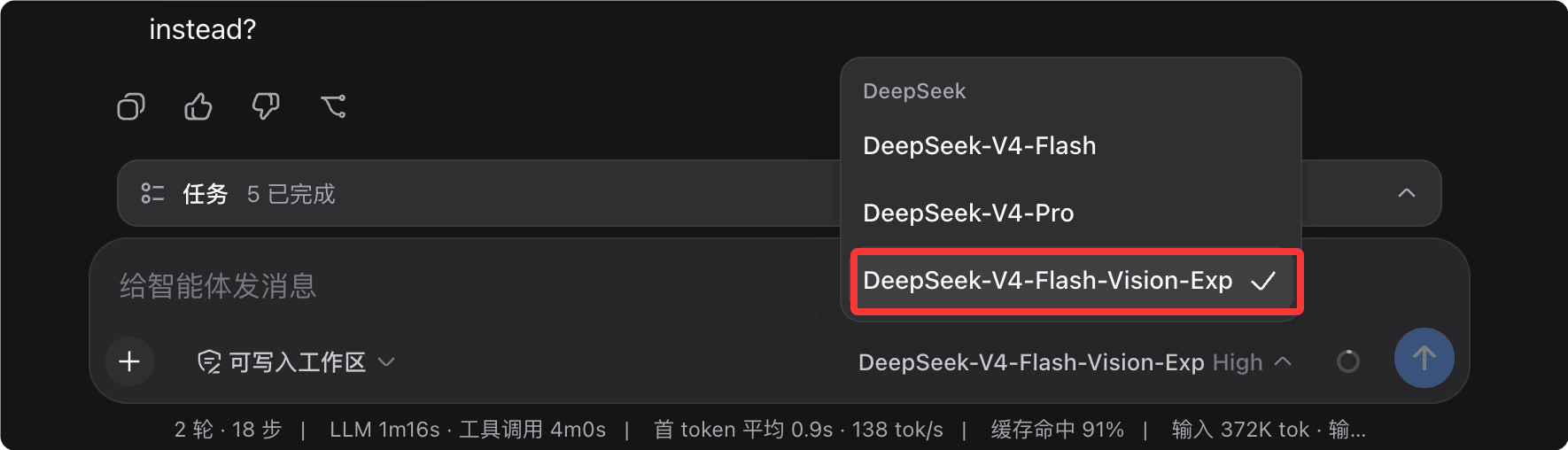
Switch to the vision model, and then we can directly drag images or PPT files into the document to let it look at the content in the images ( Test image download):

What is multimodal
To understand multimodality, we first need to understand the word "modality." Modality refers to different forms of information representation: text is one modality, and images, audio, and video are each different modalities as well.
| modality | Common forms | Corresponding AI capabilities |
|---|---|---|
| Text | Articles, code, conversations | Large Language Model (LLM) |
| image | Photos, screenshots, design mockups, charts | Visual understanding model |
| audio | Speech, music | Speech recognition and generation models |
| Video | Short videos, screen recordings, surveillance footage | Video understanding model |
In the past, large language models only processed a single modality—text. Everything you sent them had to be converted into text first.
Multimodal models can simultaneously receive images and text, uniformly converting them into token sequences before processing them together.

The key point: images are not "directly seen" by the model. Instead, a vision encoder first cuts them into patches and converts them into vectors, which are then concatenated with text tokens into the same sequence.
Images also consume tokens. One image takes up to 384 tokens—this is exactly the source of the multimodal billing rules mentioned later.
For Agents, multimodality brings a qualitative change, not just a nice-to-have enhancement.
| Comparison Item | Text-only model | Multimodal model |
|---|---|---|
| Input form | Text only | Mixed text and images |
| Troubleshoot code errors | Requires users to manually transcribe error messages into text | Directly send error screenshots |
| Reproduce the design mockup | Unable to reference visual drafts | Write pages directly from design mockups |
| Analyze data charts | Cannot read images within images | Look at the image and give conclusions directly |
V4-Flash-Vision-Exp: Multimodal vision model now available
DeepSeek-V4-Flash-Vision-Exp is an experimental multimodal vision understanding model, now available on the DeepSeek API platform.
Users can set viamodel='deepseek-v4-flash-vision-exp'Then you can access the model.
Its capability positioning can be summarized in one sentence: text capabilities without compromise, visual capabilities with a major leap.
In pure text capabilities (Agent, reasoning, world knowledge, etc.), it is on par with the official DeepSeek-V4-Flash release.
On Agent Benchmarks requiring visual understanding, it has achieved a significant leap over DeepSeek-V4-Flash, with multimodal Agent capabilities now approaching Opus-4.8.
| Capability dimension | DeepSeek-V4-Flash | DeepSeek-V4-Flash-Vision-Exp |
|---|---|---|
| Pure text Agent tasks | Release baseline | On par with the official version |
| Reasoning and world knowledge | Release baseline | On par with the official version |
| Visual understanding Agent tasks | Not supported; multimodal elements are ignored in evaluation | A major leap, approaching Opus-4.8 |
| Model positioning | Official version | Experimental version |
Evaluation methodology note: For Code Agent text tasks in public benchmark sets, DeepSeek series models are tested using DeepSeek Harness minimal mode as the framework, with max setting, temperature=1.0, topp=0.95.
In the ApexBench and Agents' Last Exam evaluations, the text model DeepSeek-V4-Flash ignores the multimodal elements in them.
Multimodal API Quick Start
The multimodal API supports three calling formats: Chat Completions, Messages, and Responses, making it easy to integrate with various Agent tools.
The three formats have identical capabilities—just choose based on the interface style you're familiar with.
| Call format | Interface style | Who is it for? |
|---|---|---|
| Chat Completions | OpenAI classic chat interface | Developers who already have OpenAI SDK code |
| Messages | Anthropic Messages interface,base_url is https://api.deepseek.com/anthropic | Developers who already have Anthropic-style code or toolchains |
| Responses | OpenAI's new Responses API | Developers using the new SDK who prefer concise input structures |
All three formats support mixed image-text input. Images can be passed in three ways: base64 inline, external URL, or Files API.

| Passing method | Request body size | Whether an image hosting service is needed | Applicable scenarios |
|---|---|---|---|
| base64 inline | big | Not Required | Local images, one-off small images |
| External URL | small | requires | Images already deployed on publicly accessible servers |
| Files API | small | Not Required | The same image used multiple times, high-frequency batch tasks |
Method 1: base64 inline
After encoding a local image as a base64 string, write it directly into the request body as a data URL.
Example
# Dependency: pip install openai
import base64
from openai import OpenAI
# DeepSeek endpoint is compatible with OpenAI SDK, just change base_url to switch
client = OpenAI(
api_key="sk-your-secret-key", # Required: replace with your own DeepSeek API key
base_url="https://api.deepseek.com" # Required: DeepSeek official endpoint
)
# Read local image, encode into base64 string
with open("example-logo.png", "rb") as f:
b64 = base64.b64encode(f.read()).decode("utf-8")
response = client.chat.completions.create(
model="deepseek-v4-flash-vision-exp", # Required: Multimodal visual understanding model
messages=[
{
"role": "user",
"content": [
# Text and images are interleaved in array order, and the model understands them in order.
{"type": "text", "text": "What is the text in the image?"},
{
"type": "image_url",
# base64 inline: data:image format;base64,encoded content
"image_url": {"url": f"data:image/png;base64,{b64}"}
}
]
}
],
stream=False # Optional: whether to stream output, default False
)
print(response.choices[0].message.content)
Run output:
图片中的文字是 "EXAMPLE"。
Method 2: External URL
Images are deployed on publicly accessible servers, and the request only carries a URL string, keeping the request body very small.
Example
curl https://api.deepseek.com/chat/completions \
-H "Content-Type: application/json" \
-H "Authorization: Bearer ${DEEPSEEK_API_KEY}" \
-d '{
"model": "deepseek-v4-flash-vision-exp",
"messages": [
{
"role": "user",
"content": [
{"type": "text", "text": "Summarize the trend of this chart in one paragraph."},
{"type": "image_url", "image_url": {"url": "https://static.example.com/images/chart-demo.png"}}
]
}
]
}'
The URL must be a public address accessible by the platform. Internal network addresses and local loopback addresses cannot be fetched.
Both base64 and URL methods support adding an optional detail field in image_url to control image resolution precision.
| detail value | Behavior | Applicable scenarios |
|---|---|---|
| low | Scale to 512×512 before parsing, lower token consumption | Only need a rough look: identify the image type, find the main subject |
| high | Equivalent to original | Need to see details clearly |
| original | Analysis preserving original image precision | Read text, view small icons, analyze charts |
| auto | Currently equivalent to original | Default value, behavior when detail is not passed |
Setting detail to low when running screenshot-type tasks in batches is the most direct way to control multimodal costs.
Messages and Responses format
Those who already have Anthropic or new-style OpenAI code can switch to DeepSeek multimodal almost seamlessly.
Messages format uses image content blocks, and images are passed through the source field.
Example
# The endpoint uses DeepSeek's Anthropic-compatible path /anthropic, and the header fields are also consistent with Anthropic
curl https://api.deepseek.com/anthropic/v1/messages \
-H "Content-Type: application/json" \
-H "x-api-key: ${DEEPSEEK_API_KEY}" \
-d '{
"model": "deepseek-v4-flash-vision-exp",
"max_tokens": 1024,
"messages": [
{
"role": "user",
"content": [
{
"type": "image",
"source": {
"type": "url",
"url": "https://static.example.com/images/code-screenshot.png"
}
},
{"type": "text", "text": "This code will report an error when run; which line is the problem?"}
]
}
]
}'
The Responses format uses an input array, with input_text for text and input_image for images.
Example
# The client creation method is the same as the base64 example above.
response = client.responses.create(
model="deepseek-v4-flash-vision-exp", # Required: Multimodal visual understanding model
input=[
{
"role": "user",
"content": [
# Use input_text for text and input_image for images
{"type": "input_text", "text": "Organize the table in the screenshot into Markdown"},
{
"type": "input_image",
"image_url": "https://static.example.com/images/table.png"
}
]
}
]
)
# For the Responses format, simply use output_text
print(response.output_text)
Files API: upload first, then reference
The Files API is now open, and this API is free of charge.
Users can upload images to the platform first, then reference them via file_id in requests.
This has two direct benefits: requests no longer carry large chunks of base64, saving request bandwidth; the same image does not need to be uploaded repeatedly across multiple requests.
Step 1: Upload the image and get the file_id.
Example
# The upload itself is free and does not incur any charges.
curl https://api.deepseek.com/files \
-H "Authorization: Bearer ${DEEPSEEK_API_KEY}" \
-F "purpose=user_data" \
-F "file=@example-chart.png"
After successful upload, the platform returns the file's metadata.
Example
"id": "file-api-qw3x8v2m6n",
"object": "file",
"filename": "example-chart.png",
"purpose": "user_data",
"bytes": 154320,
"created_at": 1787300000,
"expires_at": 1789900000
}
| Fields | Description |
|---|---|
| id | File identifier, starts with file-api-, used to reference the image in subsequent requests |
| filename | Original file name at upload time |
| purpose | File purpose, currently only supports user_data |
| bytes | File size, in bytes |
| created_at | Upload time, Unix timestamp |
| expires_at | Expiration time, optional, only returned if a validity period was set during upload |
During upload, you can also use the expires_after parameter to specify a validity period, ranging from 1 hour to 30 days. If not passed, the file remains valid permanently.
Step 2: Reference the image using file_id in the multimodal request.
{
  "model": "deepseek-v4-flash-vision-exp",
  "messages": [
    {
      "role": "user",
      "content": [
        {"type": "text", "text": "这个图表的整体趋势是什么?"},
        {"type": "file", "file_id": "file-api-qw3x8v2m6n"}
      ]
    }
  ]
}
When should the Files API be used?
When the same image needs to be reused across multiple requests (for example, Agent tasks running in batches on the same set of screenshots), uploading once and referencing everywhere saves more bandwidth and is faster than passing base64 each time.
The file block also supports file_data for direct inline base64 (mutually exclusive with file_id, can be combined with the filename field), suitable for scenarios where you occasionally want to skip the upload step.
When referencing a file_id via the Anthropic-compatible Messages endpoint, you need to additionally include the request header anthropic-beta: files-api-2025-04-14.
Billing instructions and notes
Multimodal requests are billed by token. Images are converted into tokens and then participate in billing.
| Billing item | Rules |
|---|---|
| Image billing | Images are converted to tokens and billed by token |
| Maximum per image | Up to 384 tokens |
| Pricing | Consistent with the DeepSeek-V4-Flash model |
| Files API | Free |
Image tokens occupy context window space. For multi-image tasks, watch the total consumption: 10 images can occupy up to 3840 tokens.
Images are automatically scaled before entering the model: images smaller than about 384×384 are enlarged, while larger images are shrunk to roughly the equivalent total pixels of 800×800.
Therefore, token consumption only depends on the resized dimensions; a 2000×2000 image and a 5000×5000 image consume the same amount; in multi-image requests, each image is calculated independently under the same rule.
base64 noticeably enlarges the request body. For large images or high-frequency calls, consider using external URLs or the Files API instead.
Multimodal requests also have some hard limits. Exceeding them will directly return a 400 error.
| Restriction item | Rules |
|---|---|
| Image format | JPEG, PNG, GIF, WebP; determined by actual file content, not by extension name |
| External URL length | No more than 8192 characters, and the image must be downloadable within 60 seconds |
| Request body size | No more than 48 MiB |
| Single image size | base64 and URL methods max 32 MiB, Files API max 64 MiB |
| Number of images per request | Up to 600 images |
| Maximum image side length | 8192 pixels; when a request contains 15 or more images, it drops to 4096 pixels |
| Image position | Can only be placed in user messages. Including images in system and assistant messages will raise an error. |
V4-Flash-Vision-Exp is an experimental model. Capabilities and service specifications may change with version iterations. For critical production pipelines, it is recommended to also evaluate official models.
For more complete usage instructions, refer to the official API documentation:API Guide - Image Understanding、API Guide - Files API。
Summary
V4-Flash-Vision-Exp brings multimodal capabilities into DeepSeek's Agent ecosystem with the positioning of "text without compromise, vision with a major leap."
For developers, the cost of getting started is very low: just change one model name, and Agents in DeepSeek Harness can understand screenshots, design mockups, and charts.
It is recommended to first try the three official examples to get a feel, then bring in your own business images and get your first "see the image and do the work" Agent task running.