CSS hsl() function
Example
Defining HSL colors:
#p1 {background-color:hsl(120,100%,50%);} /*green*/
#p2 {background-color:hsl(120,100%,75%);} /*light green*/
#p3 {background-color:hsl(120,100%,25%);} /*dark green*/
#p4 {background-color:hsl(120,60%,70%);} /*soft green*/
Try it Yourself »
Definition and usage
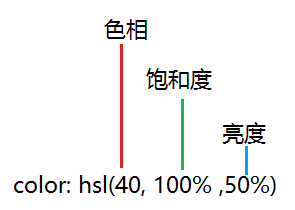
The hsl() function defines colors using hue, saturation, and lightness.
HSL stands for Hue, Saturation, and Lightness (English: Hue, Saturation, Lightness).
- Hue (H)It is a basic property of color, which is the commonly referred to color name, such as red, yellow, etc.
- Saturation (S)It refers to the purity of color. The higher the value, the purer the color; the lower the value, the grayer it becomes, taking a value from 0-100%.
- Lightness (L)Takes 0-100%. Increasing lightness causes the color to change toward white; decreasing lightness causes the color to change toward black.
HSL is a representation of points in the RGB color model in a cylindrical coordinate system. These two representations attempt to be more intuitive than RGB, which is based on a Cartesian coordinate geometry.
Supported versions: CSS3
Browser Support
The numbers in the table indicate the first browser version number that supports this function.
| Function | |||||
|---|---|---|---|---|---|
| hsl() | 1.0 | 9.0 | 1.0 | 3.1 | 9.5 |
CSS Syntax
hsl(hue, saturation, lightness)
| Value | Description |
|---|---|
| hue - hue | Define hue (0 to 360) - 0 (or 360) is red, 120 is green, 240 is blue. |
| saturation - saturation | Defines saturation; 0% is gray, 100% is full color. |
| lightness - brightness | Defines lightness; 0% is dark, 50% is normal, 100% is white. |
other extensions