C# polymorphism
Polymorphism is the ability of the same behavior to have multiple different forms or manifestations.
polymorphismIt means having multiple forms. In the object-oriented programming paradigm, polymorphism often manifests as "one interface, multiple functions."
Polymorphism can be static or dynamic. InStatic polymorphismthis case, the response of a function occurs at compile time. InDynamic polymorphismWherein, the function's response occurs at runtime.
In C#, every type is polymorphic because all types, including user-defined types, inherit from Object.
Polymorphism means the same interface, using different instances to perform different operations, as shown in the figure:
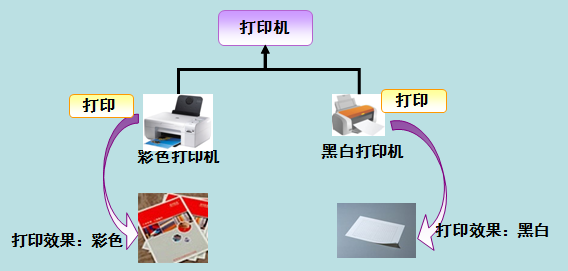
In real life, for example, the action of pressing the F1 key:
- If currently in the Flash interface, the pop-up is the AS 3 help document;
- If currently in Word, the pop-up is Word Help;
- If under Windows, the pop-up is Windows Help and Support.
The same event occurring on different objects will produce different results.
Static polymorphism
At compile time, the mechanism that connects functions and objects is called early binding, also known as static binding. C# provides two techniques to implement static polymorphism. They are:
- Function overloading
- Operator overloading
Operator overloading will be discussed in the next chapter; next, we will discuss function overloading.
Function overloading
You can have multiple definitions of the same function name in the same scope. The definitions of the function must differ from each other, either in the types of parameters in the parameter list or in the number of parameters. Different overloads are not function declarations that differ only in return type.
The following example demonstrates several identical functionsAdd(), used to perform addition on different numbers of parameters:
Example
namespace PolymorphismApplication
{
public class TestData
{
public int Add(int a, int b, int c)
{
return a + b + c;
}
public int Add(int a, int b)
{
return a + b;
}
}
class Program
{
static void Main(string[] args)
{
TestData dataClass = new TestData();
int add1 = dataClass.Add(1, 2);
int add2 = dataClass.Add(1, 2, 3);
Console.WriteLine("add1 :" + add1);
Console.WriteLine("add2 :" + add2);
}
}
}
The following example demonstrates several identical functionsprint(), used to print different data types:
Example
namespace PolymorphismApplication
{
class Printdata
{
void print(int i)
{
Console.WriteLine("Output integer: {0}", i );
}
void print(double f)
{
Console.WriteLine("Output floating-point type: {0}" , f);
}
void print(string s)
{
Console.WriteLine("Output string: {0}", s);
}
static void Main(string[] args)
{
Printdata p = new Printdata();
// Call print to print the integer
p.print(1);
// Call print to print a floating-point number
p.print(1.23);
// Call print to print a string
p.print("Hello Example");
Console.ReadKey();
}
}
}
When the above code is compiled and executed, it produces the following results:
输出整型: 1
输出浮点型: 1.23
输出字符串: Hello Example
Dynamic polymorphism
C# allows you to use the keywordabstractCreate an abstract class to provide a partial implementation of an interface. When a derived class inherits from the abstract class, the implementation is complete.Abstract classContains abstract methods, which can be implemented by derived classes. Derived classes have more specialized functionality.
Please note, below are some rules regarding abstract classes:
- You cannot create an instance of an abstract class.
- You cannot declare an abstract method outside an abstract class.
- By placing the keyword before the class definitionsealed, the class can be declared assealed class. When a class is declared assealedWhen sealed, it cannot be inherited. An abstract class cannot be declared as sealed.
The following program demonstrates an abstract class:
Example
namespace PolymorphismApplication
{
abstract class Shape
{
abstract public int area();
}
class Rectangle: Shape
{
private int length;
private int width;
public Rectangle( int a=0, int b=0)
{
length = a;
width = b;
}
public override int area ()
{
Console.WriteLine(The area of the Rectangle class:);
return (width * length);
}
}
class RectangleTester
{
static void Main(string[] args)
{
Rectangle r = new Rectangle(10, 7);
double a = r.area();
Console.WriteLine("Area: {0}",a);
Console.ReadKey();
}
}
}
When the above code is compiled and executed, it produces the following results:
Rectangle 类的面积:
面积: 70
When there is a function defined in a class that needs to be implemented in an inherited class, you can usevirtual method。
A virtual method is declared using the keywordvirtualDeclared.
Virtual methods can have different implementations in different inherited classes.
The call to a virtual method occurs at runtime.
Dynamic polymorphism is achieved throughAbstract classandvirtual methodImplemented.
The following example creates a Shape base class and derived classes Circle, Rectangle, Triangle. The Shape class provides a virtual method named Draw, which is overridden in each derived class to draw the specified shape for that class.
Example
using System.Collections.Generic;
public class Shape
{
public int X { get; private set; }
public int Y { get; private set; }
public int Height { get; set; }
public int Width { get; set; }
// Virtual method
public virtual void Draw()
{
Console.WriteLine("Execute the base class's drawing task");
}
}
class Circle : Shape
{
public override void Draw()
{
Console.WriteLine("Draw a circle");
base.Draw();
}
}
class Rectangle : Shape
{
public override void Draw()
{
Console.WriteLine("Draw a rectangle");
base.Draw();
}
}
class Triangle : Shape
{
public override void Draw()
{
Console.WriteLine("Draw a triangle");
base.Draw();
}
}
class Program
{
static void Main(string[] args)
{
// Create a List<Shape> object, and add Circle, Triangle, and Rectangle to it.
var shapes = new List<Shape>
{
new Rectangle(),
new Triangle(),
new Circle()
};
// Use a foreach loop to iterate over the derived classes of this list, and call the Draw method on each Shape object
foreach (var shape in shapes)
{
shape.Draw();
}
Console.WriteLine("Press any key to exit.");
Console.ReadKey();
}
}
When the above code is compiled and executed, it produces the following results:
Draw a rectangle
Execute the base class drawing task
Draw a triangle
Execute the base class drawing task
Draw a circle
Execute the base class drawing task
Press any key to exit.
The following program demonstrates calculating the area of different shapes using the virtual method area():
Example
namespace PolymorphismApplication
{
class Shape
{
protected int width, height;
public Shape( int a=0, int b=0)
{
width = a;
height = b;
}
public virtual int area()
{
Console.WriteLine("Area of the parent class:");
return 0;
}
}
class Rectangle: Shape
{
public Rectangle( int a=0, int b=0): base(a, b)
{
}
public override int area ()
{
Console.WriteLine(The area of the Rectangle class:);
return (width * height);
}
}
class Triangle: Shape
{
public Triangle(int a = 0, int b = 0): base(a, b)
{
}
public override int area()
{
Console.WriteLine("Area of the Triangle class:");
return (width * height / 2);
}
}
class Caller
{
public void CallArea(Shape sh)
{
int a;
a = sh.area();
Console.WriteLine("Area: {0}", a);
}
}
class Tester
{
static void Main(string[] args)
{
Caller c = new Caller();
Rectangle r = new Rectangle(10, 7);
Triangle t = new Triangle(10, 5);
c.CallArea(r);
c.CallArea(t);
Console.ReadKey();
}
}
}
When the above code is compiled and executed, it produces the following results:
Rectangle 类的面积:
面积:70
Triangle 类的面积:
面积:25
other extensions