Claude Code Interaction Modes
Unlike the web version of Claude, Claude Code is not a simple chat tool, but rather adevelopment collaboration system with engineering context, permission control, and execution capabilities。
Therefore, when handling tasks, it introduces three corethinking modes:
- Ask (Inquiry)
- Plan (Planning)
- Edit (Editing)
Understanding the boundaries and responsibilities of these three modes is key to using Claude Code efficiently and safely.
In terminal execution, there is no need to manually switch; Claude will switch automatically. In the VS Code plugin, you can manually switch modes:
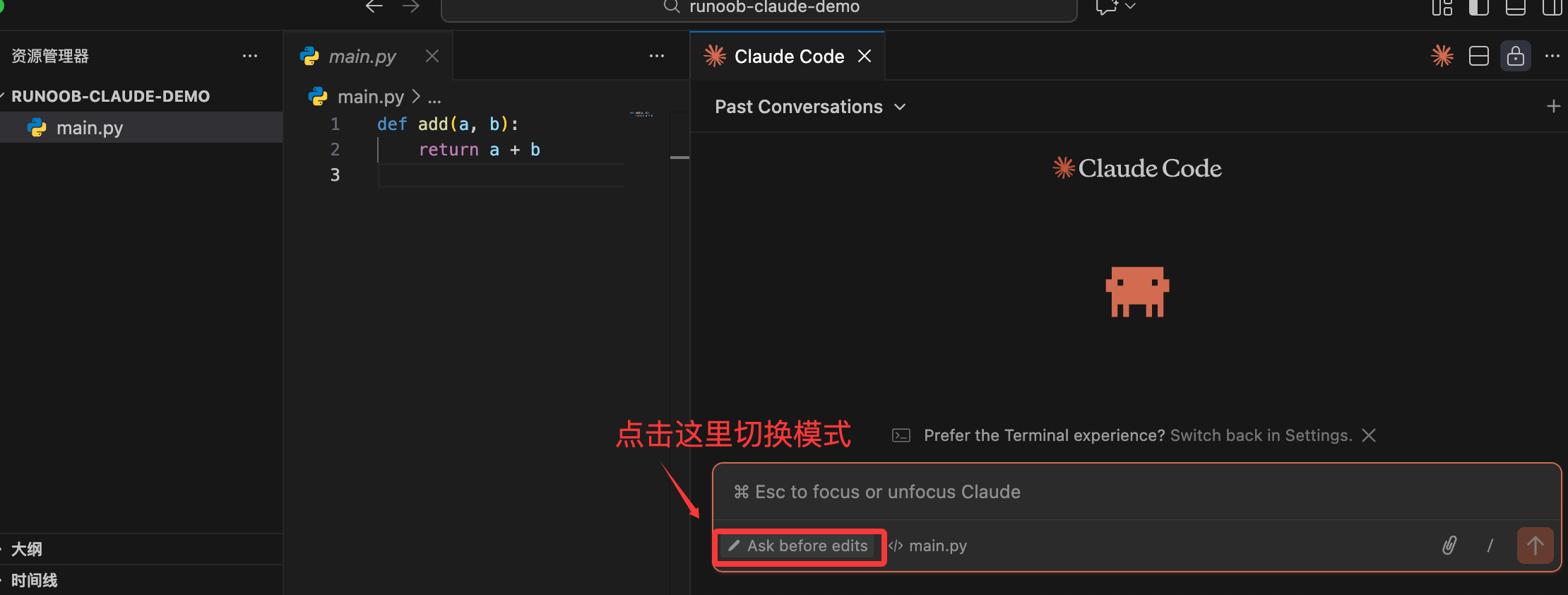
Detailed Explanation of the Three Interaction Modes
When using Claude Code in the terminal, youdon't need to manually toggle the mode switchClaude will automatically determine which mode to enter based on your instruction content.
However,as a user, you must clearly express your intentions in the Promptotherwise, Claude can easily behave in ways inconsistent with your expectations.
1. Ask Mode: Look Only, Don't Act (Read-Only Analysis)
Ask Mode is Claude Code's default safe mode.
Use Cases
When you are in the following situations, you should prioritize using Ask Mode:
- Can't understand existing code
- Just took over a new project
- Want to locate the cause of a Bug but haven't figured out how to fix it
- Want to confirm whether a piece of logic is reasonable
Mode Characteristics
- Claude Can read code
- Can analyze, explain, and reason
- Will never modify any files
- Will not execute any Shell commands
You can think of Ask Mode as:
A senior engineer who is experienced but keeps both hands behind their back.
Example Instructions
解释一下 src/auth.ts 里的 JWT 验证流程
In this project, where is the database connection initialized?
Why might this code have issues under high concurrency?
Professional Advice:
When uncertain whether to change code, always Ask first.
2. Plan Mode: Plan Before Acting (Planning Only, No Execution)
Plan Mode is the mode in Claude Code that most resembles architect thinking.
Use Cases
When you are dealing withcomplex or large-impact changesyou should use Plan Mode, for example:
- Adding a core module
- Refactoring existing interfaces or business processes
- Introducing new technologies (caching, middleware, authentication schemes, etc.)
- Modifications involving multiple files and multiple layers
Mode Characteristics
- Claude will not directly change code
- It will first providea complete implementation plan
- usually presented in the form of a step list (TODO List)
- Only after you confirm the plan does it proceed to the Edit phase for execution.
The core value of Plan Mode is:
Changing "write code first" into "reach consensus first".
Example Instructions
我想给现有的 API 增加一个 Redis 缓存层,请先给我一个实施方案
计划一下如何把这个项目的样式从 CSS 改为 Tailwind CSS
If we need to split this module, what would be the reasonable steps?
Practical Advice:
The more you use Plan Mode, the lower the probability of rework.
3. Edit Mode: Direct Execution (Can Write Code)
Edit Mode is the stage where Claude Code actually gets to work.
Use Cases
When you already clearly know:
- What to change
- What to change it to
- The risk of the change is controllable
At this point, you can directly enter Edit Mode.
Mode Features
- Claude will locate relevant files
- Generate a precise Diff (difference modification)
- May request to execute commands such as tests and builds
- All write operations require your confirmation
In Edit mode, your role is:
The final reviewer of code, not a bystander.
Example instructions
把登录接口的响应码从 200 改为 201
修复 main.py 第 45 行的类型错误
Without changing existing behavior, refactor this function for readability.
Professional habits:
The more specific the description, the safer Claude's changes.
Core Slash Commands (/)
Slash commands are used toControl the session state and behavior of Claude Code, not for writing business code.
Enter in the terminal/to trigger.
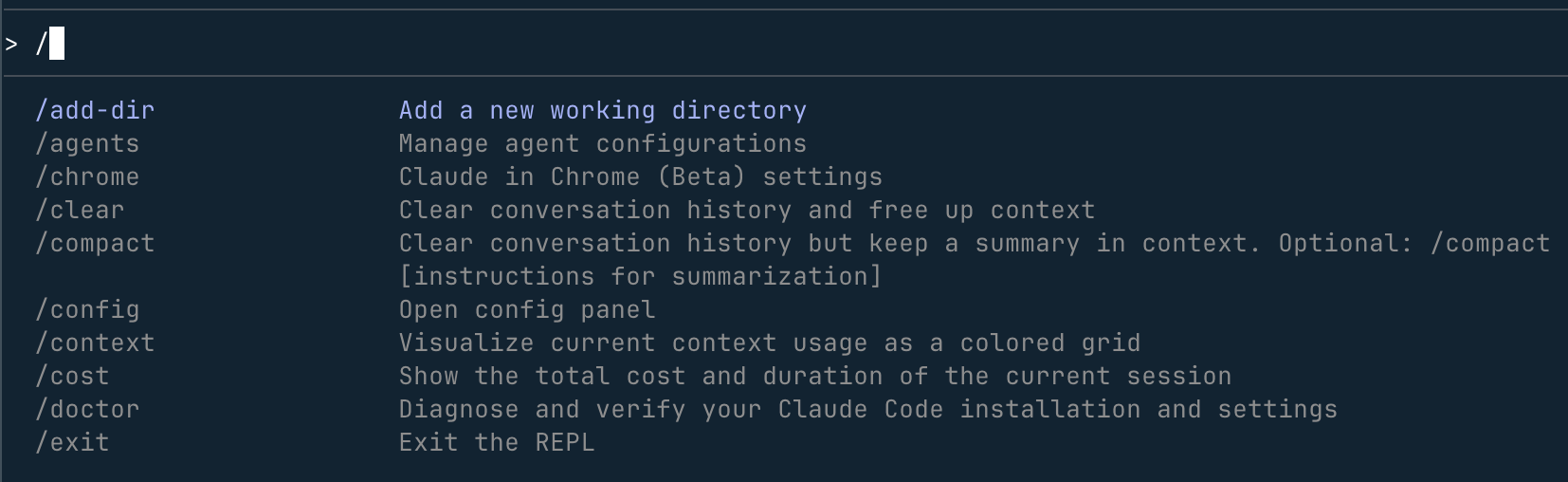
| Command | Purpose | Expert tips |
|---|---|---|
/help |
View all commands | Must-see for first-time users |
/cost |
View current session consumption | Prevent unintentional token burning |
/compact |
Compact context | Use when the conversation becomes long and slow |
/reset |
Reset session | Very important when switching tasks |
/docs |
Index documents | Let Claude reference specified documents |
/review |
Code review | Check Git staged changes |
Suggestions:
/cost and /compact are high-frequency commands for long-term users.
A Typical Example of an Interaction Flow
In real development, the three modes are oftenUsed consecutively。
Example Flow
1、Ask
为什么我的注册接口一直返回 400 错误?
Claude analyzes the code and logs, pointing out that email validation is missing.
2、Plan
I want to add email format validation and normalize the error messages. How would you do it?
Claude provides steps: modify validation logic → update tests → adjust return structure.
3、Edit
Let's proceed as planned.
Claude modifies the files and shows the Diff for your confirmation.
Ask is for understanding the problem, Plan is for avoiding detours, Edit is for careful execution.
Permission Confirmation Mechanism in Interactions
Claude Code is very restrained with system operations, and any risky behavior will request your confirmation.
Common Permission Confirmations
-
Write files
The code Diff will be shown, and you need to confirm before writing. -
Execute commands
For examplenpm test、pnpm build, will explicitly ask whether it is allowed.
Other extensionsImportant reminder:
Never confirm directly without reviewing the Diff.
Claude is powerful, but it can still produce errors or hallucinations.