HTML API
There are two localStorage APIs in the browser: localStorage and sessionStorage, both existing in the window object. localStorage corresponds to window.localStorage, and sessionStorage corresponds to window.sessionStorage.
The main difference between localStorage and sessionStorage is their lifetime.
Basic Usage
The term here
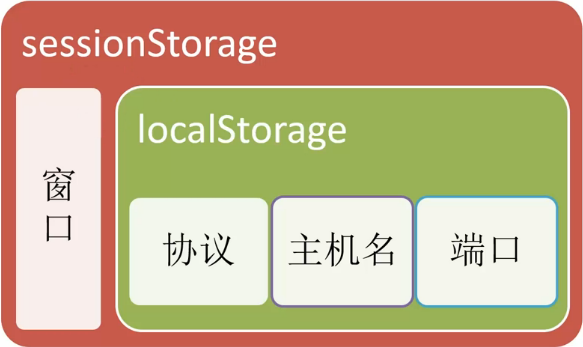
Scoperefers to: how to isolate localStorage between different pages (you can't read Tencent's localStorage on Baidu's page, haha).localStorageAs long as the same protocol, same hostname, and same port are used, the same localStorage data can be read/modified.sessionStorageComparelocalStorageMore strictly, in addition to protocol, hostname, and port, it also requires being in the samewindow(i.e., a browser tab).
Lifetime
localStorageTheoretically, it is permanently valid, i.e., it will not disappear unless actively cleared. Even if the saved data exceeds the browser-specified size, it will not clear old data but only throw an error. However, note that in mobile device browsers or variousNative AppusedWebViewin,localStorageit is unreliable, and may be cleared due to various reasons (such as exiting the app, network switching, insufficient memory, etc.).sessionStorageIts lifetime, as the name suggests, is similar tosessionsession. As long as the browser (including browser tabs) is closed, it will be cleared. BecausesessionStoragethe lifetime of sessionStorage is too short, its application scenarios are very limited. However, on the other hand, it is less prone to exceptions and is relatively reliable.
Data Structure
localStorage is a standard key-value (KV) data type. It is simple but also easy to extend. As long as the object to be stored in localStorage is converted into a string in some encoding way, it can be easily supported. For example: converting an object into a JSON string allows storing objects; converting an image into a DataUrl (base64) allows storing images. In addition, for key-value data types, the feature that 'keys are unique' is quite important. If you assign a value repeatedly with the same key, it will overwrite the previous value.
Expiration Time
Unfortunately, localStorage natively does not support setting an expiration time. If you want to set one, you have to wrap a layer of logic yourself:
Capacity Limit
Currently, the industry basically unanimously sets it to 5M, which is already much larger than cookies' 4K. Use it sparingly, young man.
Domain Restriction
Due to the browser's security policy, localStorage cannot be cross-domain, nor can a subdomain inherit the parent domain's localStorage data. This is quite different from cookies.
Exception Handling
localStorage is not completely stable in the current browser environment, and various bugs may occur. Exception handling must be considered carefully. Personally, I think localStorage is just an optimization method for resource localization. The program's usability cannot be reduced because of using localStorage. I absolutely oppose exception handling that only outputs some error messages in the console. Exception handling for localStorage generally usestry/catchto catch/handle exceptions.
How to test whether the user's current browser supports localStorage
The current common practice is to checkwindow.localStoragewhether it exists.try/catchIn the structure,set/geta test data item is used to check whether an exception occurs, in order to determine whether the browser supports localStorage. Of course, remember to delete the test data after testing.
Browser Compatibility
| Feature | Chrome | Firefox | Internet Explorer | Opera | Safari | Android | Opera Mobile | Safari Mobile |
|---|---|---|---|---|---|---|---|---|
| localStorage | 4 | 3.5 | 8 | 10.50 | 4 | 2.1 | 11 | iOS 3.2 |
| sessionStorage | 5 | 2 | 8 | 10.50 | 4 | 2.1 | 11 | iOS 3.2 |
How to Debug
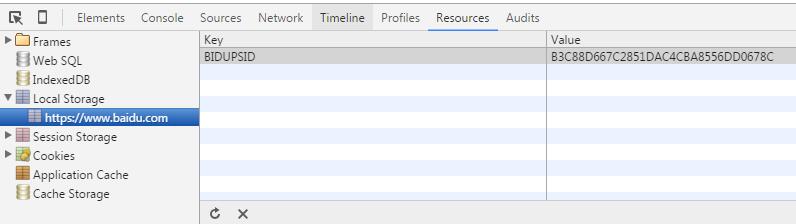
In the Chrome developer tools,Resources - Local Storagepanel, andResources - Session Storagein the panel, you can see the localStorage data under the current domain.
Cannot call setItem() repeatedly on iOS devices
In addition, on iPhone/iPad, sometimes a weird QUOTA_EXCEEDED_ERR error occurs when calling setItem(). In this case, generally calling removeItem() before setItem() will solve it.
Recommended Plugins
Reference Articles
Original link: https://segmentfault.com/a/1190000004121465